We Use CookiesWe use cookies to enhance the security, performance, functionality and for analytical and promotional activities. By continuing to browse this site you are agreeing to our privacy policy

10 Best Cheap Document Scanner 2026 in the United States

How do we rank products for you?

Our technology thoroughly searches through the online shopping world, reviewing hundreds of sites. We then process and analyze this information, updating in real-time to bring you the latest top-rated products. This way, you always get the best and most current options available.

headphones-stars

Our Top Picks

#1

Winner

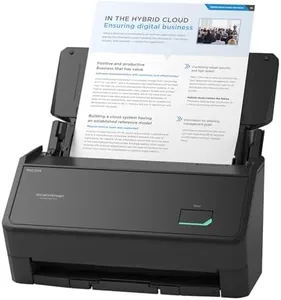
ScanSnap iX1300 Compact Wireless or USB Double-Sided Color Document, Photo & Receipt Scanner with Auto Document Feeder and Manual Feeder for Mac or PC, Black

Rating
10.0
Chosen by1,418
Resolution
Scanning Speed
Duplex Scanning

Most important from
952 reviews

Resolution
Scanning quality at 600 dpi is excellent for everyday use, capturing clear details suitable for digital archiving and casual prints.
Scanning Speed
The scanner delivers duplex scans of standard documents in about 2 seconds each and photos at 600 dpi in roughly 5 seconds, making it impressively fast for both paper and photo scanning.
Duplex Scanning
The scanner automatically detects blank pages during duplex scanning, helping to streamline document processing and reduce manual cleanup.
Connectivity
Setup and connectivity are seamless, with USB and Wi-Fi options allowing flexible placement and wireless scanning directly to computers or cloud services.
Software Compatibility
The software keeps things simple yet functional, focusing on straightforward scan settings without unnecessary complexity, which is ideal for users who prefer dedicated editing tools.
Size and Portability
Its compact, lightweight design fits perfectly on small desks and can be easily stored away when not in use, combining portability with convenience.

The ScanSnap iX1300 is a solid choice for an affordable document scanner that fits well in small spaces. Its compact design is ideal for desks with limited room, and it weighs just 4.4 pounds, making it fairly portable if you need to move it around. It offers a high resolution of 600 dpi, ensuring scanned documents and photos are clear and detailed. The scanner can handle a variety of paper types, including thick items and plastic cards, which adds to its versatility.

Scanning speed is quite good, with up to 30 pages per minute for double-sided documents, allowing it to handle everyday scanning tasks efficiently. The Automatic Document Feeder (ADF) is included, enabling easy scanning of multiple pages in one go without manually feeding each sheet. Duplex scanning (scanning both sides automatically) is supported, which is a useful feature that saves time.

Connectivity options include both USB and Wi-Fi, allowing scanning directly to your computer, mobile devices, or cloud services. The scanner also works without a computer, providing a convenient standalone scanning solution. The bundled ScanSnap Home software helps organize and edit scanned files, supporting documents, receipts, business cards, and photos, and it works on both Mac and PC. Although it might be pricier compared to some basic models with fewer features and the experience on Chromebooks via a mobile app may not be as smooth as on Mac or PC, this model remains a reliable and user-friendly scanner with good speed, image quality, and flexible connectivity in the budget-friendly segment.

Rating
10.0
Chosen by1,418
Resolution
Scanning Speed
Duplex Scanning

Most important from
952 reviews

Resolution
Scanning quality at 600 dpi is excellent for everyday use, capturing clear details suitable for digital archiving and casual prints.
Scanning Speed
The scanner delivers duplex scans of standard documents in about 2 seconds each and photos at 600 dpi in roughly 5 seconds, making it impressively fast for both paper and photo scanning.
Duplex Scanning
The scanner automatically detects blank pages during duplex scanning, helping to streamline document processing and reduce manual cleanup.
Connectivity
Setup and connectivity are seamless, with USB and Wi-Fi options allowing flexible placement and wireless scanning directly to computers or cloud services.
Software Compatibility
The software keeps things simple yet functional, focusing on straightforward scan settings without unnecessary complexity, which is ideal for users who prefer dedicated editing tools.
Size and Portability
Its compact, lightweight design fits perfectly on small desks and can be easily stored away when not in use, combining portability with convenience.
#2

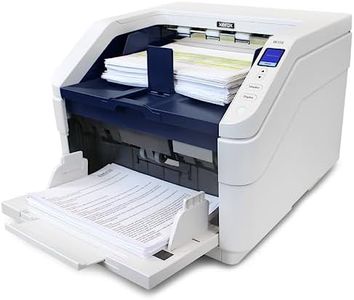
Visioneer Xerox W110 Duplex Production Scanner with Document Feeder

Rating
9.7
Scanning Speed

Most important from
2 reviews

Scanning Speed
Works fast and well.

The Visioneer Xerox W110 stands out in the cheap document scanner category with its impressive scanning speed and high capacity. Boasting a fast throughput of up to 120 pages per minute and a reliable automatic document feeder capable of holding 500 sheets, it is well-suited for users with heavy scanning needs. The ability to handle a variety of media types including photos, receipts, and standard documents adds to its versatility. Duplex scanning capability means it can scan both sides of a document simultaneously, which is a significant time-saver for large jobs.

Its resolution of 600 dpi is adequate for most document scanning tasks, allowing for clear and readable scanned documents. However, for those needing exceptionally high-resolution outputs for detailed images, this may be a limitation. The inclusion of Visioneer Acuity technology helps enhance the scanned images, ensuring that even imperfect originals are improved in clarity.

Connectivity options, such as USB and Ethernet, provide flexibility for different setups, although the lack of wireless connectivity might be seen as a downside in an increasingly wireless world. The one-touch scanning feature simplifies the process, making it easy even for beginners to scan to various destinations without fuss.

One notable drawback is its size and weight; at 50 pounds, it's quite bulky and might not be the best choice for those needing a portable solution or with limited desk space. Its high power consumption at 800 watts could also be a concern for those mindful of energy use.

In summary, the Visioneer Xerox W110 is best suited for users who require fast, high-volume scanning and can accommodate its larger size. It offers robust functionality and ease of use, making it a practical choice for office environments dealing with substantial paper workloads.

Rating
9.7
Scanning Speed

Most important from
2 reviews

Scanning Speed
Works fast and well.
#3

Epson Workforce ES-580W Wireless Color Duplex Tax Receipt & Desktop Document Scanner for PC and Mac with 100-sheet Auto Feeder (ADF), Intuitive 4.3' Touchscreen

Rating
9.7
Scanning Speed
Automatic Document Feeder (ADF)
Software Compatibility

Most important from
947 reviews

Scanning Speed
A game changer for mobile notaries, it drastically reduces scanning time from 14 minutes to just over a minute for a 46-page document.
Automatic Document Feeder (ADF)
This scanner truly excels in handling high volumes, effortlessly managing 3300 sheets, including double-sided documents, in just two days.
Software Compatibility
The software is simple yet functional, making the scanning process smooth and efficient.
Size and Portability
Perfect for on-the-go scanning with a 150-watt inverter, making it highly versatile for mobile use.

The Epson Workforce ES-580W offers impressive features for a budget-friendly document scanner. One of its standout strengths is the 100-sheet Automatic Document Feeder (ADF) which allows for efficient batch scanning, making it suitable for users needing to scan high volumes of documents quickly. Additionally, the scanner supports duplex scanning, capturing both sides of a document in one pass at speeds up to 35 pages per minute, which is quite efficient for a device in this price range.

Connectivity options are robust, with wireless capabilities allowing scans to be sent directly to smartphones, tablets, computers, or cloud storage without needing a computer. The 4.3-inch touchscreen adds to its ease of use, providing an intuitive interface for managing scans and settings directly from the device. The ability to save scans directly to USB or email is a convenient feature that enhances its versatility.

However, the resolution is capped at 300 dpi, which might be lower than what some users require for high-quality image scans. The scanner is a bit on the heavier side at 3.7 kilograms, which might affect portability if you need to move it frequently. Despite these drawbacks, the inclusion of OCR for searchable PDFs and the capability to convert scans to editable Word or Excel files are significant advantages for document management. The ES-580W is a strong contender for users needing reliable, fast, and versatile scanning on a budget, with its main limitations being the lower resolution and weight.

Rating
9.7
Scanning Speed
Automatic Document Feeder (ADF)
Software Compatibility

Most important from
947 reviews

Scanning Speed
A game changer for mobile notaries, it drastically reduces scanning time from 14 minutes to just over a minute for a 46-page document.
Automatic Document Feeder (ADF)
This scanner truly excels in handling high volumes, effortlessly managing 3300 sheets, including double-sided documents, in just two days.
Software Compatibility
The software is simple yet functional, making the scanning process smooth and efficient.
Size and Portability
Perfect for on-the-go scanning with a 150-watt inverter, making it highly versatile for mobile use.

Buying Guide for the Best Cheap Document Scanner

Choosing the right document scanner can make a big difference in how efficiently you can digitize and manage your paperwork. Whether you need a scanner for home use, a small office, or a larger business, understanding the key specifications will help you make an informed decision. Here are the main factors to consider when selecting a document scanner.
ResolutionResolution refers to the level of detail a scanner can capture, measured in dots per inch (DPI). Higher resolution means clearer and more detailed scans. For general document scanning, 300 DPI is usually sufficient. If you need to scan detailed images or graphics, look for a scanner with 600 DPI or higher. Consider your primary use: for text documents, a lower DPI is fine, but for images, higher DPI is better.
Scanning SpeedScanning speed is how quickly a scanner can process documents, typically measured in pages per minute (PPM). Faster speeds are important if you have a large volume of documents to scan regularly. Scanners with speeds of 20-30 PPM are good for moderate use, while higher speeds (40+ PPM) are better for heavy use. Think about how often and how much you need to scan to determine the right speed for you.
Automatic Document Feeder (ADF)An Automatic Document Feeder (ADF) allows you to load multiple pages into the scanner at once, which the scanner will then process automatically. This feature is crucial for scanning large batches of documents efficiently. ADF capacities can range from 20 to over 100 sheets. If you frequently scan multi-page documents, an ADF with a higher capacity will save you time and effort.
Duplex ScanningDuplex scanning means the scanner can scan both sides of a document simultaneously. This feature is essential if you often deal with double-sided documents, as it significantly speeds up the scanning process. If you mostly scan single-sided documents, this feature may not be as critical, but it's a great time-saver for double-sided scanning.
ConnectivityConnectivity options determine how you can connect the scanner to your computer or network. Common options include USB, Wi-Fi, and Ethernet. USB is straightforward and reliable for direct connections, while Wi-Fi and Ethernet are useful for networked environments where multiple users need access to the scanner. Choose the connectivity option that best fits your setup and workflow.
Software CompatibilitySoftware compatibility refers to the scanner's ability to work with various operating systems and document management software. Ensure the scanner is compatible with your computer's operating system (Windows, macOS, etc.) and any specific software you plan to use for managing scanned documents. Compatibility ensures smooth integration into your existing workflow.
Size and PortabilityThe size and portability of a scanner can be important depending on your workspace and mobility needs. Compact and portable scanners are great for small desks or if you need to scan documents on the go. Larger scanners may offer more features but require more space. Consider where and how you will use the scanner to choose the right size for your needs.

FAQ