10 Best Document Scanners 2026 in the United States






Related Products
Up to 13% off





Recommended lists

Our technology thoroughly searches through the online shopping world, reviewing hundreds of sites. We then process and analyze this information, updating in real-time to bring you the latest top-rated products. This way, you always get the best and most current options available.

Our Top Picks
Winner
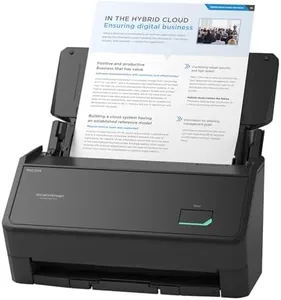
ScanSnap iX1400 High-Speed Simple One-Touch Button Color Document, Photo & Receipt Scanner with Auto Document Feeder for Mac or PC, Black
Most important from
967 reviews
The ScanSnap iX1400 stands out as a user-friendly document scanner, designed to simplify the scanning process with its one-touch operation. This feature makes it particularly suitable for individuals or small businesses that need a straightforward, efficient way to digitize various documents, including business cards, receipts, and photos. The scanner's resolution of 600 dpi ensures clear and detailed scans, though it may not be the highest resolution available for professional photo scanning requirements.
The Auto Document Feeder (ADF) is a notable convenience, allowing for batch scanning. Connectivity is straightforward with a reliable USB connection, ensuring stable performance without the need for wireless setup. This scanner is compatible with both Mac and PC, which is great for mixed-device environments. The included ScanSnap Home software aids in organizing and managing scanned documents, further enhancing productivity. Optical Character Recognition (OCR) capability is beneficial for creating searchable and editable documents.
At 7.1 pounds, the scanner is fairly portable, but its size might be cumbersome for those needing a truly compact device (6.3”D x 11.5”W x 6”H). In summary, the ScanSnap iX1400 is a robust and reliable choice for users looking for an easy-to-use, efficient document scanner, though those with specific needs like high-resolution photo scanning or duplex capabilities might need to consider other options.
Most important from
967 reviews
Epson Workforce ES-400 II Color Duplex Desktop Document Scanner for PC and Mac with Auto Doc Feeder (ADF), Image Adjustment Tools
Most important from
1198 reviews
The Epson Workforce ES-400 II is a reliable desktop document scanner that caters well to both home and office environments. One of its standout features is the Auto Document Feeder (ADF) with a 50-sheet capacity, allowing for efficient batch scanning. With a scanning speed of 35 pages per minute, it’s great for those who need to quickly process large volumes of documents. The resolution of 300 dpi ensures decent quality scans for most common office documents, although it might not suffice for very high-detail needs like photographs or intricate graphics.
Connectivity is straightforward with USB, but it lacks wireless options which might be a limitation for some users. The included Epson ScanSmart Software is user-friendly and offers handy features like automatic file naming, direct scanning to email, and integration with popular cloud services. Additionally, the TWAIN driver ensures compatibility with most document management software, making it easy to incorporate into existing workflows. Optical Character Recognition (OCR) is another strong feature, enabling the creation of searchable PDFs and converting documents into editable Word or Excel files.
The scanner weighs 8.14 pounds and has dimensions of 14.4 x 11.2 x 9.8 inches, which, while compact for a desktop scanner, might be cumbersome for those needing a portable solution. The Epson Workforce ES-400 II is a robust option for users needing a document scanner that efficiently handles moderate to high volume scanning tasks, with excellent software support and OCR capabilities. However, if you require higher resolution scans or wireless connectivity, you might need to consider other models.
Most important from
1198 reviews
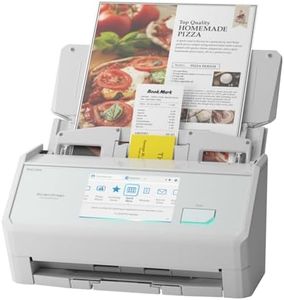
ScanSnap iX2500 Wireless or USB High-Speed Cloud Enabled Document, Photo & Receipt Scanner with Large 5" Touchscreen and 100 Page Auto Document Feeder for Mac or PC, White
Most important from
82 reviews
The ScanSnap iX2500 is a strong choice if you need a versatile and reliable document scanner for home, office, or small business use. It offers a high resolution of 600 dpi, which means your scans will be clear and detailed — suitable for documents, photos, and receipts. Its speed is impressive at 45 pages per minute with double-sided scanning, so you won’t spend long waiting for large batches. The 100-sheet automatic document feeder (ADF) is a helpful size, allowing you to scan multiple pages without interruption. It also supports duplex scanning, meaning it scans both sides of a page automatically, saving you time and effort.
Connectivity is flexible with built-in Wi-Fi 6 and USB-C options, so you can wirelessly scan to computers, mobile devices, or cloud services, or connect directly with a cable. The large 5-inch touchscreen makes it easy to select scanning profiles and customize your workflow, which is a user-friendly feature for those not comfortable with complicated software. Speaking of software, the scanner automatically organizes and optimizes scans, handles documents, receipts, photos, and even business cards with ease, and includes OCR (Optical Character Recognition) to convert scans into searchable text.
In terms of size, it’s relatively compact and weighs about 7.7 pounds, making it portable enough for moving between spaces but not ideal for travel. The device also includes smart protections like a brake roller system and sensors to avoid paper jams and damage, which enhances reliability over time. Its power consumption at 17 watts is on the higher side for scanners, and while it’s easy to use, the touchscreen and features might be more than needed if you only require very basic scanning. Also, the price point is generally higher compared to simpler models, reflecting its advanced capabilities. If you want a fast, high-quality scanner that offers wireless convenience, strong software support, and handles a range of document types efficiently, the ScanSnap iX2500 is a solid pick. It suits users who scan regularly and appreciate time-saving features without needing technical setup.