We Use CookiesWe use cookies to enhance the security, performance, functionality and for analytical and promotional activities. By continuing to browse this site you are agreeing to our privacy policy

10 Best Wireless Printers With Cheap Ink 2026 in the United States
How do we rank products for you?

Our technology thoroughly searches through the online shopping world, reviewing hundreds of sites. We then process and analyze this information, updating in real-time to bring you the latest top-rated products. This way, you always get the best and most current options available.

headphones-stars

Our Top Picks

#1

Winner

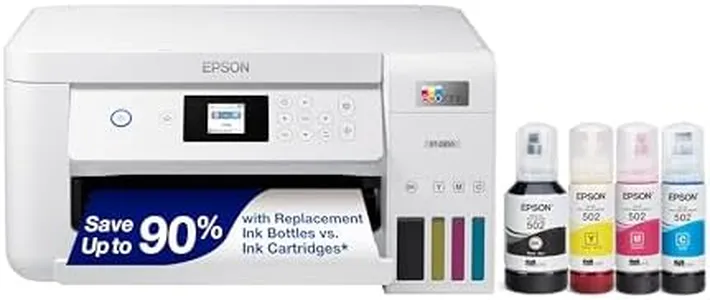
Epson EcoTank ET-2800 Wireless Color All-in-One Cartridge-Free Supertank with Scan and Copy, The Ideal Basic Home Printer - White

Rating
10.0
Chosen by1,124
Print Quality (DPI)
Ink Cost and Yield
Connectivity Options

Most important from
20317 reviews

Print Quality (DPI)
The photos printed are of excellent quality, with bright and vivid colors, and no ink smudges.
Ink Cost and Yield
Filling the ink tank is very easy and satisfying, promising longer-lasting ink and less plastic waste compared to traditional cartridges.
Connectivity Options
Users have reported issues with app-to-printer connection, sometimes requiring fiddling around to print documents or photos.
Size and Design
This printer is smaller and more lightweight than expected, taking up less desk space and offering an easy setup process with guided instructions.

The Epson EcoTank ET-2800 is an appealing choice for anyone looking for a budget-friendly home printer that minimizes ongoing ink costs. Its standout feature is the cartridge-free printing system, utilizing high-capacity ink tanks instead of traditional cartridges. This innovation can lead to significant savings, reportedly up to 90% on replacement ink, as it can print up to 4,500 black pages and 7,500 color pages before needing a refill, which is equivalent to about 90 cartridges.

When it comes to print quality, the ET-2800 excels with its Micro Piezo Heat-Free Technology, producing sharp text and vibrant color photos on various paper types. This makes it a solid option for families or individuals who need both basic printing and occasional photo printing. The inclusion of a built-in scanner and copier adds further value, making it a versatile all-in-one device.

In terms of connectivity, the printer supports both wired and wireless options, allowing easy mobile printing, which is a plus for tech-savvy users. The print speed reaches a maximum of 10 pages per minute for monochrome and 5 pages per minute for color printing, which may be slower compared to some competitors in the same category. The EcoTank ET-2800 is relatively lightweight at 8.8 pounds and designed to fit comfortably in most home office spaces. However, some users might find its size not as compact as they would prefer if space is a major concern. Additionally, while the 2-year warranty offers peace of mind, it’s worth noting that the durability of the unit long-term is a point to watch.

The ET-2800 shines in cost-effectiveness and print quality, making it ideal for home users looking to save on ink without sacrificing quality. Users should be mindful of its slower print speeds and ensure they have adequate space for it.

Rating
10.0
Chosen by1,124
Print Quality (DPI)
Ink Cost and Yield
Connectivity Options

Most important from
20317 reviews

Print Quality (DPI)
The photos printed are of excellent quality, with bright and vivid colors, and no ink smudges.
Ink Cost and Yield
Filling the ink tank is very easy and satisfying, promising longer-lasting ink and less plastic waste compared to traditional cartridges.
Connectivity Options
Users have reported issues with app-to-printer connection, sometimes requiring fiddling around to print documents or photos.
Size and Design
This printer is smaller and more lightweight than expected, taking up less desk space and offering an easy setup process with guided instructions.
#2

Epson EcoTank ET-2803 Wireless Color All-in-One Cartridge-Free Supertank Printer with Scan, Copy and AirPrint Support

Rating
9.4
Print Quality (DPI)
Ink Cost and Yield
Connectivity Options

Most important from
20317 reviews

Print Quality (DPI)
Print quality stands out with sharp, detailed results that work especially well for sublimation projects.
Ink Cost and Yield
The refillable ink tanks provide an incredibly economical printing experience, eliminating the hassle and expense of cartridges.
Connectivity Options
Wireless connectivity is stable and reliable, maintaining a strong signal without frequent drops.
Paper Handling
It handles specialty media like sublimation paper and DTF film smoothly, which many printers struggle with.
Size and Design
The printer is compact and fits well on a desk without taking up too much space.

The Epson EcoTank ET-2803 is a wireless color all-in-one printer designed to save money on ink with its refillable ink tanks, which is a big plus if you print frequently and want to avoid costly cartridges. It offers very high print resolution (up to 5760 x 1440 dpi), so your documents and photos will look sharp and detailed. However, its print speed is modest, at 10 pages per minute (ppm) for black and white and 5 ppm for color, making it better suited for home or small office use rather than heavy-duty printing.

The printer supports Wi-Fi and USB connections, making it easy to print wirelessly from your phone, tablet, or computer. Paper handling is straightforward with a single 100-sheet tray supporting common paper sizes, but it lacks duplex (double-sided) printing, which could be inconvenient if you want to save paper or print booklets. The compact size and lightweight design make it easy to fit into smaller spaces. It also includes scanning and copying functions, adding convenience for everyday tasks.

While the upfront cost might be higher than basic printers, the low ink cost and included ink bottles mean you’ll spend less on consumables over time. If you need fast, two-sided printing or handle large print volumes daily, this model might feel a bit limited. For users seeking affordable ink refills, good print quality, and wireless convenience in a modestly sized all-in-one printer, the EcoTank ET-2803 is a solid choice.

Rating
9.4
Print Quality (DPI)
Ink Cost and Yield
Connectivity Options

Most important from
20317 reviews

Print Quality (DPI)
Print quality stands out with sharp, detailed results that work especially well for sublimation projects.
Ink Cost and Yield
The refillable ink tanks provide an incredibly economical printing experience, eliminating the hassle and expense of cartridges.
Connectivity Options
Wireless connectivity is stable and reliable, maintaining a strong signal without frequent drops.
Paper Handling
It handles specialty media like sublimation paper and DTF film smoothly, which many printers struggle with.
Size and Design
The printer is compact and fits well on a desk without taking up too much space.
#3

Canon MegaTank G3270 All-in-One Wireless Inkjet Printer, Home Use, Print, Scan and Copy

Rating
7.9
Print Quality (DPI)
Print Speed (PPM)
Ink Cost and Yield

Most important from
4710 reviews

Print Quality (DPI)
Print quality is very good on standard settings but can be improved by adjusting the settings.
Print Speed (PPM)
Print speed is okay—not fast, but not snail-paced either, suitable for everyday use.
Ink Cost and Yield
Having tanked ink versus having to buy cartridges is extremely cost-effective.
Connectivity Options
Occasional connection issues can be annoying if you’re in a rush.
Duplex Printing
No automatic double-sided printing, which is a bummer if you need that feature regularly.

The Canon MegaTank G3270 All-in-One Wireless Inkjet Printer is a solid option for home use, especially if you prioritize low ink costs and high yield. With its MegaTank system, it boasts the ability to print up to 6,000 black and white pages and 7,700 color pages on a single set of ink bottles, making it one of the most economical choices in terms of ink cost and yield. This can potentially save users up to $1,000 on ink over time, which is a significant advantage for frequent printers. It includes up to 2 years of ink, which reduces the need for frequent refills and further enhances its cost-effectiveness.

The print quality is quite good, with a resolution of up to 4800 x 1200 DPI, making it suitable for both text and color prints. The print speed is relatively modest, at 11 pages per minute (PPM) for black and white and 6 PPM for color. This might not be ideal for users who need to print large volumes quickly. The connectivity options are versatile, offering Wi-Fi and USB connections, as well as compatibility with smartphones and PCs, making it easy to print from various devices.

Its paper handling capabilities are decent, with a maximum input sheet capacity of 100 and the ability to handle various paper sizes. A notable drawback is the absence of duplex printing, meaning it cannot print on both sides of the paper automatically, which could be a downside for those looking to save paper or print documents efficiently. The printer’s design is compact and functional, with a 1.35” Square LCD display for easy navigation. Its single-sided printing and single paper tray might limit its suitability for more demanding office environments. The Canon MegaTank G3270 is best suited for home users who value low ink costs and decent print quality and don’t mind slightly slower print speeds and the lack of duplex printing.

Rating
7.9
Print Quality (DPI)
Print Speed (PPM)
Ink Cost and Yield

Most important from
4710 reviews

Print Quality (DPI)
Print quality is very good on standard settings but can be improved by adjusting the settings.
Print Speed (PPM)
Print speed is okay—not fast, but not snail-paced either, suitable for everyday use.
Ink Cost and Yield
Having tanked ink versus having to buy cartridges is extremely cost-effective.
Connectivity Options
Occasional connection issues can be annoying if you’re in a rush.
Duplex Printing
No automatic double-sided printing, which is a bummer if you need that feature regularly.

Buying Guide for the Best Wireless Printers With Cheap Ink

When choosing a wireless printer with cheap ink, it's important to consider several key specifications to ensure you get the best fit for your needs. Wireless printers offer the convenience of printing from multiple devices without the need for cables, and finding one with affordable ink can save you money in the long run. Here are the key specs to consider and how to navigate them to make an informed decision.
Print Quality (DPI)Print quality is measured in DPI (dots per inch), which indicates how many dots of ink the printer can place on a square inch of paper. Higher DPI means better print quality, which is important for printing detailed images and professional documents. For general home use, a DPI of 600x600 is usually sufficient. For high-quality photo printing, look for printers with a DPI of 1200x1200 or higher. Consider your primary use: if you mostly print text documents, a lower DPI will suffice, but for photos and graphics, opt for a higher DPI.
Print Speed (PPM)Print speed is measured in PPM (pages per minute) and indicates how quickly a printer can produce pages. This is important if you need to print large volumes of documents quickly. Printers with speeds of 10-20 PPM are suitable for home use, while those with speeds of 20-30 PPM are better for small offices. If you frequently print large documents or need fast turnaround times, choose a printer with a higher PPM. For occasional printing, a lower PPM will be adequate.
Ink Cost and YieldInk cost and yield refer to the price of replacement ink cartridges and how many pages they can print before needing to be replaced. This is crucial for keeping long-term printing costs low. Look for printers that use high-yield cartridges, which can print more pages and reduce the frequency of replacements. Research the cost of the printer's ink cartridges and compare them to the number of pages they can print. If you print frequently, opt for a printer with lower ink costs and higher yield cartridges to save money over time.
Connectivity OptionsConnectivity options determine how you can connect your devices to the printer. Common options include Wi-Fi, Bluetooth, and mobile printing capabilities like AirPrint or Google Cloud Print. Wi-Fi is essential for wireless printing from multiple devices, while Bluetooth allows for direct printing from nearby devices. Mobile printing capabilities enable you to print directly from your smartphone or tablet. Choose a printer with the connectivity options that match your devices and how you plan to use the printer. For a versatile setup, look for printers that offer multiple connectivity options.
Paper HandlingPaper handling refers to the types and sizes of paper a printer can accommodate, as well as its paper tray capacity. This is important for ensuring the printer can handle your specific printing needs. Standard printers typically handle letter and legal-sized paper, but if you need to print on envelopes, labels, or photo paper, check the printer's specifications. Additionally, consider the paper tray capacity; a larger capacity means less frequent refilling. For general home use, a tray capacity of 100-150 sheets is usually sufficient. For higher volume printing, look for a larger capacity.
Duplex PrintingDuplex printing allows a printer to automatically print on both sides of a sheet of paper, which can save paper and reduce costs. This feature is particularly useful for printing double-sided documents like reports and booklets. If you frequently print documents that benefit from double-sided printing, look for a printer with automatic duplexing. For occasional use, manual duplexing (where you manually flip the paper) may be sufficient, but automatic duplexing offers greater convenience and efficiency.
Size and DesignThe size and design of a printer can affect where you can place it and how it fits into your workspace. Compact printers are ideal for small spaces and home offices, while larger models may offer more features but require more space. Consider the dimensions of the printer and where you plan to place it. If space is limited, look for a compact model that still meets your printing needs. Additionally, consider the design and aesthetics if the printer will be in a visible area.

FAQ