We Use CookiesWe use cookies to enhance the security, performance, functionality and for analytical and promotional activities. By continuing to browse this site you are agreeing to our privacy policy

10 Best Thermal Printers 2026 in the United States
How do we rank products for you?

Our technology thoroughly searches through the online shopping world, reviewing hundreds of sites. We then process and analyze this information, updating in real-time to bring you the latest top-rated products. This way, you always get the best and most current options available.

headphones-stars

Our Top Picks

#1

Winner

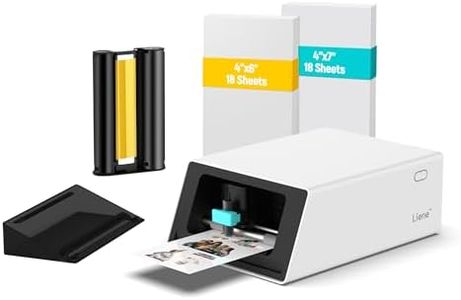
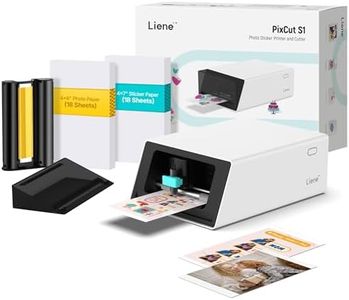
Liene PixCut S1 Color Sticker Printer & Cutting Machine - All-in-One Sticker Maker for DIY Crafts, Custom Labels & Gifts. Thermal Dye-Sublimation Photo Printer, 300 DPI, Precise AI Auto-Cutting

Rating
10.0
Chosen by1,416
Print Speed
Print Resolution
Connectivity Options

Most important from
896 reviews

Print Speed
Printing speed is slow at about one page per minute, which is suitable only for low-volume or hobby use.
Print Resolution
Prints with professional-level quality and precise cutting, making it excellent for small print runs.
Connectivity Options
The mobile app simplifies operation but lacks a proper tablet interface and offers no PC compatibility, restricting design flexibility.
Media Compatibility
Sticker sheets have poor adhesion, especially on curved or uneven surfaces, limiting their versatility.
Durability and Build Quality
Compact size and included supplies make it convenient for home, school, or craft projects rather than professional environments.
Ease of Use
The all-in-one print-and-cut feature with AI-powered background removal is innovative but may face future cost changes.

The Liene PixCut S1 is a unique thermal dye-sublimation sticker printer designed for DIY enthusiasts who want an all-in-one device for printing and cutting custom stickers and labels. It delivers vibrant, high-quality prints at 300 dpi resolution with up to 16.7 million colors, making your stickers look colorful and detailed. One standout feature is its ability to print and cut in a single step using AI for precise image extraction and automatic cutting, which helps create perfectly trimmed stickers without waste or hassle.

Connectivity is straightforward with Bluetooth, allowing easy control directly from your smartphone via an app, which adds to its user-friendly experience. The printing speed is quite slow at only 1 page per minute, so it is better suited for smaller projects rather than high-volume printing. The printer supports media sizes up to 4x7 inches and comes with laminated sticker paper that produces durable, waterproof, fade-resistant results, great for long-lasting use.

Its compact size and included supplies make it convenient for home, school, or craft use, but it is primarily for color sticker creation rather than general printing tasks. While the build quality seems decent and the app integration simplifies operation, the relatively low printing speed and limited sheet capacity mean it is ideal for hobbyists or light users rather than professional or fast-paced environments.

Rating
10.0
Chosen by1,416
Print Speed
Print Resolution
Connectivity Options

Most important from
896 reviews

Print Speed
Printing speed is slow at about one page per minute, which is suitable only for low-volume or hobby use.
Print Resolution
Prints with professional-level quality and precise cutting, making it excellent for small print runs.
Connectivity Options
The mobile app simplifies operation but lacks a proper tablet interface and offers no PC compatibility, restricting design flexibility.
Media Compatibility
Sticker sheets have poor adhesion, especially on curved or uneven surfaces, limiting their versatility.
Durability and Build Quality
Compact size and included supplies make it convenient for home, school, or craft projects rather than professional environments.
Ease of Use
The all-in-one print-and-cut feature with AI-powered background removal is innovative but may face future cost changes.
#2

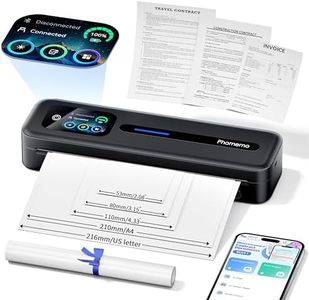
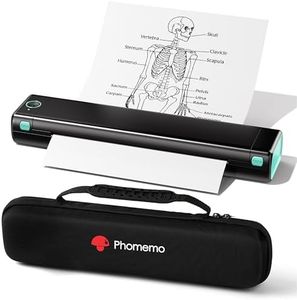
Phomemo Upgraded Portable Printer with Touchscreen, M832D Bluetooth Wireless Thermal Inkless Printer, Supports 8.5"x11" US Letter & A4, Compatible with iOS, Android, PC for Travel, Black

Rating
8.8
Print Resolution
Connectivity Options
Media Compatibility

Most important from
530 reviews

Print Resolution
The 300 DPI resolution delivers crisp, professional-looking monochrome prints that exceed expectations for a thermal printer.
Connectivity Options
Bluetooth pairing is quick and seamless, and USB-C connectivity adds flexible options for laptop and PC use.
Media Compatibility
A built-in paper bin holds up to 50 sheets, supporting multiple paper sizes including A4 and US Letter, enhancing versatility on the go.
Durability and Build Quality
Build quality feels robust and durable for everyday portable use, though it’s not designed for heavy industrial workloads.
Ease of Use
Compact and lightweight, it fits effortlessly into bags, ideal for travelers, students, and remote workers needing reliable printing anywhere.

The Phomemo M832D thermal printer is a lightweight and portable option, perfect for users who need to print on the go, such as travelers, students, or small business owners. It offers a decent print speed of up to 6 pages per minute and a sharp 300 DPI resolution, which delivers clear, professional-looking monochrome prints without ink or toner, keeping running costs low and maintenance simple. A standout feature is its touchscreen display that makes it very easy to check battery life and paper settings, which is helpful for beginners or those who prefer straightforward controls.

Connectivity is strong with Bluetooth for phones and tablets, optimized for 50% faster pairing, plus a USB-C port for laptop and PC connections, although Bluetooth doesn’t support those devices. The printer supports a wide range of paper sizes, from standard US Letter and A4 sheets to smaller thermal rolls, making it versatile for printing everything from documents to quick notes. The built-in 2600mAh battery supports about 200 pages per charge, which is solid for portable use, and the device is designed to be quiet and compact.

The maximum print speed is moderate compared to larger thermal printers, so it might not be ideal for large volume printing quickly. Also, it prints only in monochrome and doesn't support duplex (double-sided) printing, which could limit some office tasks. While it feels well-built for travel and daily tasks, it may not withstand heavy industrial use. This makes the Phomemo M832D an accessible, eco-friendly mobile printer that balances ease of use, portability, and print quality, suitable for casual users and professionals needing reliable printing away from a desk.

Rating
8.8
Print Resolution
Connectivity Options
Media Compatibility

Most important from
530 reviews

Print Resolution
The 300 DPI resolution delivers crisp, professional-looking monochrome prints that exceed expectations for a thermal printer.
Connectivity Options
Bluetooth pairing is quick and seamless, and USB-C connectivity adds flexible options for laptop and PC use.
Media Compatibility
A built-in paper bin holds up to 50 sheets, supporting multiple paper sizes including A4 and US Letter, enhancing versatility on the go.
Durability and Build Quality
Build quality feels robust and durable for everyday portable use, though it’s not designed for heavy industrial workloads.
Ease of Use
Compact and lightweight, it fits effortlessly into bags, ideal for travelers, students, and remote workers needing reliable printing anywhere.
#3

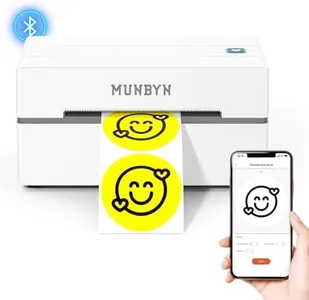
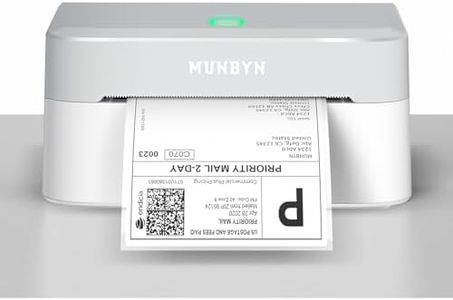
MUNBYN Bluetooth Thermal Label Printer, 130B Wireless 4x6 Shipping Label Printer for Shipping Packages Small Business Office or Home, Compatible with iPhone Android iPad Windows macOS Chrome Etsy eBay

Rating
8.5
Print Speed
Print Resolution
Connectivity Options

Most important from
2941 reviews

Print Speed
Compact yet powerful, fitting perfectly in small workspaces while delivering exceptional print quality and impressive speed.
Print Resolution
The printer consistently produces high-quality prints after a minor adjustment of labels, ensuring professional-looking results.
Connectivity Options
Bluetooth connectivity is a game-changer, allowing for wireless printing directly from mobile devices and saving significant time.
Durability and Build Quality
Despite its small size, it feels well-made and functions fantastically, making tasks easier with its steady performance.
Ease of Use
Exceeded expectations in many ways, being easy to set up, reliable, and reasonably priced.

The MUNBYN Bluetooth Thermal Label Printer is designed with small businesses and home offices in mind, offering a portable and efficient solution for shipping label printing. One of its standout features is the fast print speed of 180 mm/sec, which allows users to quickly generate labels, saving time during busy periods. The printer utilizes advanced thermal printing technology, eliminating the need for ink or toner, which not only reduces ongoing costs but also keeps your workspace tidy. The print resolution of 203 DPI ensures clear and readable labels, making it effective for barcodes and shipping information.

When it comes to connectivity, this printer offers both Bluetooth and USB options. It supports wireless printing from mobile devices running iOS and Android, which is great for users always on the go. However, it’s important to note that while the Bluetooth capability is useful for mobile printing, desktop and laptop users will need to rely on a USB connection, lacking the ability to print wirelessly from computers.

The printer's compact design of just 2.3 pounds makes it easy to transport, catering well to those who may need to print labels while traveling or at different job sites. Additionally, compatibility with various platforms like eBay, Etsy, and Shopify means it fits seamlessly into many small business operations. Some users might find the limited range of connectivity for PC use a drawback, as Bluetooth printing is not supported for laptops and desktops. In conclusion, the MUNBYN 130B is a practical choice for those looking for a reliable thermal printer for label printing, especially in a small business context, albeit with a few limitations in its connectivity options for PC users.

Rating
8.5
Print Speed
Print Resolution
Connectivity Options

Most important from
2941 reviews

Print Speed
Compact yet powerful, fitting perfectly in small workspaces while delivering exceptional print quality and impressive speed.
Print Resolution
The printer consistently produces high-quality prints after a minor adjustment of labels, ensuring professional-looking results.
Connectivity Options
Bluetooth connectivity is a game-changer, allowing for wireless printing directly from mobile devices and saving significant time.
Durability and Build Quality
Despite its small size, it feels well-made and functions fantastically, making tasks easier with its steady performance.
Ease of Use
Exceeded expectations in many ways, being easy to set up, reliable, and reasonably priced.

Buying Guide for the Best Thermal Printers

When choosing a thermal printer, it's important to consider several key specifications to ensure you select the best model for your needs. Thermal printers are widely used for printing receipts, labels, and barcodes due to their speed and efficiency. Understanding the different features and how they align with your requirements will help you make an informed decision.
Print SpeedPrint speed refers to how quickly the printer can produce printed material, usually measured in millimeters per second (mm/s). This is important because a faster print speed can improve efficiency, especially in high-volume environments like retail or shipping. Print speeds can range from around 50 mm/s to over 300 mm/s. If you need to print a large number of labels or receipts quickly, look for a printer with a higher print speed. For occasional or low-volume printing, a lower speed may be sufficient.
Print ResolutionPrint resolution is measured in dots per inch (DPI) and determines the clarity and detail of the printed output. Higher resolution means better print quality, which is crucial for printing barcodes, logos, or any detailed graphics. Common resolutions are 203 DPI, 300 DPI, and 600 DPI. For general receipt printing, 203 DPI is usually adequate. For more detailed prints, such as high-quality labels or graphics, consider a printer with 300 DPI or higher.
Connectivity OptionsConnectivity options refer to how the printer connects to your computer or network. Common options include USB, Ethernet, Wi-Fi, and Bluetooth. This is important because it affects how easily you can integrate the printer into your existing setup. USB is straightforward for direct connections, Ethernet is ideal for networked environments, Wi-Fi offers wireless convenience, and Bluetooth is great for mobile printing. Choose the connectivity option that best fits your operational setup and workflow.
Media CompatibilityMedia compatibility refers to the types and sizes of paper or labels the printer can handle. This is important because it determines the versatility of the printer for different tasks. Some printers are designed specifically for receipt paper, while others can handle a variety of label sizes and types. Consider what you will be printing most often and ensure the printer supports those media types. If you need to print a variety of labels and receipts, look for a printer with broader media compatibility.
Durability and Build QualityDurability and build quality refer to how well the printer is constructed and how long it is likely to last under regular use. This is important because a more durable printer will withstand the rigors of a busy environment and reduce the need for frequent replacements. Look for printers with robust construction, good reviews on longevity, and possibly a warranty. If you are in a high-usage environment, such as retail or logistics, prioritize durability to ensure reliable performance.
Ease of UseEase of use refers to how user-friendly the printer is, including setup, operation, and maintenance. This is important because a printer that is easy to use will save time and reduce frustration. Features to look for include intuitive controls, easy paper loading, and straightforward software. If you or your staff are not very tech-savvy, prioritize a printer known for its ease of use to ensure smooth operation.

FAQ