We Use CookiesWe use cookies to enhance the security, performance, functionality and for analytical and promotional activities. By continuing to browse this site you are agreeing to our privacy policy

10 Best Stream Deck 2026 in the United States

How do we rank products for you?

Our technology thoroughly searches through the online shopping world, reviewing hundreds of sites. We then process and analyze this information, updating in real-time to bring you the latest top-rated products. This way, you always get the best and most current options available.

headphones-stars

Our Top Picks

#1

Winner

Elgato Stream Deck + White - Studio Controller with LCD Keys, Dials, and Touch Strip for Post Production in Adobe Premiere Pro, Photoshop, DaVinci Resolve, Final Cut Pro - Workflow Automation

Rating
10.0
Chosen by1,171
Customizability
Integration with Streaming Software
Build Quality

Most important from
4292 reviews

Customizability
The combination of customizable buttons and knobs delivers unexpected utility that greatly enhances workflow efficiency.
Integration with Streaming Software
Its seamless integration with popular creative software and streaming platforms turns it into a powerful productivity hub.
Build Quality
The device feels premium and solid, with a satisfying weight and a compact design that declutters the desk.

The Elgato Stream Deck + is designed as a creative tool that fits well for video editors, designers, and music producers who want to speed up their workflow. It offers 8 customizable LCD buttons plus 4 dials, making it easy to launch shortcuts or adjust settings like volume and timeline scrub. The addition of a touch strip further helps smooth navigation across tools and workspace pages.

This setup is especially well integrated with popular Adobe apps like Premiere Pro, Photoshop, and After Effects, which is ideal if you use those programs regularly. The build feels solid and studio-ready, with a compact size that won't take up much desk space, though at just over 1 pound it's more suited for stationary use than portability on the go. Connectivity is flexible with USB-C and USB-A options.

On the downside, 8 buttons might feel limiting if you want many shortcuts at once, and this model is focused on editing and production rather than general streaming tasks. For someone mainly aiming to automate stream controls or gaming overlays, a different Stream Deck might be a better fit. However, if your focus is post-production or creative workflow automation, this device offers a stylish, efficient way to customize your workspace and save time.

Rating
10.0
Chosen by1,171
Customizability
Integration with Streaming Software
Build Quality

Most important from
4292 reviews

Customizability
The combination of customizable buttons and knobs delivers unexpected utility that greatly enhances workflow efficiency.
Integration with Streaming Software
Its seamless integration with popular creative software and streaming platforms turns it into a powerful productivity hub.
Build Quality
The device feels premium and solid, with a satisfying weight and a compact design that declutters the desk.
#2

Elgato Stream Deck MK.2 White – Studio Controller, 15 macro keys, trigger actions in apps and software like OBS, Twitch, ​YouTube and more, works with Mac and PC

Rating
9.4
Number of Buttons
Customizability
Integration with Streaming Software

Most important from
2273 reviews

Number of Buttons
Fifteen buttons are sufficient due to features like profiles, folders, and multi-action buttons, effectively offering infinite customization possibilities.
Customizability
The ability to create submenus means each button can open multiple shortcuts, vastly expanding customization beyond single actions.
Integration with Streaming Software
Integration with popular platforms like OBS, Twitch, Photoshop, and Discord makes this device highly versatile for creators and streamers alike.
Build Quality
The tactile, backlit LCD keys provide clear feedback and enhance the overall user experience during intense workflows.
Size and Portability
This gadget quickly becomes indispensable, fitting neatly on any desk while saving valuable time with easy access to apps and commands.

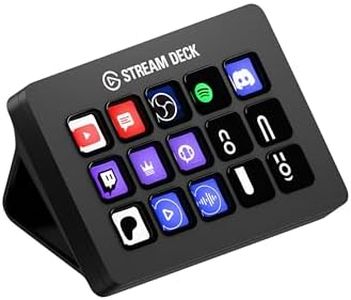
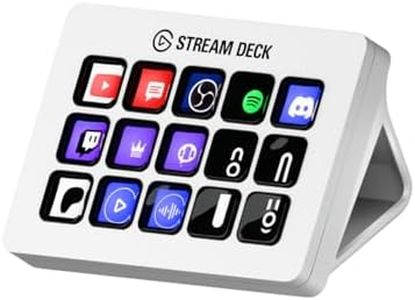
The Elgato Stream Deck MK.2 White is an excellent choice for streamers and content creators seeking a versatile control pad with 15 customizable LCD buttons. These buttons enable users to trigger a wide range of actions such as switching scenes in OBS, posting on Twitch or YouTube, adjusting audio, or controlling smart lights with a simple tap. Its deep integration with popular streaming and social platforms ensures seamless compatibility with most setups. The compact design, weighing only 145 grams and measuring just under 5 inches wide, makes it easy to fit on any desk and portable enough to carry around.

The device offers reliable build quality, and the backlit keys provide clear visual feedback so users know when commands have been executed. It features a micro USB connection, which may be a consideration for those evaluating connection types. Supporting both Mac and PC platforms, the MK.2 is well-suited for boosting productivity in streaming, video editing, or creative workflows. While users seeking a smaller controller or one with more buttons might consider other options, this model delivers a solid balance of customization and ease of use, making it a dependable choice for most streamers.

Rating
9.4
Number of Buttons
Customizability
Integration with Streaming Software

Most important from
2273 reviews

Number of Buttons
Fifteen buttons are sufficient due to features like profiles, folders, and multi-action buttons, effectively offering infinite customization possibilities.
Customizability
The ability to create submenus means each button can open multiple shortcuts, vastly expanding customization beyond single actions.
Integration with Streaming Software
Integration with popular platforms like OBS, Twitch, Photoshop, and Discord makes this device highly versatile for creators and streamers alike.
Build Quality
The tactile, backlit LCD keys provide clear feedback and enhance the overall user experience during intense workflows.
Size and Portability
This gadget quickly becomes indispensable, fitting neatly on any desk while saving valuable time with easy access to apps and commands.
#3

Elgato Stream Deck MK.2 – Studio Controller, 15 macro keys, trigger actions in apps and software like OBS, Twitch, ​YouTube and more, works with Mac and PC

Rating
9.1
Customizability
Integration with Software
Build Quality

Most important from
9993 reviews

Customizability
Perfect for non-streamers looking to streamline workflows and boost productivity with customizable keys and seamless software integration.
Integration with Software
Perfect for non-streamers looking to streamline workflows and boost productivity with customizable keys and seamless software integration.
Build Quality
Solid build quality with a detachable stand adds flexibility for positioning.

The Elgato Stream Deck MK.2 is designed for streamers, content creators, and anyone needing quick access to various software functionalities. With its 15 customizable LCD keys, you can easily control apps like OBS or Twitch, making it a great tool for live streaming and video production. The one-touch operation allows you to trigger multiple actions, streamlining workflows in music production, video editing, and more.

One of the main strengths of this device is its integration with popular platforms, offering powerful plugins that enhance functionality. Users appreciate the visual feedback, ensuring they know when their commands have been executed. It's lightweight and portable, making it easy to handle at different setups or during travel.

There are some drawbacks to consider. While 15 keys may be sufficient for many users, those needing more extensive controls might find it limiting. The build quality, while adequate, is mainly plastic, which might not feel as premium to some users. Lastly, while it's generally user-friendly, beginners may need some time to fully understand how to customize and make the most out of its features.

Rating
9.1
Customizability
Integration with Software
Build Quality

Most important from
9993 reviews

Customizability
Perfect for non-streamers looking to streamline workflows and boost productivity with customizable keys and seamless software integration.
Integration with Software
Perfect for non-streamers looking to streamline workflows and boost productivity with customizable keys and seamless software integration.
Build Quality
Solid build quality with a detachable stand adds flexibility for positioning.

Buying Guide for the Best Stream Deck

Choosing the right stream deck can significantly enhance your streaming experience by providing you with easy access to various functions and shortcuts. A stream deck is a customizable control pad that allows you to manage your stream, switch scenes, launch media, and much more with the press of a button. When selecting a stream deck, consider your specific needs and how you plan to use it. Here are some key specifications to consider:
Number of ButtonsThe number of buttons on a stream deck determines how many functions you can access directly. More buttons mean more shortcuts and commands at your fingertips. Stream decks typically come with varying numbers of buttons, such as 6, 15, or 32. If you are a beginner or have a simple setup, a smaller stream deck with fewer buttons might suffice. However, if you have a complex setup with many functions, a larger stream deck with more buttons will be beneficial.
CustomizabilityCustomizability refers to how easily you can personalize the buttons and functions on your stream deck. This includes changing the icons, assigning different commands, and creating multi-action sequences. High customizability allows you to tailor the stream deck to your specific needs and workflow. Look for stream decks that offer easy-to-use software for customization. If you frequently change your setup or need specific functions, prioritize a stream deck with high customizability.
Integration with Streaming SoftwareIntegration with streaming software is crucial for seamless operation. A stream deck should be compatible with popular streaming software like OBS Studio, Streamlabs, and XSplit. Good integration ensures that you can control your stream directly from the deck without any issues. Check the compatibility of the stream deck with the software you use. If you use multiple streaming platforms, ensure the stream deck supports all of them.
Build QualityBuild quality refers to the durability and feel of the stream deck. A well-built stream deck will last longer and provide a better user experience. Look for stream decks made from high-quality materials with responsive buttons. If you stream frequently or travel with your equipment, a sturdy and reliable stream deck is essential.
Size and PortabilityThe size and portability of a stream deck can affect where and how you use it. Smaller stream decks are more portable and can fit into tight spaces, making them ideal for streamers who travel or have limited desk space. Larger stream decks offer more buttons but take up more room. Consider your workspace and whether you need a portable option when choosing the size of your stream deck.

FAQ