We Use CookiesWe use cookies to enhance the security, performance, functionality and for analytical and promotional activities. By continuing to browse this site you are agreeing to our privacy policy

10 Best Shipping Label Printers 2026 in the United States
How do we rank products for you?

Our technology thoroughly searches through the online shopping world, reviewing hundreds of sites. We then process and analyze this information, updating in real-time to bring you the latest top-rated products. This way, you always get the best and most current options available.

headphones-stars

Our Top Picks

#1

Winner

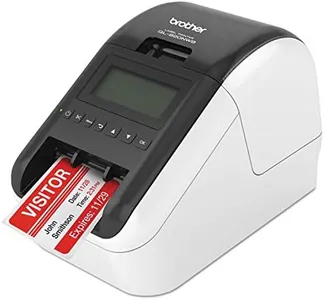
Brother QL-820NWB Professional, Ultra Flexible Monochrome Label Printer with Multiple Connectivity options

Rating
10.0
Chosen by1,133
Print Speed
Print Resolution
Connectivity Options

Most important from
626 reviews

Print Speed
Upgrading from older models like the QL 570, users notice significant improvements in speed, options, and wireless connectivity.
Print Resolution
This printer excels in quick, high-quality printing with clear results, making it ideal for office use.
Connectivity Options
Installation is a breeze, even on a wired network, and the printer is easily found by Mac systems without any intervention.
Ease of Use
The desktop software is user-friendly, offering a variety of fonts and graphics for perfect printing results in both portrait and landscape.

The Brother QL-820NWB Professional label printer offers flexible connectivity options including Bluetooth, Ethernet, and Wireless, making it versatile for various setups. The USB host interface is a handy addition for connecting peripherals like scanners. This printer is impressively fast, capable of printing up to 110 standard address labels per minute with a resolution of 300dpi, ensuring clear and sharp prints.

One standout feature is its ability to print in black and red using the DK-2251 labels, adding a layer of flexibility for users who might need color-coded labels. The device also includes a monochrome LCD screen for easy standalone use without needing a computer. With a weight of 2.5 pounds, it is relatively portable. The Brother QL-820NWB is durable and well-built, suitable for regular use in an office environment. The ease of use is enhanced by the accompanying P-touch Editor software, which helps in designing and printing labels efficiently.

It is worth noting that the maximum print speed for color is significantly lower at just 1 ppm, which might be a limitation for those needing colored labels frequently. Additionally, the printer's maximum label length of 3 feet is generous but might be restrictive for very large label needs. The device's price and the need for specific label rolls could also be a consideration for budget-conscious users. Despite these minor drawbacks, this model is a robust and highly functional choice for professionals needing reliable and high-speed label printing.

Rating
10.0
Chosen by1,133
Print Speed
Print Resolution
Connectivity Options

Most important from
626 reviews

Print Speed
Upgrading from older models like the QL 570, users notice significant improvements in speed, options, and wireless connectivity.
Print Resolution
This printer excels in quick, high-quality printing with clear results, making it ideal for office use.
Connectivity Options
Installation is a breeze, even on a wired network, and the printer is easily found by Mac systems without any intervention.
Ease of Use
The desktop software is user-friendly, offering a variety of fonts and graphics for perfect printing results in both portrait and landscape.
#2

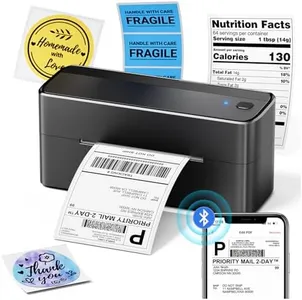
Phomemo Bluetooth Shipping Label Printer, 241BT 4X6 Wireless Thermal Label Printer for Small Business, Labels Printers for Shipping Package, Compatible with iPhone, Android, Amazon, Shopify, Black

Rating
9.1
Print Technology
Print Speed
Print Resolution

Most important from
3772 reviews

Print Technology
Thermal printing eliminates the need for ink or toner, resulting in significant time and cost savings.
Print Speed
It prints labels rapidly and handles bulk jobs without jams or misalignments thanks to smart auto-calibration.
Print Resolution
The printer delivers sharp, clear labels with flawless barcode scanning and no smudging or fading.
Label Size Compatibility
Compatible with a wide range of label sizes and types, including both branded and third-party options.
Connectivity Options
USB connectivity offers stable and glitch-free printing, ideal for direct desktop use.
Durability and Build Quality
The compact, solidly built design fits perfectly in small office spaces and feels durable.
Ease of Use
Setup is quick and straightforward, with smooth driver installation on multiple operating systems.

The Phomemo 241BT is a wireless thermal shipping label printer designed mainly for small business owners or anyone needing to print shipping labels quickly and cost-effectively. It uses thermal printing technology, which means no ink or toner is required, helping save money over time. The printer supports label sizes up to 4x6 inches, which covers most standard shipping labels for services like UPS, USPS, Amazon, and Shopify. With a print speed of up to 150 mm/s, it can produce labels efficiently, and its 203 DPI resolution delivers clear and readable text and barcodes, which is crucial for shipping accuracy.

Connectivity is flexible: you can print wirelessly through Bluetooth using the dedicated Labelife app on iOS or Android devices, or via USB on Windows, Mac, Chrome OS, and Linux computers. Bluetooth printing requires the app, as direct connection isn’t supported, which may require some adjustment for users unfamiliar with app-based printing. The printer is reasonably compact and portable, weighing just under 3 pounds, making it easy to move around.

The printer only prints in black and white, so color labels would require special color thermal paper (sold separately), which may limit some creative uses. There is no duplex (double-sided) printing, though this is generally unnecessary for shipping labels. The build quality is solid enough for small business use, and Phomemo’s customer support provides multiple ways to get help. The device offers a balanced mix of speed, print quality, and ease of use focused on straightforward, reliable shipping label printing, making it well suited for users who value wireless convenience and cost savings without needing color labels or advanced features.

Rating
9.1
Print Technology
Print Speed
Print Resolution

Most important from
3772 reviews

Print Technology
Thermal printing eliminates the need for ink or toner, resulting in significant time and cost savings.
Print Speed
It prints labels rapidly and handles bulk jobs without jams or misalignments thanks to smart auto-calibration.
Print Resolution
The printer delivers sharp, clear labels with flawless barcode scanning and no smudging or fading.
Label Size Compatibility
Compatible with a wide range of label sizes and types, including both branded and third-party options.
Connectivity Options
USB connectivity offers stable and glitch-free printing, ideal for direct desktop use.
Durability and Build Quality
The compact, solidly built design fits perfectly in small office spaces and feels durable.
Ease of Use
Setup is quick and straightforward, with smooth driver installation on multiple operating systems.
#3

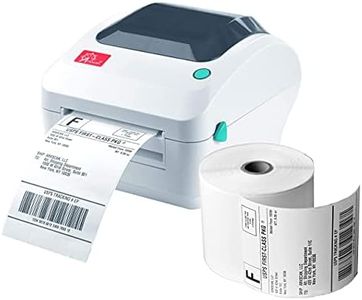
Rollo USB Shipping Label Printer - Commercial Grade 4x6 Thermal Label Printer for Shipping Packages - High Speed Custom Sticker Label Maker for Small Business - Supports Windows & Mac

Rating
8.8
Print Technology
Print Speed
Label Size Compatibility

Most important from
16172 reviews

Print Technology
The Rollo USB Shipping Label Printer is incredibly easy to use, with all barcodes and text coming out crisp and clear.
Print Speed
This printer has been a game-changer for my small business, significantly speeding up our shipping process.
Label Size Compatibility
Switching paper sizes is a breeze; just adjust the sliders, feed the paper, and the printer recognizes the size instantly.
Connectivity Options
Works well even with older USB connections, thanks to its own power source.
Durability and Build Quality
The Rollo printer has proven durable, handling thousands of labels without any issues.
Ease of Use
The Rollo USB Shipping Label Printer is incredibly easy to use, with all barcodes and text coming out crisp and clear.

The Rollo USB Shipping Label Printer is a strong contender in the shipping label printer category, especially for small business owners and e-commerce sellers. One of its standout features is the high-speed printing capability, reaching up to 150mm/s, which translates to one 4x6 label per second. This efficiency can significantly enhance shipping workflows, particularly for those who handle a high volume of packages. Additionally, it uses direct thermal technology, eliminating the need for costly ink and toner replacements, which can be a major plus for cost-conscious users.

In terms of connectivity, the Rollo is compatible with both Windows and Mac systems, making it versatile for a range of users. The included Rollo Ship Manager app simplifies shipping processes by integrating with various e-commerce platforms. Users can also create custom labels for different purposes, from barcodes to thank you stickers, adding to its functionality beyond just shipping labels.

However, it is best suited for monochrome printing, as it only has a maximum resolution of 203 DPI. While this is sufficient for shipping labels, those needing color labels or higher-quality prints may find this lacking. The printer is also a wired model, which might not be ideal for users seeking wireless options. Durability is a strong point, with the thermal printer head capable of printing up to 650,000 labels, significantly outlasting many competitors. The build quality is solid, but the design is quite compact and may not suit all workspace setups. For small to medium-sized businesses looking for a reliable and efficient shipping label printer, the Rollo USB is a worthy investment, although those needing advanced features or color printing might need to consider alternatives.

Rating
8.8
Print Technology
Print Speed
Label Size Compatibility

Most important from
16172 reviews

Print Technology
The Rollo USB Shipping Label Printer is incredibly easy to use, with all barcodes and text coming out crisp and clear.
Print Speed
This printer has been a game-changer for my small business, significantly speeding up our shipping process.
Label Size Compatibility
Switching paper sizes is a breeze; just adjust the sliders, feed the paper, and the printer recognizes the size instantly.
Connectivity Options
Works well even with older USB connections, thanks to its own power source.
Durability and Build Quality
The Rollo printer has proven durable, handling thousands of labels without any issues.
Ease of Use
The Rollo USB Shipping Label Printer is incredibly easy to use, with all barcodes and text coming out crisp and clear.

Buying Guide for the Best Shipping Label Printers

Choosing the right shipping label printer can significantly streamline your shipping process, making it more efficient and cost-effective. When selecting a shipping label printer, it's important to consider several key specifications that will ensure the printer meets your specific needs. Understanding these specifications will help you make an informed decision and choose a printer that best fits your requirements.
Print TechnologyPrint technology refers to the method the printer uses to produce labels. The two main types are thermal transfer and direct thermal. Thermal transfer printers use a ribbon to transfer ink onto the label, making them suitable for labels that need to last longer and withstand various conditions. Direct thermal printers, on the other hand, use heat-sensitive paper and are ideal for short-term labels. If you need labels that will be exposed to heat, sunlight, or chemicals, thermal transfer is the better choice. For standard shipping labels that will be used quickly, direct thermal printers are usually sufficient.
Print SpeedPrint speed is the rate at which the printer can produce labels, usually measured in inches per second (ips). This is important if you have a high volume of shipments and need to print labels quickly. Printers with higher print speeds (e.g., 8-12 ips) are ideal for busy shipping environments where efficiency is crucial. For smaller operations with lower shipping volumes, a printer with a moderate print speed (e.g., 4-6 ips) will be adequate.
Print ResolutionPrint resolution, measured in dots per inch (dpi), determines the clarity and quality of the printed labels. Higher resolution (e.g., 300 dpi) is important for labels that require detailed graphics or small text. For standard shipping labels that primarily include barcodes and text, a lower resolution (e.g., 203 dpi) is usually sufficient. Consider your specific labeling needs to determine the appropriate resolution.
Label Size CompatibilityLabel size compatibility refers to the range of label sizes the printer can handle. This is important if you need to print various label sizes for different types of packages. Ensure the printer you choose can accommodate the label sizes you commonly use. Some printers offer adjustable settings to handle multiple label sizes, which can be beneficial for versatility.
Connectivity OptionsConnectivity options determine how the printer connects to your computer or network. Common options include USB, Ethernet, Wi-Fi, and Bluetooth. USB is standard for direct connections, while Ethernet and Wi-Fi are useful for networked environments where multiple users need access. Bluetooth is convenient for wireless printing from mobile devices. Choose the connectivity option that best fits your setup and workflow.
Durability and Build QualityDurability and build quality are important for ensuring the printer can withstand the demands of your shipping environment. Look for printers with robust construction, especially if they will be used in a high-volume or industrial setting. Consider the materials used and any additional features like dust or moisture resistance. A durable printer will have a longer lifespan and require less maintenance.
Ease of UseEase of use includes factors like setup, operation, and maintenance. A user-friendly printer will save you time and reduce the likelihood of errors. Look for printers with intuitive interfaces, clear instructions, and easy-to-load label mechanisms. Consider any additional software or features that simplify the printing process, such as automatic label detection or calibration.

FAQ