We Use CookiesWe use cookies to enhance the security, performance, functionality and for analytical and promotional activities. By continuing to browse this site you are agreeing to our privacy policy

10 Best PS5 cooling stations 2026 in the United States
How do we rank products for you?

Our technology thoroughly searches through the online shopping world, reviewing hundreds of sites. We then process and analyze this information, updating in real-time to bring you the latest top-rated products. This way, you always get the best and most current options available.

headphones-stars

Our Top Picks

#1

Winner

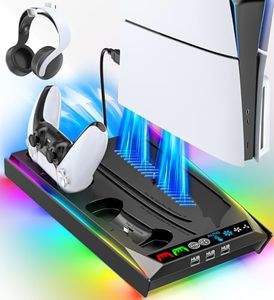
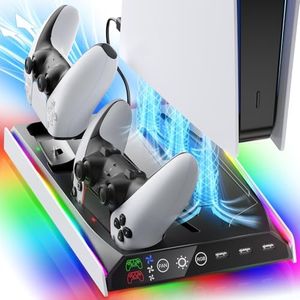
Rysker PS5/Slim/Pro Stand, PS5 Cooling Station Built-in 3-Level Cooling Fan & Fast Charger for Disc & Digital, PS 5 Accessories with Safety Screw and Headset Holder

Rating
10.0
Chosen by1,180
Cooling Method
Fan Speed and Noise Level
Power Source

Most important from
3594 reviews

Cooling Method
The cooling station noticeably improves airflow during long gaming sessions, making the console feel much cooler to the touch.
Fan Speed and Noise Level
The device operates very quietly, allowing uninterrupted gaming without distracting fan noise.
Power Source
Charging capabilities extend beyond controllers to include Bluetooth headsets, adding valuable versatility.
Additional Features
Additional USB ports offer convenient options for charging multiple devices or adding extra cooling fans for older PS5 models.
Size and Compatibility
Installation is straightforward when you utilize the provided safety screw that fits into the PS5’s dedicated screw hole, ensuring a secure and scratch-free fit.

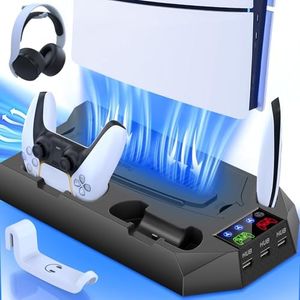
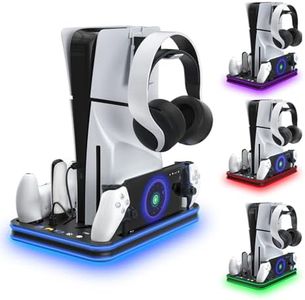
The Rysker PS5 Cooling Station is designed specifically for the PS5 and its Slim and Pro versions, fitting both Disc and Digital models securely with included safety screws to prevent scratches and keep your console stable. It features a built-in turbo fan with three adjustable speed levels, which you can easily control by touch. A handy memory function saves your preferred fan speed even after restarting, so you don't have to reset it every time. This helps keep your PS5 cool during extended gaming sessions.

Powering the station is flexible, with a built-in cable suitable for USB hubs and other common sources, and a smart chip that protects your PS5 controllers by stopping charging at 80% to avoid overheating or overcharging. Alongside cooling, it also serves as a fast charger compatible with original PS5 controllers and the new PS5 Edge controllers (but not third-party ones). The station has three USB ports on the side for charging multiple devices and a special slot to neatly store the PS5 Media Remote, helping keep your gaming area tidy. Weighing just under 2 pounds and measuring about 14.5 by 9 by 2 inches, it won’t take up too much space.

Highly rated for its sturdy fit, fan speed options, and extra charging features, this cooling stand is a great choice for PS5 owners who want an all-in-one solution to cool their console, charge controllers, and organize accessories.

Rating
10.0
Chosen by1,180
Cooling Method
Fan Speed and Noise Level
Power Source

Most important from
3594 reviews

Cooling Method
The cooling station noticeably improves airflow during long gaming sessions, making the console feel much cooler to the touch.
Fan Speed and Noise Level
The device operates very quietly, allowing uninterrupted gaming without distracting fan noise.
Power Source
Charging capabilities extend beyond controllers to include Bluetooth headsets, adding valuable versatility.
Additional Features
Additional USB ports offer convenient options for charging multiple devices or adding extra cooling fans for older PS5 models.
Size and Compatibility
Installation is straightforward when you utilize the provided safety screw that fits into the PS5’s dedicated screw hole, ensuring a secure and scratch-free fit.
#2

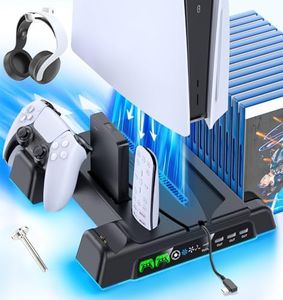
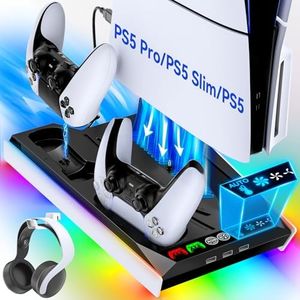
PS5/Slim/Pro Stand and Cooling Station with LED Controller Charging Station for PlayStation 5 Console, Controller Charger, Cooling Stand, PS5/Slim/Pro Accessories Kit with 3 Level Cooling Fan - Black

Rating
8.2
Cooling Method
Fan Speed and Noise Level
Power Source

Most important from
22695 reviews

Cooling Method
This cooling station effectively vents hot air from the PS5, significantly reducing overheating issues even in warm, poorly ventilated rooms.
Fan Speed and Noise Level
Fan speeds strike a good balance between efficient cooling and manageable noise levels, though the sound can be noticeable during intense gaming sessions.
Power Source
Dual controller charging docks with LED indicators provide a convenient and fast way to recharge controllers simultaneously, enhancing gaming readiness.
Additional Features
The all-in-one design offers excellent organization with dedicated spots for controllers, headsets, games, and accessories, keeping the gaming area neat and accessible.
Size and Compatibility
The sturdy, well-crafted stand fits all PS5 models perfectly and saves valuable space on entertainment centers with its sleek, multifunctional layout.

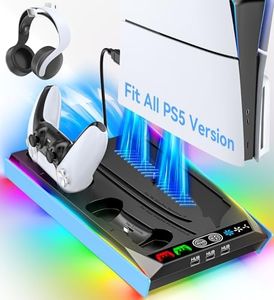
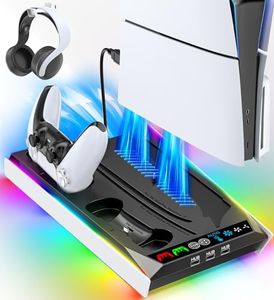
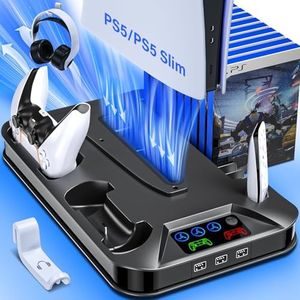
This PS5 Cooling Station is a practical all-in-one stand designed to fit all versions of the PlayStation 5, including the Slim and Pro models. It features three adjustable cooling fans with enlarged turbo blades, aiming to keep your console cool during long gaming sessions. The fan speeds are designed to balance cooling performance with manageable noise levels, though some users might notice fan sound during intense use. Powered through your PS5 setup, it doesn’t require extra adapters, simplifying use.

A standout feature is its multifunctionality: it includes a dual controller charging dock with LED indicators to charge two DualSense controllers simultaneously in under two hours, plus four additional charging ports for other devices. The stand also offers smart storage options for up to 14 game discs, a headset, screws, and other accessories, helping to keep your gaming area tidy. Safety protections guard against overcharging and overheating, which is reassuring for device longevity.

Note that the product doesn’t include the PS5 console, controllers, or other accessories shown. It is best suited for PS5 owners looking for a space-saving solution that combines cooling, charging, and organization in one unit. For those who want a neat setup without multiple gadgets cluttering their space, this cooling station is an excellent choice, though individuals sensitive to fan noise might want to test it first.

Rating
8.2
Cooling Method
Fan Speed and Noise Level
Power Source

Most important from
22695 reviews

Cooling Method
This cooling station effectively vents hot air from the PS5, significantly reducing overheating issues even in warm, poorly ventilated rooms.
Fan Speed and Noise Level
Fan speeds strike a good balance between efficient cooling and manageable noise levels, though the sound can be noticeable during intense gaming sessions.
Power Source
Dual controller charging docks with LED indicators provide a convenient and fast way to recharge controllers simultaneously, enhancing gaming readiness.
Additional Features
The all-in-one design offers excellent organization with dedicated spots for controllers, headsets, games, and accessories, keeping the gaming area neat and accessible.
Size and Compatibility
The sturdy, well-crafted stand fits all PS5 models perfectly and saves valuable space on entertainment centers with its sleek, multifunctional layout.
#3

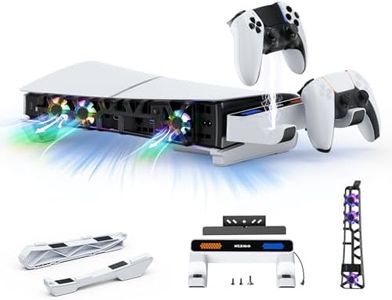
NexiGo PS5 Slim Horizontal Stand with Charging Station for Dual_Sense&Dual_Sense Edge Controllers,Silent Cooling Fan w/Intelligent Temperature Control, LED Indicators, White

Rating
8.2
Fan Speed and Noise Level
Additional Features
Size and Compatibility

Most important from
146 reviews

Fan Speed and Noise Level
The fan offers three speed settings and automatically powers on and off with the console, providing effective cooling without annoying manual controls.
Additional Features
The blue LED lights enhance the aesthetic without interfering with viewing, and can be turned off or unplugged for complete darkness.
Size and Compatibility
The stand securely holds the PS5 Slim horizontally, eliminating wobbling and providing a stable base especially useful when vertical placement isn’t an option.

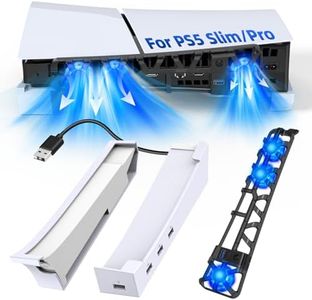
The NexiGo PS5 Slim Horizontal Stand is designed to keep your PS5 Slim console cooler while adding useful features. It uses temperature-controlled fans that automatically adjust their speed based on how hot your console gets, which helps keep noise low by turning off the fans when the system is cool. This dynamic fan control is handy if you want quieter play sessions without manually adjusting settings. The stand also raises your console slightly to improve airflow and stability, making it easier to fit the PS5 Slim horizontally in your entertainment setup.

One of the standout features is the charging dock for two DualSense or DualSense Edge controllers, which screws directly onto the bottom of the console for a secure hold. It charges controllers fully in about three hours and includes LED indicators that let you quickly see battery status. You can even customize or turn off the LEDs if you prefer less light.

Powered by the PS5 Slim itself, the stand doesn't require extra plugs, simplifying setup and reducing clutter. The compact size and white color blend well with the PS5 Slim’s design, making it a neat addition without taking up much space. Since it’s made specifically for the 2023+ PS5 Slim models, it won’t work with the original or larger versions of the PS5. While the cooling fan is quiet, it will still make some noise when active. The charging dock is great for convenience, but those with more than two controllers might need additional charging solutions. This NexiGo stand is a solid pick for PS5 Slim owners wanting improved cooling, stable horizontal placement, and convenient controller charging in one compact package.

Rating
8.2
Fan Speed and Noise Level
Additional Features
Size and Compatibility

Most important from
146 reviews

Fan Speed and Noise Level
The fan offers three speed settings and automatically powers on and off with the console, providing effective cooling without annoying manual controls.
Additional Features
The blue LED lights enhance the aesthetic without interfering with viewing, and can be turned off or unplugged for complete darkness.
Size and Compatibility
The stand securely holds the PS5 Slim horizontally, eliminating wobbling and providing a stable base especially useful when vertical placement isn’t an option.

Buying Guide for the Best PS5 cooling stations

When choosing a cooling station for your PlayStation 5, it's important to consider several key specifications to ensure you get the best performance and longevity out of your console. A cooling station can help prevent overheating, which can lead to hardware issues and reduced performance. Here are the key specs you should look at and how to choose the right one for your needs.
Cooling MethodThe cooling method refers to how the station cools your PS5. This can be through fans, heat sinks, or a combination of both. Fans are the most common and can vary in size and speed. Larger, faster fans generally provide better cooling but can be noisier. Heat sinks passively dissipate heat and are silent but may not be as effective as active cooling. If you play for long hours or in a warm environment, a station with powerful fans might be best. For quieter operation, consider a model with efficient heat sinks.
Fan Speed and Noise LevelFan speed is measured in RPM (revolutions per minute) and affects how much air the fan can move. Higher RPMs mean better cooling but can also result in more noise. Noise level is measured in decibels (dB). If you prefer a quieter gaming experience, look for cooling stations with lower dB ratings or adjustable fan speeds. If cooling performance is your top priority, higher RPM fans might be more suitable, even if they are a bit louder.
Power SourceCooling stations can be powered through USB connections or external power adapters. USB-powered stations are convenient as they can draw power directly from the PS5, but they might not be as powerful as those with external adapters. If you want a more powerful cooling solution, consider a station with an external power source. For ease of use and fewer cables, a USB-powered option might be more suitable.
Additional FeaturesSome cooling stations come with extra features like built-in charging docks for controllers, additional USB ports, or storage for games and accessories. These can add convenience and help keep your gaming area organized. If you have multiple controllers or a lot of accessories, a cooling station with these additional features might be beneficial. If you prefer a simpler setup, a basic cooling station without extra features might be sufficient.
Size and CompatibilityEnsure that the cooling station is compatible with the PS5 and fits well in your gaming setup. Some stations are designed to be compact and save space, while others might be larger but offer better cooling performance. Measure your available space and consider how the station will fit with your other gaming equipment. If space is limited, a more compact model might be necessary. For maximum cooling, a larger station might be the better choice.

FAQ