We Use CookiesWe use cookies to enhance the security, performance, functionality and for analytical and promotional activities. By continuing to browse this site you are agreeing to our privacy policy

10 Best Pocket Printers 2026 in the United States
How do we rank products for you?

Our technology thoroughly searches through the online shopping world, reviewing hundreds of sites. We then process and analyze this information, updating in real-time to bring you the latest top-rated products. This way, you always get the best and most current options available.

headphones-stars

Our Top Picks

#1

Winner

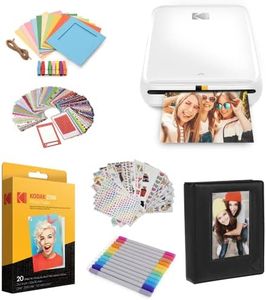
KODAK Step Printer Wireless Mobile Photo Printer with Zink Zero Ink Technology & Kodak App for iOS & Android (White) Gift Bundle

Rating
10.0
Chosen by1,227
Print Quality
Print Size
Connectivity

Most important from
2682 reviews

Print Quality
The printer delivers impressive photo quality with vibrant prints that make memorable scrapbooks and planners.
Print Size
Prints are small but ideal for casual snapshots and personalized projects, enhancing memories in a tangible, creative way.
Connectivity
Connecting via Bluetooth is straightforward, and the Kodak app provides a fun, user-friendly experience with plenty of editing tools and creative extras.
Battery Life
Battery life is solid, often lasting through multiple printing sessions without needing a recharge.
Paper Type
Sticky-backed photo paper works perfectly for scrapbooking, offering just the right amount of adhesion to stay put or peel off easily.

The Kodak Step Printer is a compact and lightweight pocket printer ideal for anyone who enjoys printing photos on the go. Using Zink’s zero-ink technology, it produces 2x3 inch sticky-backed photo prints without needing ink cartridges, making it affordable and mess-free. The prints have decent quality at 300 dpi resolution and are resistant to moisture and smudges, which is great for scrapbooking or decorating personal items. Connectivity is simple with Bluetooth and NFC support, allowing easy pairing with iOS and Android devices through the Kodak app. The app enhances the experience by offering editing tools, filters, stickers, and collage options, letting users personalize images before printing.

The built-in rechargeable battery lasts for about 25 prints per charge, which is enough for casual use but may require recharging during longer sessions. One downside is the slow print speed—about one photo per minute—which can feel lengthy if printing many pictures. Also, the small print size limits photo use to fun, casual snapshots rather than larger keepsakes. This printer is well-suited for photo lovers wanting a portable, convenient way to print small, vibrant photos directly from their phone with creative app features, while it is less ideal for high-volume or larger-format printing needs.

Rating
10.0
Chosen by1,227
Print Quality
Print Size
Connectivity

Most important from
2682 reviews

Print Quality
The printer delivers impressive photo quality with vibrant prints that make memorable scrapbooks and planners.
Print Size
Prints are small but ideal for casual snapshots and personalized projects, enhancing memories in a tangible, creative way.
Connectivity
Connecting via Bluetooth is straightforward, and the Kodak app provides a fun, user-friendly experience with plenty of editing tools and creative extras.
Battery Life
Battery life is solid, often lasting through multiple printing sessions without needing a recharge.
Paper Type
Sticky-backed photo paper works perfectly for scrapbooking, offering just the right amount of adhesion to stay put or peel off easily.
#2

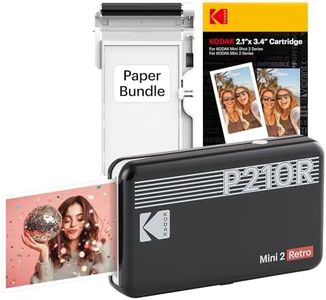
KODAK Mini 2 Retro 2x3" Portable Photo Printer, 38 Sheets, Bluetooth Smartphone Printer for iPhone & Android, Instant Color Prints, 4PASS Dye Sublimation, Black

Rating
10.0
Print Quality
Print Size
Connectivity

Most important from
11427 reviews

Print Quality
Prints vibrant, true-to-life colors with excellent clarity that surpass expectations compared to similar compact printers.
Print Size
The 2.1x3.4 inch photo size is perfect for creative projects like vision boards, scrapbooking, and personalized cards.
Connectivity
Setup and Bluetooth connection are straightforward through the Kodak app, enabling quick printing without complicated pairing steps.
Battery Life
Battery life is decent for typical use, making it reliable for events and on-the-go printing sessions.
Print Speed
The printing process is a bit noisy due to the multi-pass method but remains reasonably fast and suitable for casual use.
App Features
The Kodak app’s built-in editing tools enhance photo customization, adding value beyond simple printing.

The Kodak Mini 2 Retro is a compact and lightweight pocket printer designed for instant color photo printing from your smartphone or tablet via Bluetooth. It produces 2.1x3.4 inch photos using dye sublimation technology with a 4PASS printing method that ensures vibrant, fingerprint-proof, and water-resistant images ideal for keepsakes. Print quality is solid at 300 dpi, making your photos look clear and durable. The printer connects easily through the free Kodak app, which offers creative editing tools and lets you choose between border or borderless prints—perfect for scrapbooking or personalized gifts.

Battery-wise, it uses one D battery, which is convenient but may not last as long as rechargeable options, so you might want to carry spares if printing frequently. Printing speed is quite slow at about 1 page per minute, so it is best suited for casual use rather than quick mass printing. It supports only glossy photo paper sized 2.1x3.4 inches, which limits print size flexibility but fits well in wallets or albums.

This printer is ideal for users looking for a fun, portable way to print small, high-quality photos without fuss, especially for personal or gift purposes. If faster printing, larger photo sizes, or rechargeable battery convenience are priorities, other models might be more suitable.

Rating
10.0
Print Quality
Print Size
Connectivity

Most important from
11427 reviews

Print Quality
Prints vibrant, true-to-life colors with excellent clarity that surpass expectations compared to similar compact printers.
Print Size
The 2.1x3.4 inch photo size is perfect for creative projects like vision boards, scrapbooking, and personalized cards.
Connectivity
Setup and Bluetooth connection are straightforward through the Kodak app, enabling quick printing without complicated pairing steps.
Battery Life
Battery life is decent for typical use, making it reliable for events and on-the-go printing sessions.
Print Speed
The printing process is a bit noisy due to the multi-pass method but remains reasonably fast and suitable for casual use.
App Features
The Kodak app’s built-in editing tools enhance photo customization, adding value beyond simple printing.
#3

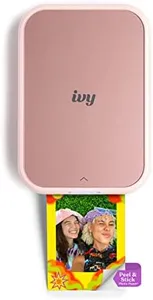
Canon Ivy 2 Mini Photo Printer, Print from Compatible iOS & Android Devices, Sticky-Back Prints, Blush Pink

Rating
8.8
Print Quality
Connectivity
App Features

Most important from
4159 reviews

Print Quality
Prints come out clear and of good quality, especially when reproducing photos from larger originals.
Connectivity
Bluetooth connectivity is seamless, allowing quick pairing with smartphones for hassle-free printing.
App Features
The accompanying app offers a variety of fun and creative options to customize photos before printing.

The Canon Ivy 2 Mini Photo Printer is a compact and lightweight device designed for quick, on-the-go photo printing directly from your smartphone. Thanks to its ZINK (Zero Ink) technology, it doesn’t require ink cartridges, using special paper with embedded color crystals instead. This makes it very convenient and mess-free. The prints measure 2x3 inches, ideal for small photos or stickers, and they come with a peel-and-stick backing to easily place your pictures anywhere. Print quality has been improved, offering sharper images and better color contrast, especially for skin tones, which is great for casual snapshots.

Connectivity is straightforward with Bluetooth 5.0, ensuring a smooth link to compatible iOS and Android devices through the Canon Mini Print App. The app also allows you to customize your photos before printing, adding fun effects or layouts. However, the print speed is quite slow, around 0.01 pages per minute, so it’s not meant for printing many photos quickly. Battery life is reasonable for portable use, powered by a rechargeable lithium-ion battery included in the package.

A limitation to consider is the print size and media type, as it only prints on glossy photo paper sized 2x3 inches, which might be too small for those wanting larger prints. It only prints single-sided images without an option for duplex printing or additional functions like scanning or copying. This mini printer suits those who want a fun, portable way to instantly print small, sticker-like photos for scrapbooking, decorating, or sharing in social settings. It excels in personal, casual use where convenience and ease matter most rather than high-volume or large-format printing.

Rating
8.8
Print Quality
Connectivity
App Features

Most important from
4159 reviews

Print Quality
Prints come out clear and of good quality, especially when reproducing photos from larger originals.
Connectivity
Bluetooth connectivity is seamless, allowing quick pairing with smartphones for hassle-free printing.
App Features
The accompanying app offers a variety of fun and creative options to customize photos before printing.

Buying Guide for the Best Pocket Printers

Pocket printers are compact, portable devices that allow you to print photos and documents on the go. They are perfect for travelers, event-goers, or anyone who wants to quickly print memories without needing a full-sized printer. When choosing a pocket printer, it's important to consider several key specifications to ensure you get the best fit for your needs. Here are the most important specs to look at and how to navigate them.
Print QualityPrint quality is measured in dots per inch (DPI). Higher DPI means better resolution and clearer images. For casual use and small photos, a DPI of around 300 is usually sufficient. If you want more detailed and professional-looking prints, look for a higher DPI. Consider what you will be printing most often to determine the level of print quality you need.
Print SizePrint size refers to the dimensions of the printed photo or document. Common sizes for pocket printers include 2x3 inches and 3x4 inches. Smaller sizes are more portable and convenient for quick snapshots, while larger sizes are better for more detailed prints. Think about what you plan to print and choose a size that fits your needs.
ConnectivityConnectivity options determine how you can send images to the printer. Most pocket printers use Bluetooth or Wi-Fi to connect to your smartphone or tablet. Some may also have USB or NFC options. Bluetooth is generally the most convenient for on-the-go printing, while Wi-Fi can offer more stable connections. Choose a printer with connectivity options that match your devices and usage habits.
Battery LifeBattery life indicates how long the printer can operate on a single charge. Longer battery life means you can print more photos before needing to recharge. If you plan to use the printer frequently or for extended periods, look for a model with a longer battery life. Consider how often and where you will be using the printer to determine the battery capacity you need.
Print SpeedPrint speed is how quickly the printer can produce a photo or document. Faster print speeds are more convenient, especially if you need to print multiple items in a short time. However, faster speeds can sometimes compromise print quality. If you value speed over quality, look for a printer with a higher print speed. If quality is more important, be willing to wait a bit longer for each print.
Paper TypePocket printers use different types of paper, such as ZINK (zero ink) or traditional ink-based paper. ZINK paper is more convenient as it doesn't require ink cartridges, but it may not offer the same quality as ink-based prints. Consider the cost and availability of the paper type, as well as the quality of prints you desire. Choose a printer that uses paper that fits your preferences and budget.
App FeaturesMany pocket printers come with companion apps that offer additional features like photo editing, filters, and templates. These features can enhance your printing experience and allow for more creativity. Look for a printer with an app that is user-friendly and offers the features you want. Consider how much you value these extra features when making your decision.

FAQ