We Use CookiesWe use cookies to enhance the security, performance, functionality and for analytical and promotional activities. By continuing to browse this site you are agreeing to our privacy policy

10 Best Photo Printers For Photographers 2026 in the United States
How do we rank products for you?

Our technology thoroughly searches through the online shopping world, reviewing hundreds of sites. We then process and analyze this information, updating in real-time to bring you the latest top-rated products. This way, you always get the best and most current options available.

headphones-stars

Our Top Picks

#1

Winner

Epson EcoTank Photo ET-8550 Wireless Wide-format Color All-in-One Supertank Printer with Scanner Copier, Ethernet and 4.3-inch Colorfull Touchscreen

Rating
10.0
Chosen by1,440
Print Resolution
Color Accuracy
Ink Type

Most important from
2356 reviews

Print Resolution
Lines are crisp and accurate to the original, making sale-worthy prints.
Color Accuracy
Prints on many different materials like sticker paper, cardstock, and holographic paper with great accuracy.
Ink Type
The ink tanks are huge and transparent, so you can tell how much ink is in them, and the ink lasts a long time.
Connectivity Options
The wireless print function is really great. I can print a 4x6 from my phone in a few clicks.

The Epson EcoTank Photo ET-8550 is a versatile photo printer designed specifically for photographers and creative enthusiasts. One of its standout strengths is its cartridge-free printing system. This feature allows for vibrant and sharp prints thanks to Epson's Claria ET Premium 6-color inks. The ability to print borderless photos up to 13" x 19" makes it an excellent choice for larger projects, appealing to those looking to create professional-quality prints from the comfort of their home. Printing speed is respectable too, with 4" x 6" photos taking just 15 seconds and color documents printing at 12 pages per minute.

The printer also excels in cost efficiency, boasting significant savings on ink; it promises to save up to 80% on replacement ink costs compared to traditional cartridges. Each set of ink bottles can provide enough ink to print up to 6,200 pages, making it a great long-term investment for avid photographers.

However, there are a few drawbacks to consider. Its weight of 24.5 pounds makes it somewhat bulky, so it may not be the best fit for small workspaces. Additionally, while the wireless connectivity and mobile printing features are convenient, users may experience occasional connectivity issues, which can be frustrating when working on urgent projects. Also, the printer relies heavily on genuine Epson ink to maintain optimal performance, meaning that using third-party inks could void the warranty.

Rating
10.0
Chosen by1,440
Print Resolution
Color Accuracy
Ink Type

Most important from
2356 reviews

Print Resolution
Lines are crisp and accurate to the original, making sale-worthy prints.
Color Accuracy
Prints on many different materials like sticker paper, cardstock, and holographic paper with great accuracy.
Ink Type
The ink tanks are huge and transparent, so you can tell how much ink is in them, and the ink lasts a long time.
Connectivity Options
The wireless print function is really great. I can print a 4x6 from my phone in a few clicks.
#2

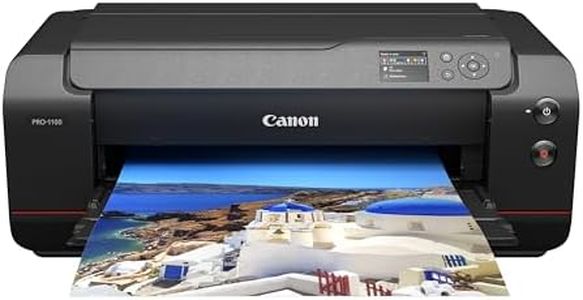
Canon imagePROGRAF PRO-1100: 17” Professional Wireless Inkjet Photo Printer

Rating
9.1
Print Resolution
Color Accuracy
Print Speed

Most important from
67 reviews

Print Resolution
This printer produces gallery-quality prints that balance vivid, durable output with reliable performance.
Color Accuracy
The photo quality is outstanding, delivering rich, vibrant colors that make every print worth the wait.
Print Speed
Print speed is slower compared to smaller models, but the uncompromised quality justifies the pace.
Paper Handling
Using Canon pro platinum paper with a metallic finish dramatically enhances landscape and architectural photos.

The Canon imagePROGRAF PRO-1100 is a high-end photo printer designed with professional photographers in mind. Its standout feature is the 11-color pigment-based ink system with a Chroma Optimizer, which delivers rich color accuracy and gloss uniformity, making prints look vibrant and lifelike. The LUCIA PRO II inks enhance color depth and clarity, especially in darker areas, which is important for detailed art and photo prints. With a maximum print resolution of up to 4800 x 2400 dpi, it produces sharp, detailed images on a variety of media sizes up to 17 x 22 inches, suitable for large format photo prints.

Connectivity options include USB and Wi-Fi, allowing for flexible setup in studios or home offices. Paper handling is solid, featuring an air feeding system to prevent paper jams or skewing, and it supports multiple paper sizes including popular photo dimensions and larger formats. The print speed is quite slow at about 1 page per minute, which means it’s best suited for quality over quantity rather than high-volume printing. The printer is also quite heavy and large, so it requires a dedicated space. While it lacks duplex printing, this is less critical for photo printing.

Its professional print and layout software helps photographers manage color calibration and print workflow with precision. This printer excels at producing museum-quality, color-accurate photo prints with excellent detail and durability, making it a great choice for photographers who prioritize print quality and color fidelity over speed and portability.

Rating
9.1
Print Resolution
Color Accuracy
Print Speed

Most important from
67 reviews

Print Resolution
This printer produces gallery-quality prints that balance vivid, durable output with reliable performance.
Color Accuracy
The photo quality is outstanding, delivering rich, vibrant colors that make every print worth the wait.
Print Speed
Print speed is slower compared to smaller models, but the uncompromised quality justifies the pace.
Paper Handling
Using Canon pro platinum paper with a metallic finish dramatically enhances landscape and architectural photos.
#3

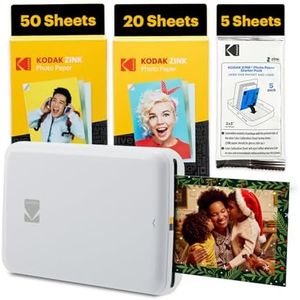
Kodak Step Instant Smartphone Photo Printer - 75 Sheets Bundle - Portable Mini Color Wireless Mobile Printer - Zink 2x3” Sticky-Back Photos - Bluetooth Compatible with Smart Devices - Fun App -White

Rating
9.1
Color Accuracy
Print Speed
Connectivity Options

Most important from
323 reviews

Color Accuracy
Printing is quick and easy with vibrant colors that stand out, offering great value for the price.
Print Speed
Printing is quick and easy with vibrant colors that stand out, offering great value for the price.
Connectivity Options
Bluetooth connectivity is seamless and setup is straightforward, making it user-friendly from the start.
Paper Handling
Paper handling is simple, though occasional streaking may appear early on but typically resolves quickly.

The Kodak Step Instant Smartphone Photo Printer is a compact and portable device designed for quick and casual photo printing from smartphones and tablets via Bluetooth. It uses ZINK zero-ink technology, eliminating the need for ink cartridges, which offers a convenient and mess-free printing experience. It prints 2x3 inch sticky-backed photos that are smudge-proof, water-resistant, and tear-resistant, making them ideal for scrapbooking or decorating personal items.

The print resolution is 300 dpi, which is suitable for small prints but may not meet the expectations of photographers seeking high-detail or larger prints. Color accuracy is generally good for casual use, though it does not match professional photo printers. The print speed is about one page per minute, making it appropriate for printing a few photos but less so for large batches. The included app provides editing features such as filters, stickers, and collages, which add creative options before printing.

Paper handling is straightforward, with one tray that holds up to 10 sheets and a bundle providing 75 sheets of glossy photo paper. Connectivity is simple via Bluetooth, without support for Wi-Fi or wired connections. This printer is well-suited for photography enthusiasts and casual users who want a fun, portable way to print small photos instantly, rather than professional photographers needing high-resolution prints or larger formats.

Rating
9.1
Color Accuracy
Print Speed
Connectivity Options

Most important from
323 reviews

Color Accuracy
Printing is quick and easy with vibrant colors that stand out, offering great value for the price.
Print Speed
Printing is quick and easy with vibrant colors that stand out, offering great value for the price.
Connectivity Options
Bluetooth connectivity is seamless and setup is straightforward, making it user-friendly from the start.
Paper Handling
Paper handling is simple, though occasional streaking may appear early on but typically resolves quickly.

Buying Guide for the Best Photo Printers For Photographers

Choosing the right photo printer is crucial for photographers who want to produce high-quality prints of their work. The right printer can make a significant difference in the color accuracy, detail, and overall presentation of your photos. When selecting a photo printer, it's important to consider several key specifications that will impact the quality and efficiency of your printing process. Understanding these specs will help you make an informed decision and ensure that the printer you choose meets your specific needs as a photographer.
Print ResolutionPrint resolution is measured in dots per inch (DPI) and indicates how many dots of ink the printer can place on a square inch of paper. Higher DPI values generally mean better print quality, with more detail and smoother gradients. For photographers, a higher resolution is important to accurately reproduce the fine details and textures in your photos. Printers with a resolution of 2400 DPI or higher are typically suitable for professional photo printing. If you frequently print large photos or need the highest possible quality, aim for the highest DPI available.
Color AccuracyColor accuracy refers to how well a printer can reproduce the colors in your photos. This is crucial for photographers who need their prints to match the original image as closely as possible. Printers with more ink cartridges (such as those with six or more colors) tend to offer better color accuracy and a wider color gamut. Look for printers that use pigment-based inks, as they generally provide more accurate and long-lasting colors compared to dye-based inks. If you work with a lot of vibrant or subtle colors, prioritize color accuracy in your choice.
Ink TypeThere are two main types of ink used in photo printers: dye-based and pigment-based. Dye-based inks are known for their vibrant colors and smooth gradients, making them ideal for glossy prints. However, they may not be as long-lasting as pigment-based inks, which are more resistant to fading and water damage. Pigment-based inks are better suited for archival-quality prints and matte finishes. Consider the type of prints you produce most often and choose a printer with the appropriate ink type to match your needs.
Print SizePrint size refers to the maximum dimensions of the prints a printer can produce. Standard photo printers typically handle up to 8.5 x 11 inches, while larger format printers can print up to 13 x 19 inches or even larger. If you frequently print large photos or need to create posters and other large-format prints, opt for a printer that supports larger paper sizes. For everyday photo printing, a standard size printer may be sufficient. Consider your typical print size requirements when making your decision.
Print SpeedPrint speed is measured in pages per minute (PPM) and indicates how quickly a printer can produce prints. While speed may not be the most critical factor for photographers, it can be important if you need to produce a large number of prints in a short amount of time. Faster printers can save you time, especially during busy periods or when working on large projects. However, be aware that higher print speeds can sometimes compromise print quality. Balance your need for speed with the quality requirements of your prints.
Connectivity OptionsConnectivity options determine how you can connect your printer to your computer or other devices. Common options include USB, Wi-Fi, and Ethernet. Wi-Fi connectivity allows for wireless printing, which can be convenient if you want to print from multiple devices or locations. Some printers also offer mobile printing capabilities, enabling you to print directly from your smartphone or tablet. Consider your workflow and how you prefer to connect your devices when choosing a printer with the right connectivity options for you.
Paper HandlingPaper handling refers to the types and sizes of paper a printer can accommodate, as well as the capacity of its paper trays. For photographers, it's important to choose a printer that can handle a variety of photo paper types, including glossy, matte, and fine art papers. Additionally, a printer with multiple paper trays or a high-capacity tray can save you time by reducing the need to frequently reload paper. Consider the types of paper you use most often and ensure the printer you choose can handle them efficiently.

FAQ