We Use CookiesWe use cookies to enhance the security, performance, functionality and for analytical and promotional activities. By continuing to browse this site you are agreeing to our privacy policy

10 Best Photo Printer 2026 in the United States

How do we rank products for you?

Our technology thoroughly searches through the online shopping world, reviewing hundreds of sites. We then process and analyze this information, updating in real-time to bring you the latest top-rated products. This way, you always get the best and most current options available.

headphones-stars

Our Top Picks

#1

Winner

Epson EcoTank Photo ET-8550 Wireless Wide-format Color All-in-One Supertank Printer with Scanner Copier, Ethernet and 4.3-inch Colorfull Touchscreen

Rating
10.0
Chosen by1,178
Print Resolution
Ink System
Print Speed

Most important from
2356 reviews

Print Resolution
Gloss prints on Epson ultra premium paper are simply the finest gloss prints ever seen.
Ink System
The ink tanks are huge and transparent, allowing easy monitoring of ink levels, and the ink lasts a long time.
Print Speed
Although the cleaning process can be ink-consuming, the overall print quality and speed make up for it.
Connectivity Options
Wireless printing works great, enabling quick prints from phones and tablets with just a few clicks.
Paper Handling
This printer handles various materials like sticker paper, cardstock, and holographic paper with great accuracy.

The Epson EcoTank Photo ET-8550 is an impressive all-in-one photo printer that shines in producing vibrant, lab-quality prints, thanks to its Claria ET Premium 6-color ink system. It supports a variety of media, including borderless printing up to 13" x 19", which is ideal for photographers and creative projects. One of its standout features is the cost-effectiveness of its ink system; it utilizes high-yield ink bottles instead of traditional cartridges, significantly reducing printing costs—printing a 4" x 6" photo for around 4 cents compared to 40 cents with regular cartridges. Users can expect up to two years of printing before needing to replace the ink bottles, making it a great option for those who print frequently.

In terms of performance, the ET-8550 delivers a maximum print speed of 12 pages per minute in color and 16 in monochrome, which is respectable for a photo printer. The wireless connectivity and mobile app support allow for convenient printing from smartphones and tablets, enhancing usability for a modern household.

However, there are some drawbacks to consider. The printer is relatively heavy at 24.5 pounds, which may be cumbersome to move. Additionally, while the initial cost of the printer is justified given its long-term savings on ink, the upfront investment can be higher compared to basic models. Some users might also find the requirement for genuine Epson ink a limitation if they prefer third-party options. Moreover, while it handles various paper sizes, those who need a compact printer for smaller spaces might find it less suited to their requirements. Despite these considerations, the Epson EcoTank ET-8550 stands out as a robust choice for anyone serious about photo printing, whether for personal or professional use.

Rating
10.0
Chosen by1,178
Print Resolution
Ink System
Print Speed

Most important from
2356 reviews

Print Resolution
Gloss prints on Epson ultra premium paper are simply the finest gloss prints ever seen.
Ink System
The ink tanks are huge and transparent, allowing easy monitoring of ink levels, and the ink lasts a long time.
Print Speed
Although the cleaning process can be ink-consuming, the overall print quality and speed make up for it.
Connectivity Options
Wireless printing works great, enabling quick prints from phones and tablets with just a few clicks.
Paper Handling
This printer handles various materials like sticker paper, cardstock, and holographic paper with great accuracy.
#2

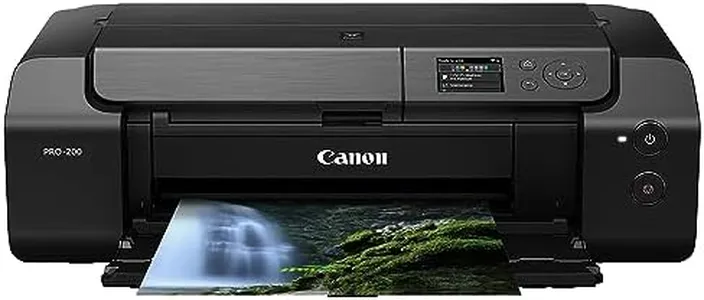
Canon PIXMA PRO-200 Wireless Professional Inkjet Photo Printer

Rating
8.8
Print Resolution
Ink System
Print Size

Most important from
823 reviews

Print Resolution
The Canon PIXMA PRO-200 produces gorgeous prints with vibrant colors and sharp details.
Ink System
The ink system is excellent, but be prepared for the cost of consumables; it's worth it for the quality.
Print Size
This printer is a beast in size, but its ability to print up to 13x19 size paper makes it worth the space.
Connectivity Options
Wireless connectivity works seamlessly, and it's easy to integrate into your home or studio network.
Paper Handling
Users appreciate the versatility in paper handling, supporting different media types with great results.
Cost of Consumables
The ink system is excellent, but be prepared for the cost of consumables; it's worth it for the quality.

The Canon PIXMA PRO-200 Wireless Professional Inkjet Photo Printer is designed for enthusiasts and professionals seeking high-quality photo prints. Its 4800 x 2400 print resolution ensures sharp and vibrant images, and the enhanced 8-color dye-based ink system offers rich, true-to-life colors. Print sizes are versatile, supporting borderless prints up to 13”x19” and custom sizes up to 13”x39”, which is excellent for larger projects. The printer is quick too, generating A3 plus prints in about 90 seconds, though it could be faster for smaller prints.

Connectivity options include both wired and wireless, with easy integration into your home or studio network, plus the added convenience of Amazon Alexa for ink management. The built-in LCD display is a user-friendly feature for checking ink levels and performing maintenance. However, one noticeable drawback is the printer's weight at 40.5 pounds, making it less portable. Additionally, the cost of consumables, especially the 8-color ink system, could be higher over time, which is worth considering.

Paper handling is suitable for various media types, but it has only one tray with a 100-sheet capacity, which may be limiting for high-volume tasks. Despite these minor setbacks, the Canon PIXMA PRO-200 is a solid choice for those prioritizing print quality and color accuracy in their photo prints.

Rating
8.8
Print Resolution
Ink System
Print Size

Most important from
823 reviews

Print Resolution
The Canon PIXMA PRO-200 produces gorgeous prints with vibrant colors and sharp details.
Ink System
The ink system is excellent, but be prepared for the cost of consumables; it's worth it for the quality.
Print Size
This printer is a beast in size, but its ability to print up to 13x19 size paper makes it worth the space.
Connectivity Options
Wireless connectivity works seamlessly, and it's easy to integrate into your home or studio network.
Paper Handling
Users appreciate the versatility in paper handling, supporting different media types with great results.
Cost of Consumables
The ink system is excellent, but be prepared for the cost of consumables; it's worth it for the quality.
#3

Epson EcoTank Photo ET-8500 Wireless Color All-in-One Supertank Printer with Scanner Copier, Ethernet and 4.3-inch Colorfull Touchscreen - White

Rating
8.2
Print Resolution
Ink System
Connectivity Options

Most important from
1196 reviews

Print Resolution
The print quality is excellent, with vibrant colors and sharp details, making it perfect for photography enthusiasts.
Ink System
The ink tanks last far longer than traditional cartridges, significantly reducing the cost per page.
Connectivity Options
Setup is straightforward and the connectivity options, including Wi-Fi and USB, are robust and user-friendly.
Paper Handling
The printer offers versatile media handling, including borderless printing and support for various media types such as cardstock and specialty media.

The Epson EcoTank Photo ET-8500 is a versatile all-in-one printer designed for high-quality photo printing. It delivers impressive print resolution and vibrant colors due to its Claria ET Premium 6-color ink system, making it suitable for printing lab-quality photos. The printer supports borderless printing up to 8.5” x 11” and can handle various media types, including cardstock and specialty media up to 1.3 mm thick, which enhances its versatility for creative projects.

One of its standout features is the cartridge-free system that uses high-yield ink bottles, significantly reducing the cost of consumables and environmental waste. Users can print a 4” x 6” photo for about 4 cents, which is much more economical compared to traditional cartridge-based systems. Additionally, the ink bottles can last up to two years, providing a long-term cost-saving benefit. The printer has a decent print speed, capable of producing a 4” x 6” photo in as fast as 15 seconds, though its maximum color print speed is 12 ppm, which might be slower for high-volume printing needs.

Connectivity options are robust, featuring Wi-Fi, USB, and Ethernet, along with support for mobile printing via the Epson Smart Panel app. The 4.3-inch color touchscreen and voice-activated printing add to its user-friendliness. However, the printer is relatively bulky and heavy, weighing 24.5 pounds, which might be a consideration for users with limited space. Although the initial cost of the printer might be higher compared to other models, it offers excellent value for in-house photo printing, making it well-suited for photography enthusiasts and small businesses looking for high-quality, cost-effective photo printing solutions.

Rating
8.2
Print Resolution
Ink System
Connectivity Options

Most important from
1196 reviews

Print Resolution
The print quality is excellent, with vibrant colors and sharp details, making it perfect for photography enthusiasts.
Ink System
The ink tanks last far longer than traditional cartridges, significantly reducing the cost per page.
Connectivity Options
Setup is straightforward and the connectivity options, including Wi-Fi and USB, are robust and user-friendly.
Paper Handling
The printer offers versatile media handling, including borderless printing and support for various media types such as cardstock and specialty media.

Buying Guide for the Best Photo Printer

Choosing the right photo printer can make a significant difference in the quality of your printed photos. When selecting a photo printer, it's important to consider several key specifications that will impact the performance and output of the printer. Understanding these specs will help you make an informed decision and ensure that the printer you choose meets your specific needs. Here are the key specifications to consider when buying a photo printer.
Print ResolutionPrint resolution is measured in dots per inch (DPI) and indicates the level of detail a printer can produce. Higher DPI values mean more detailed and sharper images. For high-quality photo prints, look for a printer with at least 1200 DPI. If you need professional-grade prints, consider printers with 2400 DPI or higher. Your choice should depend on how detailed and sharp you want your photos to be.
Ink SystemThe ink system refers to the type and number of ink cartridges a printer uses. Printers with more ink cartridges (such as those with six or more) can produce a wider range of colors and more accurate color reproduction. If you are a casual user, a printer with four cartridges (cyan, magenta, yellow, and black) may suffice. For professional photographers or those who demand the highest color accuracy, a printer with additional cartridges, such as light cyan and light magenta, is recommended.
Print SizePrint size refers to the maximum size of the paper the printer can handle. Common print sizes include 4x6 inches, 5x7 inches, and 8x10 inches. Some printers can handle larger sizes, such as 13x19 inches or even larger. Consider what sizes you typically print and choose a printer that can accommodate those sizes. If you frequently print large photos or posters, ensure the printer supports larger paper sizes.
Print SpeedPrint speed is measured in pages per minute (PPM) and indicates how quickly a printer can produce prints. While print speed is less critical for photo printing than for document printing, it can still be a factor if you need to print large volumes of photos. For occasional printing, a slower speed may be acceptable. However, if you need to print many photos quickly, look for a printer with a higher PPM.
Connectivity OptionsConnectivity options determine how you can connect your devices to the printer. Common options include USB, Wi-Fi, and Bluetooth. Wi-Fi and Bluetooth allow for wireless printing from smartphones, tablets, and computers, providing greater convenience. If you prefer a wired connection, ensure the printer has a USB port. Consider your preferred method of connecting to the printer and choose one that offers the necessary connectivity options.
Paper HandlingPaper handling refers to the types and capacities of paper the printer can manage. Some printers have multiple paper trays, allowing you to load different sizes and types of paper simultaneously. Others may have a single tray with limited capacity. If you print on various paper types (e.g., glossy, matte, cardstock), look for a printer with versatile paper handling capabilities. Additionally, consider the paper capacity if you print in large volumes to reduce the frequency of reloading paper.
Cost of ConsumablesThe cost of consumables includes ink cartridges and photo paper. Some printers have higher ongoing costs due to expensive ink or paper. It's important to consider the long-term cost of consumables when choosing a printer. Look for printers with affordable and readily available ink cartridges and paper. If you print frequently, consider printers with high-yield cartridges or bulk ink systems to reduce costs.

FAQ