We Use CookiesWe use cookies to enhance the security, performance, functionality and for analytical and promotional activities. By continuing to browse this site you are agreeing to our privacy policy

10 Best Keyboards For Macs 2026 in the United States
How do we rank products for you?

Our technology thoroughly searches through the online shopping world, reviewing hundreds of sites. We then process and analyze this information, updating in real-time to bring you the latest top-rated products. This way, you always get the best and most current options available.

headphones-stars

Our Top Picks

#1

Winner

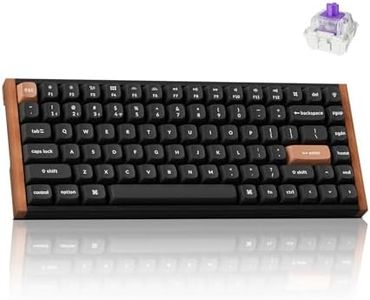
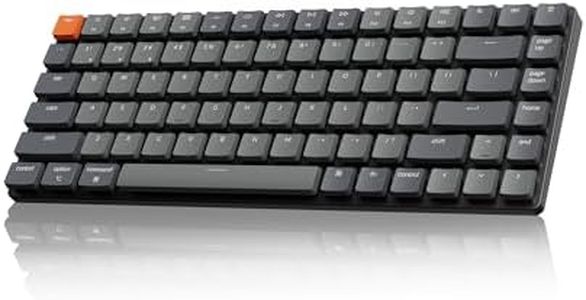
Keychron K2 HE Rapid Trigger Wireless Custom Keyboard with Hall Effect Gateron Double-Rail Magnetic Switch, QMK 2.4 GHz Bluetooth 5.2 RGB Compatible with Mac Windows Linux (Aluminum + Wood)

Rating
10.0
Chosen by1,354
Key Switch Type
Build Quality
Ergonomics

Most important from
344 reviews

Key Switch Type
The keyboard delivers a smooth, rich 'thock' sound that feels like tapping little velvet pillows, offering satisfying tactile feedback without being loud.
Build Quality
Its solid aluminum and wood frame feels extremely well made and high quality, combining durability with elegant aesthetics.
Ergonomics
Customization is next-level with adjustable actuation points and dual-function keys, making the keyboard feel custom-made for each user.
Connectivity
The wireless connection via Bluetooth or 2.4 GHz is rock-solid, and the battery life is so long it becomes easy to forget it even has a battery.
Keyboard Layout
The 75% layout saves desk space while maintaining essential keys, though some users might miss a dedicated wrist rest for longer sessions.
Backlighting
RGB lighting is subtle and customizable with many modes, but it’s not vibrant, fitting a classy aesthetic rather than flashy gamer styles.

The Keychron K2 HE is a compact 75% keyboard designed to offer a great typing and gaming experience, especially for Mac users who want flexibility and style. It features a unique magnetic mechanical switch system that allows you to customize the sensitivity and feel of each key, which is a big plus if you like fine-tuning your keyboard’s response. Connectivity is versatile with Bluetooth 5.2, 2.4 GHz wireless, and USB-C options, letting you easily switch between up to three devices like laptops, tablets, or phones.

The build quality stands out with a solid aluminum and wood frame that feels sturdy and looks elegant, though the keycaps are made of durable PBT plastic but without backlit legends, so seeing the keys in the dark might be tricky. The keyboard supports RGB backlighting for style, but since the legends don’t shine through, the light won’t help with key visibility. It’s also hot-swappable, meaning you can change the magnetic switches yourself if you want a different typing feel in the future.

Ergonomically, the 75% layout saves desk space while keeping most essential keys, but it doesn’t have a dedicated wrist rest, which some might miss for longer typing sessions. This keyboard suits users looking for a premium, customizable keyboard with a Mac-friendly layout and multi-device support, though those needing illuminated key legends or extra ergonomic features might want to consider that before buying.

Rating
10.0
Chosen by1,354
Key Switch Type
Build Quality
Ergonomics

Most important from
344 reviews

Key Switch Type
The keyboard delivers a smooth, rich 'thock' sound that feels like tapping little velvet pillows, offering satisfying tactile feedback without being loud.
Build Quality
Its solid aluminum and wood frame feels extremely well made and high quality, combining durability with elegant aesthetics.
Ergonomics
Customization is next-level with adjustable actuation points and dual-function keys, making the keyboard feel custom-made for each user.
Connectivity
The wireless connection via Bluetooth or 2.4 GHz is rock-solid, and the battery life is so long it becomes easy to forget it even has a battery.
Keyboard Layout
The 75% layout saves desk space while maintaining essential keys, though some users might miss a dedicated wrist rest for longer sessions.
Backlighting
RGB lighting is subtle and customizable with many modes, but it’s not vibrant, fitting a classy aesthetic rather than flashy gamer styles.
#2

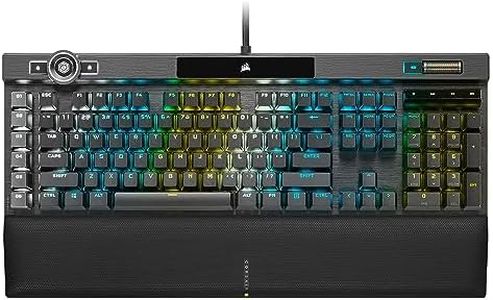
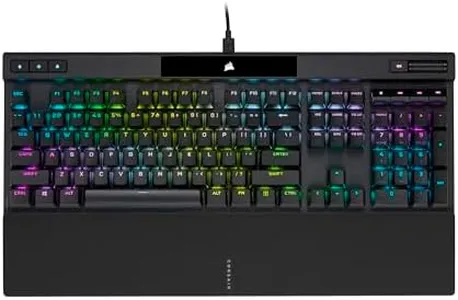
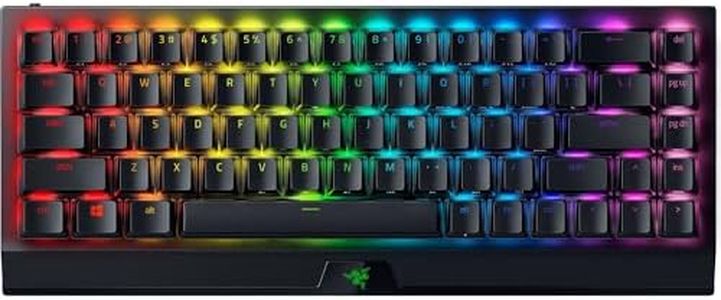
Corsair K100 RGB Optical-Mechanical Wired Gaming Keyboard - QWERTY US Layout, OPX Switches - PBT Double-Shot Keycaps - Elgato Stream Deck and iCUE Compatible - Black

Rating
9.1
Build Quality
Connectivity
Key Switch Type

Most important from
4624 reviews

Build Quality
Premium quality is evident in every aspect, delivering a top-tier typing and gaming experience that justifies the price.
Connectivity
The wireless connection is rock solid with no noticeable input delay or dropped signals even several feet away from the receiver.
Key Switch Type
Keys provide a perfect balance of tactile feedback—less clicky than traditional mechanical switches but still incredibly satisfying and precise.
Ergonomics
The utility wheel and dedicated media controls enhance productivity and customization without interfering with gameplay.
Backlighting
Battery life impresses by lasting several days under heavy use with high-brightness RGB lighting active.

The Corsair K100 RGB is a premium wired mechanical keyboard primarily designed for gaming, featuring a robust aluminum frame and durable PBT double-shot keycaps that ensure long-lasting build quality. It uses Corsair's OPX optical-mechanical switches, which provide fast response times and satisfying tactile feedback, great for both gaming and typing. The keyboard offers a full QWERTY layout with 110 keys, tailored for Windows PCs, with wired connectivity that guarantees a reliable connection.

Its standout feature is the vibrant RGB per-key backlighting and a large LightEdge lighting strip, both fully customizable via Corsair's iCUE software. While customization options are extensive, the software is more Windows-focused with recent Mac OS support. Ergonomically, the keyboard is solid but fairly standard, with no special wrist rests or adjustable tilt beyond typical configurations.

The Corsair K100 RGB excels in build quality, high-performance switches, and lighting effects, making it ideal for gamers or users who prioritize speed and durability. Users seeking seamless Mac-specific key layouts, wireless functionality, or enhanced ergonomics might consider other options.

Rating
9.1
Build Quality
Connectivity
Key Switch Type

Most important from
4624 reviews

Build Quality
Premium quality is evident in every aspect, delivering a top-tier typing and gaming experience that justifies the price.
Connectivity
The wireless connection is rock solid with no noticeable input delay or dropped signals even several feet away from the receiver.
Key Switch Type
Keys provide a perfect balance of tactile feedback—less clicky than traditional mechanical switches but still incredibly satisfying and precise.
Ergonomics
The utility wheel and dedicated media controls enhance productivity and customization without interfering with gameplay.
Backlighting
Battery life impresses by lasting several days under heavy use with high-brightness RGB lighting active.
#3

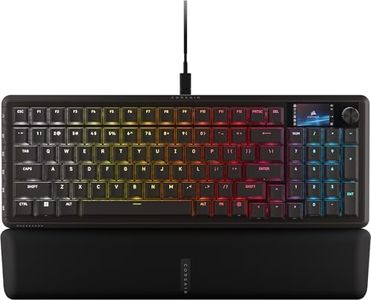
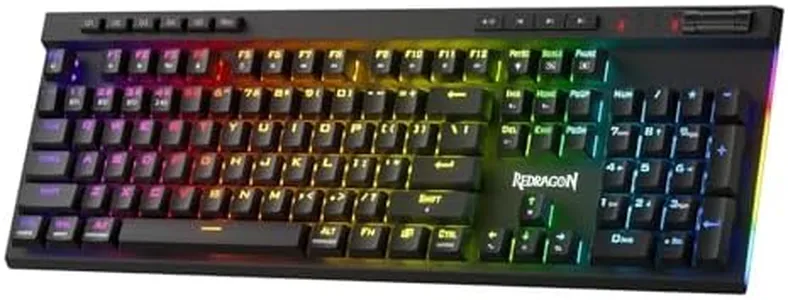
Corsair Vanguard 96 Wired Mechanical Gaming Keyboard – 96% Layout, MLX Fusion Tactile Switches, 8000Hz Polling, LCD Display, Virtual Stream Deck, G-Keys, SOCD Flashtap, QWERTY US – Black

Rating
8.5
Key Switch Type
Connectivity
Build Quality

Most important from
102 reviews

Key Switch Type
The keyboard delivers an amazing typing experience with tactile keys that feel and sound fantastic, making it a joy to use for extended periods.
Connectivity
Customizing the keyboard is straightforward and unique, allowing direct connection through Corsair's website without needing extra software, including uploading personal images or videos to the vibrant LCD screen.
Build Quality
The build feels solid and durable, providing a premium typing surface, though slightly less heavy-duty than some previous aluminum models.
Keyboard Layout
Adjusting to the slightly different key layout takes some time, especially for frequently used keys like the right control.
Ergonomics
The keyboard’s combination of compact size and nearly full key set strikes a good balance for users wanting both functionality and desk space savings.

The Corsair Vanguard 96 is a compact 96% mechanical keyboard, which means it offers nearly all the keys of a full keyboard—including arrow keys and a number pad—but in a smaller size similar to tenkeyless models. Its tactile MLX Fusion switches provide satisfying feedback when typing, which can be enjoyable for both gaming and everyday use. Connectivity is wired, so no Bluetooth or wireless options, which might be limiting if you prefer a clutter-free desk.

The keyboard includes a vibrant 1.9-inch full-color LCD screen and a rotary dial, adding customization and quick access features that are more gaming and stream-focused but can also enhance productivity. It has six programmable G-keys, useful for creating shortcuts, though Mac users should check compatibility especially since iCUE software support is coming soon. Backlighting is included, which helps in low-light environments, and the build feels solid and durable with a weighty frame. Ergonomically, it includes a wrist rest, which helps reduce strain during long typing or gaming sessions.

On the downside, the keyboard is designed primarily for gaming, so some Mac users might find the layout and features overkill for standard office work or casual use. Also, its wired connection and pending software support might require some patience before full Mac compatibility is realized. This keyboard is ideal for Mac users who want a compact, high-quality mechanical keyboard and are into gaming or streaming, but it may not suit those seeking a simple, wireless, or ultra-minimalist setup.

Rating
8.5
Key Switch Type
Connectivity
Build Quality

Most important from
102 reviews

Key Switch Type
The keyboard delivers an amazing typing experience with tactile keys that feel and sound fantastic, making it a joy to use for extended periods.
Connectivity
Customizing the keyboard is straightforward and unique, allowing direct connection through Corsair's website without needing extra software, including uploading personal images or videos to the vibrant LCD screen.
Build Quality
The build feels solid and durable, providing a premium typing surface, though slightly less heavy-duty than some previous aluminum models.
Keyboard Layout
Adjusting to the slightly different key layout takes some time, especially for frequently used keys like the right control.
Ergonomics
The keyboard’s combination of compact size and nearly full key set strikes a good balance for users wanting both functionality and desk space savings.

Buying Guide for the Best Keyboards For Macs

Choosing the right keyboard for your Mac can significantly enhance your typing experience, productivity, and overall comfort. When selecting a keyboard, it's important to consider various specifications that align with your personal preferences and usage needs. Here are some key specs to consider and how to navigate them to find the best fit for you.
Keyboard LayoutThe keyboard layout refers to the arrangement of keys on the keyboard. For Mac users, the most common layout is the QWERTY layout, which includes specific keys for macOS functions like Command, Option, and Control. This spec is important because it ensures compatibility with your Mac and provides a familiar typing experience. If you frequently use shortcuts and macOS-specific functions, a Mac-specific layout is essential. For those who type in multiple languages or have specific needs, there are alternative layouts like Dvorak or Colemak, but these are less common.
ConnectivityConnectivity options for keyboards include wired and wireless (Bluetooth) connections. This spec is important because it affects the convenience and flexibility of your setup. Wired keyboards offer a stable connection and do not require charging, making them ideal for stationary setups. Wireless keyboards provide more flexibility and a cleaner desk setup, but they need to be charged or have batteries replaced periodically. If you prefer a clutter-free workspace and don't mind occasional charging, a wireless keyboard is a great choice. For those who prioritize a stable connection and don't want to worry about battery life, a wired keyboard is better.
Key Switch TypeKey switch type refers to the mechanism beneath each key that registers a key press. This spec is important because it affects the feel and sound of typing. There are three main types: membrane, scissor, and mechanical switches. Membrane switches are quiet and have a soft feel, making them suitable for quiet environments. Scissor switches, often found in laptop keyboards, offer a low profile and a balance between tactile feedback and quietness. Mechanical switches provide a more tactile and audible typing experience, with various options like linear, tactile, and clicky switches. If you type a lot and prefer a responsive and satisfying typing experience, mechanical switches are ideal. For a quieter and more compact option, scissor or membrane switches are better.
ErgonomicsErgonomics refers to the design of the keyboard that promotes comfortable and healthy typing posture. This spec is important because it can prevent strain and injury during long typing sessions. Ergonomic keyboards often have a split design, adjustable tilt, and wrist rests to support natural hand positioning. If you spend long hours typing, an ergonomic keyboard can help reduce discomfort and the risk of repetitive strain injuries. For casual or occasional use, a standard keyboard with a comfortable layout may suffice.
BacklightingBacklighting refers to the illumination of the keys, which can be useful in low-light environments. This spec is important for visibility and aesthetics. Keyboards can have single-color backlighting or RGB backlighting, which allows for customizable colors and effects. If you often work in dimly lit areas or enjoy a visually appealing setup, a keyboard with backlighting is beneficial. For those who primarily work in well-lit environments, backlighting may not be necessary.
Build QualityBuild quality refers to the materials and construction of the keyboard. This spec is important because it affects the durability and feel of the keyboard. Keyboards can be made from plastic, metal, or a combination of materials. Higher build quality often means a more robust and premium feel, as well as better longevity. If you want a keyboard that will last and feel solid, look for one with high-quality materials and construction. For occasional use or a more budget-friendly option, a keyboard with standard build quality may be sufficient.

FAQ