We Use CookiesWe use cookies to enhance the security, performance, functionality and for analytical and promotional activities. By continuing to browse this site you are agreeing to our privacy policy

10 Best Ethernet Switch 2026 in the United States
How do we rank products for you?

Our technology thoroughly searches through the online shopping world, reviewing hundreds of sites. We then process and analyze this information, updating in real-time to bring you the latest top-rated products. This way, you always get the best and most current options available.

headphones-stars

Our Top Picks

#1

Winner

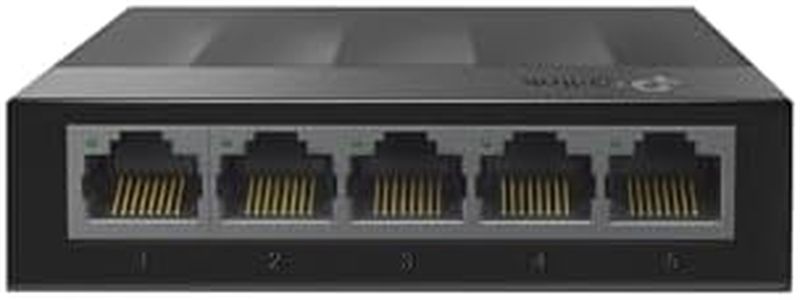
TP-Link Litewave 5 Port Gigabit Ethernet Switch | Desktop Ethernet Splitter | Unshielded Network Switch | Plug & Play | Fanless Quiet | Unmanaged (LS1005G)

Rating
10.0
Chosen by1,112
Speed
Managed vs. Unmanaged
Form Factor

Most important from
7692 reviews

Speed
Delivers fast, stable gigabit connections across all ports with zero drops, ensuring reliable network performance.
Managed vs. Unmanaged
Setup is truly plug-and-play—no configuration or software needed, making it instantly usable out of the box.
Form Factor
Runs silently and compactly, fitting neatly into small spaces without adding noise or clutter.

The TP-Link Litewave 5 Port Gigabit Ethernet Switch is a compact and straightforward device designed to expand your wired network by adding more Ethernet connections. It offers five RJ45 ports, all supporting fast gigabit speeds (up to 1000 Mbps), which makes it suitable for everyday internet use, streaming, gaming, and connecting devices like laptops, printers, or gaming consoles. This switch is unmanaged, meaning it requires no setup or software — just plug it in, and it works right away. It’s fanless, so it runs quietly, and its small size allows it to fit neatly on or behind a desk without drawing attention.

On the power side, it is energy-efficient and consumes very little electricity. However, it does not support Power over Ethernet (PoE), so it cannot power devices like some cameras or phones directly through the cable. Also, being unmanaged, it lacks advanced features that professional users might want, like traffic control or VLAN settings. Its switching capacity is adequate for home or small office use but wouldn’t be ideal for larger networks needing complex management.

This switch represents a solid choice if you need a simple, reliable way to add a few wired connections quickly and silently, especially in a home or small office environment.

Rating
10.0
Chosen by1,112
Speed
Managed vs. Unmanaged
Form Factor

Most important from
7692 reviews

Speed
Delivers fast, stable gigabit connections across all ports with zero drops, ensuring reliable network performance.
Managed vs. Unmanaged
Setup is truly plug-and-play—no configuration or software needed, making it instantly usable out of the box.
Form Factor
Runs silently and compactly, fitting neatly into small spaces without adding noise or clutter.
#2

Meraki MS250 Series 24-Port Network Switch, PoE+ (MS250-24p-HW)

The Meraki MS250 Series 24-Port Network Switch (MS250-24P-HW) is a powerful option for those needing a high-capacity, managed switch. With 24 Gigabit PoE+ ports, it provides up to 370W of power over Ethernet, which is excellent for environments requiring power to multiple devices. The 4 x 10G SFP+ uplink interfaces ensure robust connectivity options, and the dual stacking interfaces offer up to 80 Gbps of bandwidth, making it ideal for scaling and redundancy.

Additionally, the switch's non-blocking backplane supports up to 176 Gbps of switching capacity, ensuring smooth data flow without bottlenecks. The support for field replaceable, redundant power supplies adds reliability and ease of maintenance. However, it requires a separate license purchase, which can be an additional cost to consider. The switch is relatively heavy at 11 pounds but has a compact form factor of 14.89 x 19.08 x 1.72 inches, suitable for desktop use.

Despite being released in 2017, its capabilities remain relevant, particularly for high-demand network environments. A major plus is its Layer 3 switch type, which adds advanced routing capabilities, beneficial for complex networks. Potential buyers should be aware of the additional license requirement and ensure it fits within their budget and needs.

#3

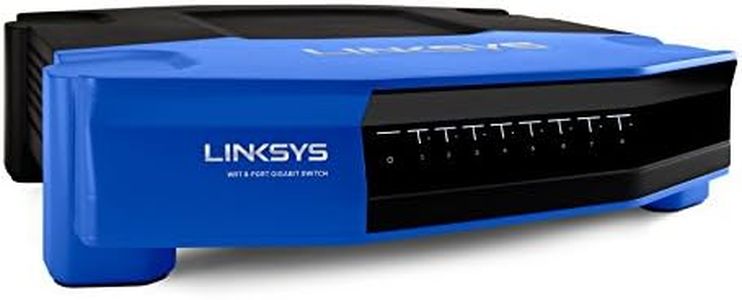
Linksys WRT 8-Port Gigabit Switch, Works with Linksys WRT1900AC Wi-Fi Router (SE4008)

Rating
8.2
Port Count
Speed

Most important from
173 reviews

Port Count
Setup is truly plug-and-play, instantly expanding the number of available gigabit ports without any complicated configuration.
Speed
The unit handles network traffic with speed and ease, maintaining reliable performance over extended use.

The Linksys WRT 8-Port Gigabit Switch offers a simple and affordable way to expand your wired home network with eight fast Gigabit Ethernet ports. These ports allow speeds up to 1 Gbps, which is much faster than older Fast Ethernet options, making it great for connecting devices like laptops, smart TVs, and game consoles. The switch supports auto-sensing, so it automatically adjusts to the highest speed your device supports. It also includes Quality of Service (QoS) features to help prioritize video and audio streaming, improving your experience with Netflix, YouTube, or online games. Energy saving is built in through an advanced power-saving mode that reduces power use when ports are not active.

Setup is very easy — just plug in your devices and you’re ready to go, which is ideal if you don’t want to deal with complicated network settings. This is an unmanaged switch, so it lacks advanced features like VLANs or detailed traffic management, which might be needed in more complex or business networks. It also does not support Power over Ethernet (PoE), so you cannot power devices like IP cameras or phones directly through the switch.

The plastic case and moderate size make it suitable for home or small office desks but not for rack mounting. For those looking for a straightforward way to add multiple wired connections with reliable speed and simple use, this Linksys switch is a solid choice. However, if management options or PoE are required, more advanced models should be considered.

Rating
8.2
Port Count
Speed

Most important from
173 reviews

Port Count
Setup is truly plug-and-play, instantly expanding the number of available gigabit ports without any complicated configuration.
Speed
The unit handles network traffic with speed and ease, maintaining reliable performance over extended use.

Buying Guide for the Best Ethernet Switch

Choosing the right Ethernet switch for your network can significantly impact the performance and reliability of your connections. An Ethernet switch is a device that connects multiple devices within a local area network (LAN) and uses MAC addresses to forward data to the correct destination. When selecting an Ethernet switch, it's important to consider several key specifications to ensure it meets your needs. Understanding these specifications will help you make an informed decision and choose the best switch for your specific requirements.
Port CountThe port count refers to the number of Ethernet ports available on the switch. This is important because it determines how many devices you can connect to the switch. If you have a small network with only a few devices, a switch with 5 to 8 ports may be sufficient. For medium-sized networks, consider switches with 16 to 24 ports. Large networks or enterprise environments may require switches with 48 ports or more. Assess the number of devices you need to connect now and in the future to choose the right port count for your needs.
SpeedEthernet switches come in different speed ratings, such as Fast Ethernet (100 Mbps), Gigabit Ethernet (1 Gbps), and 10 Gigabit Ethernet (10 Gbps). The speed of the switch determines how quickly data can be transferred between devices. For basic home or small office use, Fast Ethernet may be adequate. However, for more demanding applications like video streaming, gaming, or large file transfers, Gigabit Ethernet is recommended. For high-performance networks or data centers, consider 10 Gigabit Ethernet switches. Choose a switch with a speed that matches your network's performance requirements.
Managed vs. UnmanagedEthernet switches can be either managed or unmanaged. Unmanaged switches are simple plug-and-play devices with no configuration options, making them easy to use for basic networking needs. Managed switches, on the other hand, offer advanced features such as VLAN support, Quality of Service (QoS), and network monitoring, allowing for greater control and optimization of the network. If you need a straightforward solution for a small network, an unmanaged switch may suffice. For larger or more complex networks where you need more control and customization, a managed switch is the better choice.
Power over Ethernet (PoE)Power over Ethernet (PoE) allows the switch to deliver power to connected devices, such as IP cameras, wireless access points, and VoIP phones, through the Ethernet cables. This eliminates the need for separate power supplies for these devices, simplifying installation and reducing cable clutter. If you plan to connect PoE-enabled devices, look for a switch that supports PoE. There are different PoE standards, such as PoE (15.4W per port), PoE+ (30W per port), and PoE++ (60W or 100W per port). Choose a switch with the appropriate PoE standard based on the power requirements of your devices.
Switching CapacitySwitching capacity, also known as bandwidth or throughput, refers to the total amount of data the switch can handle at any given time. It is measured in gigabits per second (Gbps). A higher switching capacity means the switch can handle more data traffic without becoming a bottleneck. For small networks with light traffic, a lower switching capacity may be sufficient. However, for networks with heavy data traffic, such as those in businesses or data centers, a higher switching capacity is essential to ensure smooth and efficient data transfer. Consider your network's data traffic needs when choosing a switch with the appropriate switching capacity.
Form FactorThe form factor of an Ethernet switch refers to its physical size and shape. Switches come in various form factors, including desktop, rack-mounted, and wall-mounted. Desktop switches are compact and suitable for small networks or home use. Rack-mounted switches are designed to fit into standard server racks and are ideal for larger networks or data centers. Wall-mounted switches can be mounted on walls to save space and are often used in environments where space is limited. Choose a form factor that fits your installation environment and space constraints.

FAQ