We Use CookiesWe use cookies to enhance the security, performance, functionality and for analytical and promotional activities. By continuing to browse this site you are agreeing to our privacy policy

10 Best Egpu Enclosure 2026 in the United States

How do we rank products for you?

Our technology thoroughly searches through the online shopping world, reviewing hundreds of sites. We then process and analyze this information, updating in real-time to bring you the latest top-rated products. This way, you always get the best and most current options available.

headphones-stars

Our Top Picks

#1

Winner

GMKtec AD-GP1 External GPU Docking Station, eGPU Enclosure with AMD Radeon 7600M XT GPU Graphics Card, HDMI2.1, DisplayPort2.0, Oculink, USB4, eGPU Dock

Rating
10.0
Chosen by1,296
Compatibility
Power Supply
Cooling System

Most important from
115 reviews

Compatibility
Proper connection order during setup is crucial: the eGPU must be powered and connected before the PC boots to ensure it is recognized by the BIOS.
Power Supply
The built-in 240W power supply efficiently supports the GPU and peripherals, with power draw around 140W during heavy use.
Cooling System
Temperatures remain well controlled under load, but the device can become quite loud and hot, so positioning the exhaust carefully is important.
Size and Form Factor
The enclosure delivers about 90% of optimal benchmark performance over Oculink, making it a powerful yet compact solution.
Connectivity
Using the Oculink connection provides solid, low-lag, and consistent FPS gaming performance, unlike USB4 video support which can cause small freezes due to video format conversion.

The GMKtec AD-GP1 is a compact and portable eGPU enclosure that comes with a powerful AMD Radeon 7600M XT graphics card. This means it can greatly improve your laptop or mini PC’s graphics performance, making gaming smoother and visuals sharper. It supports up to four 8K monitors simultaneously through two HDMI 2.1 and two DisplayPort 2.0 outputs, which is excellent for multi-display setups.

The inclusion of an Oculink port is a standout feature, offering higher bandwidth than traditional Thunderbolt connections, which helps reduce lag and improve frame rates, especially useful for gamers and content creators. Its size is fairly small and lightweight, making it easy to carry around, although it should be used lying flat to avoid blocking cooling vents. The enclosure supports a wide range of devices through versatile USB4 and Oculink ports, ensuring compatibility with most recent laptops, gaming consoles, and mini PCs. It has a built-in 240W power supply, which is sufficient to support the GPU and connected devices.

The build quality seems solid for its price, and GMKtec backs it with a 1-year warranty and responsive customer support. This makes the AD-GP1 a strong choice if you want a ready-to-go eGPU solution with strong graphics power and multiple display support, especially if you value portability and modern connectivity options. However, if you need a very quiet or highly customizable cooling system, this might be less ideal.

Rating
10.0
Chosen by1,296
Compatibility
Power Supply
Cooling System

Most important from
115 reviews

Compatibility
Proper connection order during setup is crucial: the eGPU must be powered and connected before the PC boots to ensure it is recognized by the BIOS.
Power Supply
The built-in 240W power supply efficiently supports the GPU and peripherals, with power draw around 140W during heavy use.
Cooling System
Temperatures remain well controlled under load, but the device can become quite loud and hot, so positioning the exhaust carefully is important.
Size and Form Factor
The enclosure delivers about 90% of optimal benchmark performance over Oculink, making it a powerful yet compact solution.
Connectivity
Using the Oculink connection provides solid, low-lag, and consistent FPS gaming performance, unlike USB4 video support which can cause small freezes due to video format conversion.
#2

GOLDSOUN External GPU Enclosure Dock Compatible with Thunderbolt 3/4, eGPU Dock for Laptops and Gaming Handhelds,External Graphics Card Dock Compatible with NVIDIA/AMD PCIe,ATX Power Supply

Rating
8.8
Compatibility
Power Supply
Size and Form Factor

Most important from
10 reviews

Compatibility
Setup is straightforward for users familiar with hardware, allowing use of existing power supplies and desktop graphics cards without hassle.
Power Supply
Clear guidance on power connections is crucial since the enclosure uses an 8-pin connector near the 24-pin, not the CPU connector, which can be confusing at first.
Size and Form Factor
Compact and portable, making it ideal for users who want to boost graphics performance on the go without a full desktop upgrade.
Build Quality and Design
The design could benefit from a minor tweak, as the PSU connection can cause stress on the backplate, but creative solutions like custom braces can easily fix this.

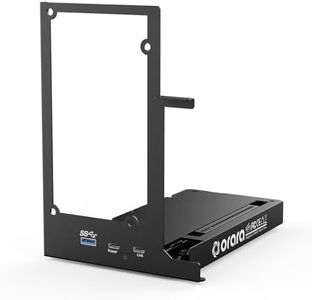
The GOLDSOUN External GPU Enclosure is designed to boost your laptop or compact PC's graphics power, especially useful for gaming, 3D modeling, or AI tasks. It supports a wide range of modern NVIDIA and AMD graphics cards, including the latest RTX 50 Series and RX 7000 Series, as long as your device has a Thunderbolt 3, Thunderbolt 4, or USB4 port. This broad compatibility makes it a versatile choice if you want to upgrade graphics without buying a full desktop.

One notable feature is its built-in connectivity hub, offering a Thunderbolt 4 port, a 10Gbps USB-A port, and a daisy chain port, which helps connect other devices alongside your GPU, adding convenience if you need extra ports. The enclosure relies on an external ATX power supply that you need to provide separately, and a graphics card is not included, so there are extra costs involved. Cooling is handled by air, which should work well for most users but might be less effective during very intense or prolonged use compared to liquid cooling options.

The device is compact and lightweight, making it easy to carry around, but the instructions recommend careful cable connections to avoid power issues, which could be challenging if you are not familiar with internal PC components. The enclosure scores well for design and functionality, though it may require some technical knowledge, especially about power connections. With a solid user rating of 4.2 stars from early users, it appears reliable but might not be the simplest option for beginners. This eGPU dock offers powerful, flexible external graphics support for users comfortable with some setup details and who want to enhance graphics performance without a full desktop upgrade.

Rating
8.8
Compatibility
Power Supply
Size and Form Factor

Most important from
10 reviews

Compatibility
Setup is straightforward for users familiar with hardware, allowing use of existing power supplies and desktop graphics cards without hassle.
Power Supply
Clear guidance on power connections is crucial since the enclosure uses an 8-pin connector near the 24-pin, not the CPU connector, which can be confusing at first.
Size and Form Factor
Compact and portable, making it ideal for users who want to boost graphics performance on the go without a full desktop upgrade.
Build Quality and Design
The design could benefit from a minor tweak, as the PSU connection can cause stress on the backplate, but creative solutions like custom braces can easily fix this.
#3

MINISFORUM DEG1 External GPU Dock Station, Mini eGPU Enclosure for RTX 4090, AMD RX 7900 XTX, Support ATX/SFX Standard Power Supplies, Oculink Interface Graphics Dock Station

Rating
8.5
Compatibility
Power Supply
Build Quality and Design

Most important from
84 reviews

Compatibility
For those with a Mini PC and an Oculink, this is the base to go with for high performance and sleek design.
Power Supply
Once installed and working, the device is essentially forgotten about, as it auto powers on with the PC.
Build Quality and Design
The eGPU dock station works flawlessly right out of the box, making the GPU look like a cool decoration.

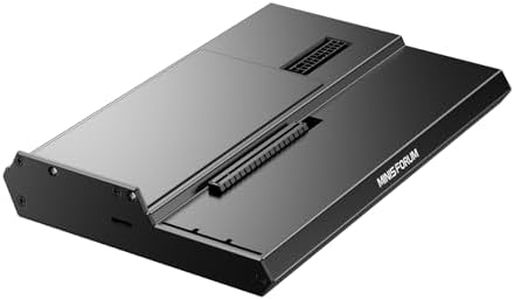
The MINISFORUM DEG1 External GPU Dock Station is a compact and versatile enclosure designed for high-end graphics cards like the RTX 4090 and AMD RX 7900 XTX. It's compatible with both ATX and SFX standard power supplies, giving users flexibility in their setup. The enclosure features a PCIe 4.0 x4 expansion interface, ensuring fast data transfer rates of up to 64 Gbps, which is suitable for demanding applications and gaming needs.

The Oculink interface does not support hot plugging, meaning you need to turn off the machine before connecting or disconnecting the GPU, which might be inconvenient for some users. The device is specifically optimized for use with MINISFORUM Mini PCs, particularly concerning the follow-start function, which requires original wires and is not universally compatible. The build quality is robust, made from aluminum, and it's lightweight at 2.53 pounds, making it portable and easy to handle.

Connectivity is a strong suit with the Oculink 4i interface, although the fixed locking interface might concern those who frequently swap GPUs. Design-wise, it has a sleek, black finish that fits well in most setups. This eGPU enclosure is best suited for users who require high performance from their GPUs and have a MINISFORUM Mini PC for optimal compatibility.

Rating
8.5
Compatibility
Power Supply
Build Quality and Design

Most important from
84 reviews

Compatibility
For those with a Mini PC and an Oculink, this is the base to go with for high performance and sleek design.
Power Supply
Once installed and working, the device is essentially forgotten about, as it auto powers on with the PC.
Build Quality and Design
The eGPU dock station works flawlessly right out of the box, making the GPU look like a cool decoration.

Buying Guide for the Best Egpu Enclosure

An eGPU (external Graphics Processing Unit) enclosure is a device that allows you to connect a desktop-class graphics card to a laptop or other computer that doesn't have the capability to house a full-sized GPU internally. This can significantly boost the graphical performance of your system, making it ideal for gaming, video editing, and other graphics-intensive tasks. When choosing an eGPU enclosure, it's important to consider several key specifications to ensure you get the best fit for your needs. Understanding these specs will help you make an informed decision and get the most out of your investment.
CompatibilityCompatibility refers to whether the eGPU enclosure can work with your computer and the graphics card you intend to use. This is crucial because not all enclosures support all systems or GPUs. To navigate this, check the enclosure's compatibility list for supported operating systems (Windows, macOS, etc.) and connection interfaces (Thunderbolt 3, USB-C). Ensure your computer has the required port and that the enclosure supports the GPU you plan to use. If you have a specific GPU in mind, verify that the enclosure can physically and electrically accommodate it.
Power SupplyThe power supply in an eGPU enclosure provides the necessary power to the graphics card and sometimes to the connected laptop. This is important because a powerful GPU requires a significant amount of power to operate efficiently. Power supplies in eGPU enclosures typically range from 300W to 700W. For high-end GPUs, you should look for enclosures with higher wattage power supplies. If you plan to use a mid-range or lower-end GPU, a lower wattage power supply will suffice. Ensure the power supply can handle the power requirements of your chosen GPU.
Cooling SystemThe cooling system in an eGPU enclosure helps to dissipate the heat generated by the graphics card during operation. This is important to prevent overheating, which can lead to reduced performance or damage to the GPU. Cooling systems can vary from basic fan setups to more advanced liquid cooling solutions. If you plan to use a high-performance GPU or engage in intensive tasks like gaming or video editing, look for enclosures with robust cooling systems. For less demanding use, a basic cooling system should be adequate.
Size and Form FactorSize and form factor refer to the physical dimensions of the eGPU enclosure and its ability to fit different sizes of graphics cards. This is important because you need to ensure that your chosen GPU will fit inside the enclosure. Enclosures come in various sizes, from compact models to larger ones that can accommodate full-sized GPUs. If you have limited space or plan to transport the enclosure frequently, a smaller form factor might be preferable. For larger, more powerful GPUs, ensure the enclosure has enough space to house them comfortably.
ConnectivityConnectivity refers to the types and number of ports available on the eGPU enclosure for connecting to your computer and other peripherals. This is important for ensuring you can connect all necessary devices and achieve optimal performance. Common connectivity options include Thunderbolt 3, USB-C, and additional USB ports for peripherals. If you need high-speed data transfer and low latency, look for enclosures with Thunderbolt 3 ports. For general use, USB-C might be sufficient. Consider the number of additional ports you might need for peripherals like keyboards, mice, and external drives.
Build Quality and DesignBuild quality and design refer to the materials and construction of the eGPU enclosure, as well as its aesthetic appeal. This is important for durability and ensuring the enclosure can withstand regular use. High-quality materials like aluminum can provide better heat dissipation and durability. Design aspects like ease of access for installing and removing the GPU, as well as the overall look of the enclosure, can also be important depending on your preferences. If you plan to frequently swap out GPUs or move the enclosure, look for models with easy access and sturdy construction.

FAQ