We Use CookiesWe use cookies to enhance the security, performance, functionality and for analytical and promotional activities. By continuing to browse this site you are agreeing to our privacy policy

10 Best Dual Hdmi Docking Station 2026 in the United States
How do we rank products for you?

Our technology thoroughly searches through the online shopping world, reviewing hundreds of sites. We then process and analyze this information, updating in real-time to bring you the latest top-rated products. This way, you always get the best and most current options available.

headphones-stars

Our Top Picks

#1

Winner

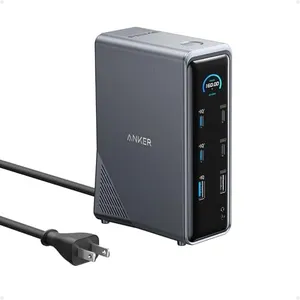
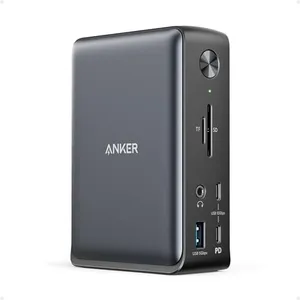
Anker Prime Docking Station, 14-Port with 160W Max Output, 10Gbps Fast Data Transfer, Real-Time Smart Interface, Audio and Ethernet Ports, Dual 4K Displays for Dell, HP, Lenovo and More

Rating
10.0
Chosen by1,219
Compatibility
Number of Ports
Power Delivery

Most important from
577 reviews

Compatibility
Flexibility is key with this dock, seamlessly handling multiple laptops across work, teaching, and personal use.
Number of Ports
With a wide array of ports, this dock offers everything needed for various devices, making it a versatile addition to any setup.
Power Delivery
The information display is handy, showing real-time power delivery to connected devices.
Build Quality and Design
Setup is incredibly easy, and the minimalist design fits perfectly into any workspace without being obtrusive.

The Anker Prime Docking Station is a versatile 14-in-1 solution designed for users who need to connect multiple devices and manage dual displays efficiently. With 14 ports, including dual HDMI for 4K displays, it offers excellent connectivity options that cater particularly well to professionals using laptops from brands like Dell, HP, and Lenovo. The ability to deliver up to 160W of power allows for quick charging of multiple devices simultaneously, which is a significant advantage for users with several gadgets needing power.

One standout feature is the ultra-fast data transfer capability of up to 10Gbps across its various ports, making it suitable for transferring large files quickly. The smart display feature provides real-time feedback on power levels and connection statuses, which can be very helpful in maintaining device performance.

There are a few limitations to consider. While it supports Windows and Chromebook systems well, Mac users will find that the two external displays will mirror each other instead of offering an extended workspace. Additionally, it is not compatible with Linux systems, which may limit its appeal to a wider audience. The build quality is solid, but its weight of 3.3 pounds might make it less portable for users looking to travel frequently.

Rating
10.0
Chosen by1,219
Compatibility
Number of Ports
Power Delivery

Most important from
577 reviews

Compatibility
Flexibility is key with this dock, seamlessly handling multiple laptops across work, teaching, and personal use.
Number of Ports
With a wide array of ports, this dock offers everything needed for various devices, making it a versatile addition to any setup.
Power Delivery
The information display is handy, showing real-time power delivery to connected devices.
Build Quality and Design
Setup is incredibly easy, and the minimalist design fits perfectly into any workspace without being obtrusive.
#2

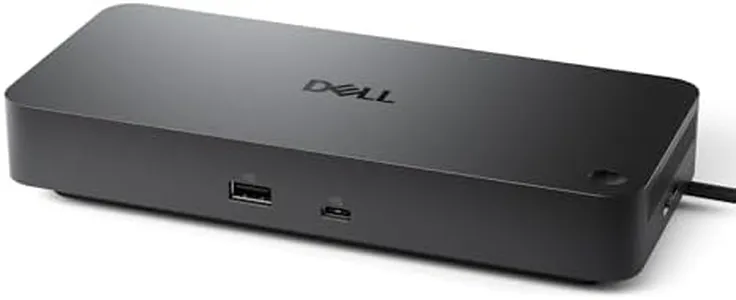
Dell Pro Dock WD25 - USB Type-C with DP Alt Mode Connector, DisplayPort/HDMI/USB 3.2 Gen2 Connectivity, Up to 100-Watt Power delivery - Black

Rating
9.7
Compatibility
Number of Ports
HDMI Resolution Support

Most important from
164 reviews

Compatibility
Works perfectly with Dell laptops, providing reliable and stable performance.
Number of Ports
Delivers seamless dual-monitor support without any connectivity issues.
HDMI Resolution Support
Offers a hassle-free solution for powering and connecting dual 27-inch monitors.
Build Quality and Design
Eliminates the clutter of multiple cables by consolidating all peripherals into one dock.

The Dell Pro Dock WD25 is a solid choice if you're looking for a dual-HDMI docking station that works well with both Dell and non-Dell laptops. It supports up to 100 watts of power delivery, meaning it can keep most laptops charged without needing a separate charger. The dock allows connection to multiple high-resolution displays, supporting up to four monitors, which is great for multitasking or larger workspaces. It features modern USB 3.2 Gen2 ports and DisplayPort/HDMI outputs to handle fast data transfer and high-quality video. A unique design feature is its ambidextrous USB-C cable that can be routed left or right, adding flexibility to your desk setup.

The build quality is robust thanks to a reinforced USB-C connector, and it’s designed with sustainability in mind, using recycled materials and reducing power consumption on standby. It weighs just over a pound, which is light but not ultra-compact, so it’s better suited for a fixed desk rather than constant travel. Its strong management features make it especially appealing for business or IT environments, but individual users can also benefit from its reliable performance and versatility.

For those seeking a docking station that balances power delivery, display support, and build quality with an eco-friendly design, the Dell Pro Dock WD25 is definitely worth considering.

Rating
9.7
Compatibility
Number of Ports
HDMI Resolution Support

Most important from
164 reviews

Compatibility
Works perfectly with Dell laptops, providing reliable and stable performance.
Number of Ports
Delivers seamless dual-monitor support without any connectivity issues.
HDMI Resolution Support
Offers a hassle-free solution for powering and connecting dual 27-inch monitors.
Build Quality and Design
Eliminates the clutter of multiple cables by consolidating all peripherals into one dock.
#3

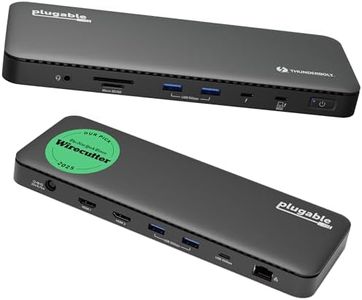
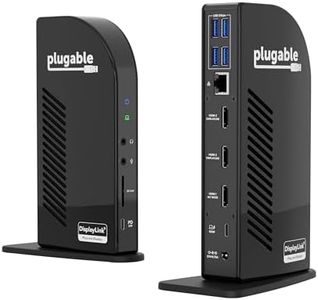
Plugable Thunderbolt 4 Dock with 100W Charging, Thunderbolt Certified, Laptop Docking Station Dual Monitor Single 8K or Dual 4K HDMI for Windows and Mac, 4X USB, Gigabit Ethernet (TBT4-UD5)

Rating
9.1
Compatibility
HDMI Resolution Support

Most important from
460 reviews

Compatibility
Confirmed compatibility with MacBook Pro with base M4 Chip, supporting up to three monitors including the laptop display.
HDMI Resolution Support
The docking station effectively supports dual 4K monitors with enough power, making it ideal for Mac users.

The Plugable Thunderbolt 4 Dock (TBT4-UD5) stands out with its 13 ports and dual HDMI support, making it a strong contender for anyone needing to connect multiple peripherals and monitors. Its ability to support dual 4K displays at 60Hz or a single 8K display ensures crisp and clear visuals, which can be especially beneficial for professionals dealing with detailed graphics or large spreadsheets.

The dock’s 100W power delivery can efficiently charge most laptops, reducing the need for additional power adapters on your desk. The Thunderbolt 4 certification adds credibility, promising fast data transfer speeds up to 40Gbps and reliable connectivity. However, it is essential to note that dual display support on Mac systems is limited to certain models like M1 Pro/Max and later versions, which might be a drawback for users with older Mac models.

The build quality is robust, and the design is sleek, which should fit well in a modern workspace. At 2.42 pounds, it is relatively heavy for a docking station, which may limit its portability. This docking station is well-suited for power users and professionals looking for high performance and extensive connectivity in their work setup.

Rating
9.1
Compatibility
HDMI Resolution Support

Most important from
460 reviews

Compatibility
Confirmed compatibility with MacBook Pro with base M4 Chip, supporting up to three monitors including the laptop display.
HDMI Resolution Support
The docking station effectively supports dual 4K monitors with enough power, making it ideal for Mac users.

Buying Guide for the Best Dual Hdmi Docking Station

Choosing the right dual HDMI docking station can significantly enhance your productivity and streamline your workspace. A docking station allows you to connect multiple peripherals to your laptop or desktop through a single connection, making it easier to manage your devices and cables. When selecting a dual HDMI docking station, it's important to consider several key specifications to ensure it meets your needs and provides the best performance for your setup.
CompatibilityCompatibility refers to whether the docking station works with your specific laptop or desktop. This is crucial because not all docking stations are universally compatible. Check if the docking station supports your device's operating system (Windows, macOS, Linux) and connection type (USB-C, Thunderbolt, USB 3.0). To pick the right one, ensure it matches your device's ports and software requirements.
Number of PortsThe number of ports indicates how many devices you can connect to the docking station. This is important because it determines the docking station's versatility and your ability to connect multiple peripherals like monitors, keyboards, mice, and external drives. Docking stations can have a range of ports, from just a few to over a dozen. Choose one that has enough ports to accommodate all your devices, plus a few extra for future expansion.
HDMI Resolution SupportHDMI resolution support refers to the maximum display resolution the docking station can handle. This is important for ensuring clear and sharp visuals on your monitors. Common resolutions include 1080p (Full HD), 1440p (Quad HD), and 2160p (4K). If you need high-definition displays for tasks like video editing or gaming, opt for a docking station that supports higher resolutions like 4K. For general office work, 1080p or 1440p may be sufficient.
Power DeliveryPower delivery (PD) refers to the docking station's ability to charge your laptop or other devices while connected. This is important for maintaining battery life and reducing the need for multiple chargers. Power delivery is measured in watts (W), with common values being 60W, 85W, and 100W. Choose a docking station with a power delivery rating that matches or exceeds your laptop's power requirements to ensure efficient charging.
Data Transfer SpeedData transfer speed indicates how quickly data can be transferred between your devices and the docking station. This is important for tasks that involve moving large files, such as video editing or backing up data. Data transfer speeds are measured in gigabits per second (Gbps), with higher values indicating faster speeds. Look for docking stations with USB 3.0 or USB-C ports, which typically offer speeds of 5 Gbps or higher, to ensure fast and efficient data transfer.
Build Quality and DesignBuild quality and design refer to the physical construction and aesthetic of the docking station. This is important for durability and how well it fits into your workspace. Consider materials like aluminum or high-quality plastic for sturdiness. Design aspects like size, weight, and cable management features can also impact your choice. Choose a docking station that is well-built and complements your workspace in terms of both functionality and appearance.

FAQ