We Use CookiesWe use cookies to enhance the security, performance, functionality and for analytical and promotional activities. By continuing to browse this site you are agreeing to our privacy policy

10 Best Digital Drawing Tablet 2026 in the United States
How do we rank products for you?

Our technology thoroughly searches through the online shopping world, reviewing hundreds of sites. We then process and analyze this information, updating in real-time to bring you the latest top-rated products. This way, you always get the best and most current options available.

headphones-stars

Our Top Picks

#1

Winner

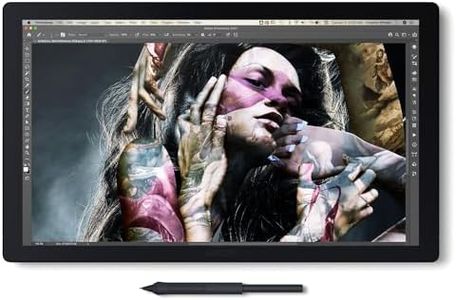
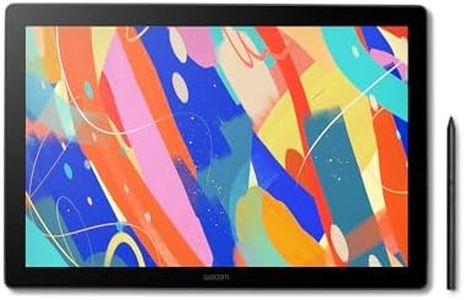
Wacom Cintiq Pro 17 Drawing Tablet with Screen, 17.3" Ultra HD 4K. 10-bit 120Hz Touchscreen Display Graphic Arts Tablet with Pro Pen 3, for Windows PC, Mac, Linux

Rating
10.0
Chosen by1,344
Resolution
Pressure Sensitivity
Connectivity

Most important from
650 reviews

Resolution
The Wacom Cintiq Pro is the best display tablet on the market, offering a beautiful 4K display with high color fidelity and designed to last for years.
Pressure Sensitivity
The pen is extremely accurate with all pressure levels usable, and there's no line wobble in an unstabilized pen.
Connectivity
The installation process was surprisingly painless with neatly packaged cables and clear labels, making it easy to set up right out of the box.
Additional Features
The ExpressKey feature is extremely easy to configure and incorporates seamlessly into the workflow, enhancing productivity.

The Wacom Cintiq Pro 17 Drawing Tablet offers a robust set of features tailored for creative professionals. Its 17.3-inch Ultra HD 4K display provides exceptional clarity and vibrant color, making it ideal for detailed digital artwork. The 120Hz refresh rate ensures smooth and responsive performance, reducing latency and improving the drawing experience.

Additionally, the tablet includes 8 customizable ExpressKeys and adjustable on-screen menus, which can significantly enhance workflow efficiency for graphic designers and artists. The Pro Pen 3 stands out with its remarkable 8192 levels of pressure sensitivity, customizable pen grips, and adjustable weight, providing a highly personalized and precise drawing experience. Connectivity through USB-C ensures compatibility with multiple operating systems, including Windows, Mac, and Linux, adding to the tablet's versatility.

The tablet's weight at 4.9 pounds might be a bit cumbersome for some users, especially when considering portability. Despite the impressive features, the price point could be a deterrent for hobbyists or those new to digital drawing tablets. Included accessories such as extra grips, replacement nibs, and the pen tray further add to the customization and convenience aspects. The fixed angle Easy Stand might be comfortable for many, but it could lack the adjustability some users might seek for varied working positions. The Wacom Cintiq Pro 17 excels in delivering high performance and customization, making it a top choice for professional artists and designers who prioritize quality and precision in their work.

Rating
10.0
Chosen by1,344
Resolution
Pressure Sensitivity
Connectivity

Most important from
650 reviews

Resolution
The Wacom Cintiq Pro is the best display tablet on the market, offering a beautiful 4K display with high color fidelity and designed to last for years.
Pressure Sensitivity
The pen is extremely accurate with all pressure levels usable, and there's no line wobble in an unstabilized pen.
Connectivity
The installation process was surprisingly painless with neatly packaged cables and clear labels, making it easy to set up right out of the box.
Additional Features
The ExpressKey feature is extremely easy to configure and incorporates seamlessly into the workflow, enhancing productivity.
#2

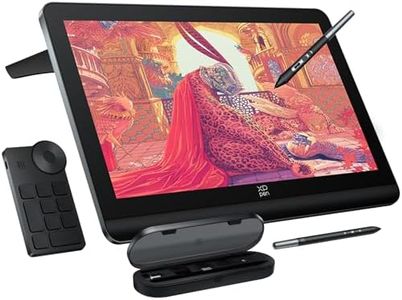
XPPen 4K UHD Artist Pro 19 Gen2 Drawing Tablet with Screen, 156% sRGB Graphic Tablet with 1.07 Billion Colors Anti-Glare Drawing Monitor with Dual 16384 Pen Pressure Stylus, Mini Keydial, 18.4"

Rating
9.4
Screen Size
Resolution
Pen Type

Most important from
174 reviews

Screen Size
The tablet’s size provides ample workspace, though some users prefer an adjustable arm for ergonomic comfort.
Resolution
The display delivers stunning 4K resolution with vibrant colors, making detailed work and color accuracy truly impressive.
Pen Type
Two battery-free styluses with customizable buttons offer great comfort and flexibility for extended use.
Additional Features
The tablet’s response time is outstanding, providing a smooth and natural drawing experience.

The XPPen Artist Pro 19 Gen2 is a strong choice for artists and designers looking for a high-resolution digital drawing tablet with a large screen. Its 18.4-inch display boasts a sharp 4K UHD resolution (3840x2160), which means you can see your work in great detail and with excellent color accuracy thanks to Calman verification and wide color gamut coverage (99.8% sRGB, 96% Adobe RGB, and 98% Display P3). This makes it especially suitable for professionals concerned with color precision, such as photographers, illustrators, and graphic designers. The full-laminated screen with anti-glare glass mimics the feel of paper, reducing eye strain and glare during long sessions.

Two battery-free styluses with 16,384 pressure sensitivity levels and tilt support offer precise, natural drawing experiences with customizable buttons to avoid accidental inputs. Connectivity is versatile, with dual USB-C ports, HDMI, and Bluetooth support, making it compatible with Windows, macOS, Android, Linux, and ChromeOS devices. Its included wireless shortcut remote with a physical dial enhances workflow efficiency. However, the tablet itself is not standalone and must be connected to a computer or laptop to work, which might not suit users wanting a fully independent device.

The relatively heavy 9.43-pound weight and 19 x 14-inch size make it less portable than smaller tablets. The higher price reflects its advanced features, but beginners serious about color accuracy and screen quality will find good value here. This tablet is well suited for digital artists who need a large, detailed workspace with excellent color fidelity and flexibility but may be less ideal for casual users or those needing portability.

Rating
9.4
Screen Size
Resolution
Pen Type

Most important from
174 reviews

Screen Size
The tablet’s size provides ample workspace, though some users prefer an adjustable arm for ergonomic comfort.
Resolution
The display delivers stunning 4K resolution with vibrant colors, making detailed work and color accuracy truly impressive.
Pen Type
Two battery-free styluses with customizable buttons offer great comfort and flexibility for extended use.
Additional Features
The tablet’s response time is outstanding, providing a smooth and natural drawing experience.
#3

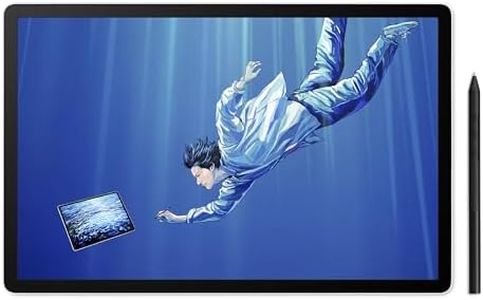
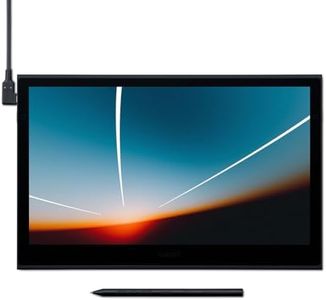
Wacom MovinkPad Pro 14, Android Mobile Drawing Tablet, 14" OLED No Computer Needed, Battery-Free Slim Pro Pen 3, 12GB RAM/256GB Storage, Anti-Glare Matte Screen, All-In-One Portable Digital Art Tablet

Rating
8.5
Screen Size
Resolution
Pressure Sensitivity

Most important from
182 reviews

Screen Size
Its portability is exceptional, fitting easily alongside a 14-inch laptop and allowing users to work comfortably by laying it flat like real paper or with a stand.
Resolution
The tablet's thin and robust design combined with a bright, matte screen delivers an elegant drawing experience that feels like working on paper but with vivid clarity.
Pressure Sensitivity
The pen stands out as the best users have encountered—slim, easy to hold, with customizable buttons and a natural, sensitive response for detailed artistry.
Connectivity
Setup is seamless and straightforward, with a minimal but sufficient package including a right-angle USB cord and pen, though some wish for wireless connectivity options.
Additional Features
At this price point, the lack of included accessories like a dedicated pen holder or stand feels like a missed opportunity, as users often need to source these separately.

The Wacom MovinkPad Pro 14 is a portable, all-in-one digital drawing tablet that operates independently without needing a computer, thanks to its built-in Android 15 system. Its 14-inch OLED screen offers a sharp 3K resolution (2880 x 1800 pixels) with vibrant colors and deep blacks, making it ideal for artists seeking clear, detailed visuals. The screen also features a special anti-glare matte finish that simulates the feel of drawing on paper and reduces unwanted reflections.

With 8,192 levels of pressure sensitivity, the included battery-free pen delivers a very natural response to strokes, providing fine control for detailed artwork. The pen's slim design and included replacement nibs add convenience for extended creative sessions. Powered by a fast Snapdragon 8s Gen 3 processor and equipped with 12GB of RAM, the tablet handles demanding art applications smoothly. Its 256GB of built-in storage, expandable via microSD, offers ample space for artwork and apps. Connectivity options such as Bluetooth, Wi-Fi, and USB-C facilitate easy connection to accessories and file transfers.

One consideration is its reliance on Android apps, which may not offer the same range or depth as desktop art software, potentially limiting advanced users. Weighing about 1.6 pounds, the tablet is fairly lightweight though not the lightest available. This device suits professional artists or serious hobbyists who desire a portable solution with a high-quality screen and excellent pen performance, especially those preferring an all-in-one setup without a separate computer.

Rating
8.5
Screen Size
Resolution
Pressure Sensitivity

Most important from
182 reviews

Screen Size
Its portability is exceptional, fitting easily alongside a 14-inch laptop and allowing users to work comfortably by laying it flat like real paper or with a stand.
Resolution
The tablet's thin and robust design combined with a bright, matte screen delivers an elegant drawing experience that feels like working on paper but with vivid clarity.
Pressure Sensitivity
The pen stands out as the best users have encountered—slim, easy to hold, with customizable buttons and a natural, sensitive response for detailed artistry.
Connectivity
Setup is seamless and straightforward, with a minimal but sufficient package including a right-angle USB cord and pen, though some wish for wireless connectivity options.
Additional Features
At this price point, the lack of included accessories like a dedicated pen holder or stand feels like a missed opportunity, as users often need to source these separately.

Buying Guide for the Best Digital Drawing Tablet

Choosing the right digital drawing tablet can significantly enhance your creative process, whether you're a professional artist, a student, or a hobbyist. The key is to understand the various specifications and how they align with your needs and preferences. By focusing on the right features, you can find a tablet that offers the best balance of performance, usability, and value for your specific use case.
Screen SizeScreen size refers to the diagonal measurement of the tablet's display area. This is important because it affects how much space you have to work on your digital canvas. Smaller screens (under 10 inches) are more portable and easier to handle, making them ideal for on-the-go use or for beginners. Medium screens (10-16 inches) offer a good balance between portability and workspace, suitable for most artists. Larger screens (over 16 inches) provide ample space for detailed work and are preferred by professionals who need a large canvas for intricate designs. Choose a screen size that matches your workspace and how you plan to use the tablet.
ResolutionResolution is the number of pixels displayed on the screen, typically measured in lines per inch (LPI) or pixels per inch (PPI). Higher resolution means more detail and clarity in your drawings. For casual use or beginners, a lower resolution (around 2000 LPI) may suffice. Intermediate users might prefer a mid-range resolution (3000-4000 LPI) for better detail. Professionals and those working on high-resolution projects should look for tablets with the highest resolution available (over 5000 LPI) to ensure precision and clarity in their work. Consider the level of detail you need in your artwork when choosing the resolution.
Pressure SensitivityPressure sensitivity refers to how many levels of pressure the tablet can detect from the stylus. This is crucial for creating varied line thickness and opacity in your drawings. Entry-level tablets may offer around 1024 levels of pressure sensitivity, which is sufficient for basic drawing and note-taking. Mid-range tablets typically offer 2048 to 4096 levels, providing more control and nuance for intermediate artists. High-end tablets can have 8192 levels or more, allowing for the most precise and detailed work, ideal for professional artists. Choose a pressure sensitivity level that matches your drawing style and the complexity of your projects.
Pen TypeThe type of pen or stylus that comes with the tablet can affect your drawing experience. Some pens are battery-free and use electromagnetic resonance (EMR) technology, which makes them lighter and more comfortable for long sessions. Others may require batteries or charging, which can add weight but might offer additional features like customizable buttons. Consider whether you prefer a lighter, maintenance-free pen or one with extra functionality. Your choice should depend on how you plan to use the pen and what features are most important to you.
ConnectivityConnectivity options determine how the tablet connects to your computer or other devices. Most tablets use USB connections, which are reliable and widely compatible. Some newer models offer wireless connectivity via Bluetooth, providing more flexibility and reducing cable clutter. If you need to move around frequently or prefer a cleaner workspace, a wireless option might be more suitable. However, if you prioritize a stable and consistent connection, a wired option could be better. Consider your working environment and how you plan to use the tablet when choosing the connectivity type.
Additional FeaturesAdditional features can enhance your drawing experience and productivity. These might include customizable shortcut buttons, multi-touch gestures, tilt recognition, and included software packages. Shortcut buttons can speed up your workflow by providing quick access to frequently used functions. Multi-touch gestures allow for intuitive navigation and zooming. Tilt recognition enables more natural drawing angles and shading techniques. Included software can provide valuable tools and resources for your projects. Think about which additional features will benefit your workflow and artistic process the most when selecting a tablet.

FAQ