We Use CookiesWe use cookies to enhance the security, performance, functionality and for analytical and promotional activities. By continuing to browse this site you are agreeing to our privacy policy

10 Best Office Headsets 2026 in the United States
How do we rank products for you?

Our technology thoroughly searches through the online shopping world, reviewing hundreds of sites. We then process and analyze this information, updating in real-time to bring you the latest top-rated products. This way, you always get the best and most current options available.

headphones-stars

Our Top Picks

#1

Winner

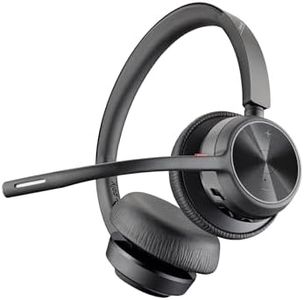
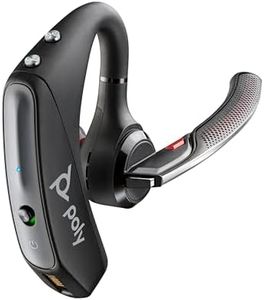
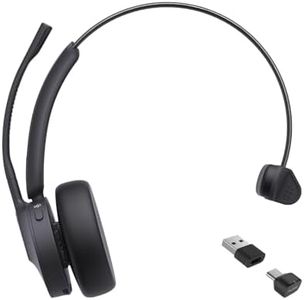
Poly - Voyager 4320 UC Wireless Headset + Charge Stand (Plantronics) - Headphones with Boom Mic - Connect to PC/Mac via USB-A Bluetooth Adapter, Cell Phone via Bluetooth - Works with Teams, Zoom &More

Rating
10.0
Chosen by1,439
Comfort and Fit
Sound Quality
Microphone Quality

Most important from
337 reviews

Comfort and Fit
The headset is comfortable and lightweight enough for 9 to 11 hours of continuous daily use, making it ideal for long workdays.
Sound Quality
Sound quality is crisp and clear, with noise cancellation effectively blocking background distractions for professional call clarity.
Microphone Quality
The flexible microphone boom holds its shape well, enhancing usability without compromising comfort.
Connectivity
Switching seamlessly between laptop and phone during calls provides excellent flexibility and convenience in hybrid work setups.
Battery Life
Battery life easily lasts all day, and charging via USB-C or the included dock is straightforward and reliable.
Compatibility
Compatibility with Microsoft Teams and Zoom is smooth, though activating mute directly from the headset can require the Bluetooth adapter for full functionality.

The Poly Voyager 4320 UC Wireless Headset is a solid choice for office and hybrid workers who need reliable communication gear. It offers good comfort with a lightweight design and padded headband, making it suitable for long hours of wear. Sound quality is clear, and the dual noise-canceling microphones with Acoustic Fence technology do a good job blocking background noise, ensuring callers hear your voice clearly even in busy environments. Connectivity is versatile—you can easily connect via the included USB-A Bluetooth adapter for stable PC/Mac use or directly with mobile devices using Bluetooth 5.2, giving you freedom of movement up to 50 meters away. Battery life is strong, providing up to 24 hours of talk time, which means less frequent charging during a busy workday.

The headset also supports wired use via USB cable if you prefer or need a backup. Compatibility with popular platforms like Microsoft Teams and Zoom is smooth, making it practical for various work setups. While the build feels durable enough for daily use, the headset is on the lighter side, so it may not feel as rugged as some heavier-duty models. Some users might prefer a bit more padding or a different fit style, but it balances comfort and functionality well. If you're looking for an affordable, easy-to-use office headset that handles calls crisply and cuts down on distractions, the Voyager 4320 is worth considering.

Rating
10.0
Chosen by1,439
Comfort and Fit
Sound Quality
Microphone Quality

Most important from
337 reviews

Comfort and Fit
The headset is comfortable and lightweight enough for 9 to 11 hours of continuous daily use, making it ideal for long workdays.
Sound Quality
Sound quality is crisp and clear, with noise cancellation effectively blocking background distractions for professional call clarity.
Microphone Quality
The flexible microphone boom holds its shape well, enhancing usability without compromising comfort.
Connectivity
Switching seamlessly between laptop and phone during calls provides excellent flexibility and convenience in hybrid work setups.
Battery Life
Battery life easily lasts all day, and charging via USB-C or the included dock is straightforward and reliable.
Compatibility
Compatibility with Microsoft Teams and Zoom is smooth, though activating mute directly from the headset can require the Bluetooth adapter for full functionality.
#2

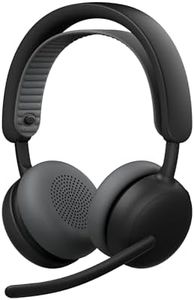
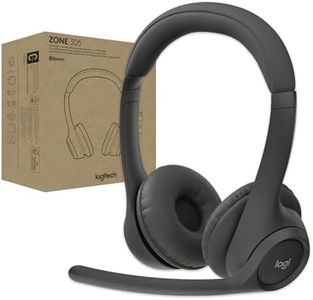
Logitech Zone Wireless 2 ES - Noise-Canceling Wireless Headset with Adaptive Hybrid ANC, Bluetooth - Black

Rating
9.7
Comfort and Fit
Sound Quality
Microphone Quality

Most important from
35 reviews

Comfort and Fit
Comfort is generally good, with a well-designed headband and snug fit, though extended wear might take some getting used to.
Sound Quality
The headset delivers clear, balanced sound quality that enhances both conference calls and music listening.
Microphone Quality
The boom microphone mutes and unmutes conveniently by flipping it up or down, enhancing call usability.
Connectivity
Bluetooth connectivity without a USB dongle makes setup effortless and works seamlessly in office environments.
Durability
Build quality feels lightweight and plastic-based, which may lack the ruggedness expected for the price point.
Compatibility
Customization through the Logi Tune software is robust on laptops, though mobile app compatibility can be limited.

The Logitech Zone Wireless 2 is a solid choice for office use, especially if you need to focus in noisy environments. Its adaptive hybrid noise cancellation adjusts automatically, helping block out distractions whether you're working at home or in a busy office. The sound quality is good, with custom 40mm drivers delivering clear audio and deep bass, making calls and music sound balanced. The dual noise-canceling microphones combined with AI technology do a great job filtering background noise, so your voice comes through clearly during calls.

Comfort is a strong point here—the headset uses a gaming-inspired strap design that spreads weight evenly, so it feels light even during long meetings or listening sessions. Controls are easy to find and use, thanks to distinct button shapes. You can connect two Bluetooth devices at once, which is convenient if you switch between phone and computer. Battery life is impressive, offering up to 20 hours of talk time or 25 hours of listening with ANC on, so you won’t have to charge it frequently. Durability is enhanced by replaceable earpads and headband, letting you keep the headset fresh without needing tools.

It’s compatible with a range of devices and customizable via the Logi Tune app to adjust sound and ANC settings to your liking. Being an on-ear design, some users might find it less isolating or comfortable compared to over-ear models, especially if you wear glasses. Also, it’s made mostly of plastic, so while it’s lightweight, it might not feel as rugged as some metal-built options. For those seeking a dependable, comfortable wireless office headset with solid noise cancellation and clear mic performance, this Logitech model fits well without being overly complicated.

Rating
9.7
Comfort and Fit
Sound Quality
Microphone Quality

Most important from
35 reviews

Comfort and Fit
Comfort is generally good, with a well-designed headband and snug fit, though extended wear might take some getting used to.
Sound Quality
The headset delivers clear, balanced sound quality that enhances both conference calls and music listening.
Microphone Quality
The boom microphone mutes and unmutes conveniently by flipping it up or down, enhancing call usability.
Connectivity
Bluetooth connectivity without a USB dongle makes setup effortless and works seamlessly in office environments.
Durability
Build quality feels lightweight and plastic-based, which may lack the ruggedness expected for the price point.
Compatibility
Customization through the Logi Tune software is robust on laptops, though mobile app compatibility can be limited.
#3

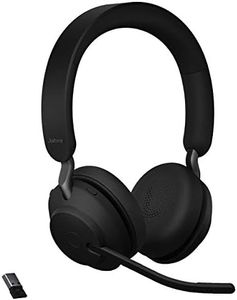
Jabra Evolve2 65 MS Wireless Headphones with Link380a, Stereo, Black – Wireless Bluetooth Headset for Calls and Music, 37 Hours of Battery Life, Passive Noise Cancelling Headphones

Rating
9.7
Comfort and Fit
Sound Quality
Microphone Quality

Most important from
1081 reviews

Comfort and Fit
The plush memory foam ear cushions provide a perfect fit, enabling hours of comfortable wear.
Sound Quality
The sound quality is exceptional, delivering crystal-clear audio with rich bass and well-balanced highs and lows.
Microphone Quality
The built-in microphone effectively blocks out background noise, ensuring crystal-clear voice transmission during calls.
Connectivity
The Bluetooth 5.0 technology ensures a stable and reliable connection, free from annoying interruptions.
Battery Life
Battery life is impressive, offering up to 37 hours of talk time and up to 30 hours of music playback on a single charge.
Compatibility
The headset integrates seamlessly with various communication platforms, ensuring compatibility and smooth operation across different devices.

The Jabra Evolve2 65 MS Wireless Headphones are a solid choice for office use, especially if you prioritize comfort and sound quality. These on-ear headphones offer notable passive noise cancellation, thanks to the memory foam padding and angled design, making it easier to focus in noisy environments. The sound quality is impressive with 40mm speakers providing rich audio for both calls and music. Additionally, the three-microphone system helps reduce background noise during calls, which is beneficial for clear communication.

The battery life is another strong point, offering up to 37 hours on a single charge, and even a quick 15-minute charge can provide up to 8 hours of use. This is particularly useful for those with busy schedules or long meetings. Comfort-wise, the headphones are designed to be worn all day, featuring soft memory foam cushions for a natural fit. The build quality is durable yet lightweight, enhancing comfort.

Connectivity is seamless, with the headphones being optimized for Microsoft Teams and compatible with leading Unified Communications platforms, making setup straightforward. However, the on-ear design might not be ideal for everyone, as some users may find over-ear models more comfortable for extended use. While the passive noise cancellation is effective, it may not be as powerful as active noise cancellation found in some other models. The Jabra Evolve2 65 MS Wireless Headphones are a reliable and comfortable option for office professionals looking for high-quality sound, impressive battery life, and easy connectivity.

Rating
9.7
Comfort and Fit
Sound Quality
Microphone Quality

Most important from
1081 reviews

Comfort and Fit
The plush memory foam ear cushions provide a perfect fit, enabling hours of comfortable wear.
Sound Quality
The sound quality is exceptional, delivering crystal-clear audio with rich bass and well-balanced highs and lows.
Microphone Quality
The built-in microphone effectively blocks out background noise, ensuring crystal-clear voice transmission during calls.
Connectivity
The Bluetooth 5.0 technology ensures a stable and reliable connection, free from annoying interruptions.
Battery Life
Battery life is impressive, offering up to 37 hours of talk time and up to 30 hours of music playback on a single charge.
Compatibility
The headset integrates seamlessly with various communication platforms, ensuring compatibility and smooth operation across different devices.

Buying Guide for the Best Office Headsets

Choosing the right office headset can significantly enhance your productivity and comfort during work. Whether you are making calls, participating in virtual meetings, or listening to music while working, the right headset can make a big difference. Here are some key specifications to consider when selecting an office headset, along with explanations to help you make an informed decision.
Comfort and FitComfort and fit are crucial because you might be wearing the headset for extended periods. Look for headsets with adjustable headbands and cushioned ear cups. Over-ear headsets provide more comfort for long use, while on-ear headsets are lighter and more portable. If you wear glasses, ensure the headset does not press too hard on your ears. Try different styles to see which one feels best for you.
Sound QualitySound quality is important for clear communication and an enjoyable listening experience. Look for headsets with good frequency response and noise-canceling features. Headsets with a wide frequency range (20 Hz to 20 kHz) offer better sound quality. Noise-canceling headsets are ideal if you work in a noisy environment, as they help block out background noise. Choose a headset with sound quality that matches your needs, whether it's for calls, music, or both.
Microphone QualityA good microphone ensures that your voice is heard clearly during calls and meetings. Look for headsets with noise-canceling microphones that reduce background noise. Boom microphones, which extend towards your mouth, generally offer better voice clarity. If you need to move around while talking, consider a headset with a wireless microphone. Test the microphone quality if possible to ensure it meets your communication needs.
ConnectivityConnectivity options include wired and wireless headsets. Wired headsets typically connect via USB or 3.5mm jack and offer a stable connection without the need for charging. Wireless headsets use Bluetooth or DECT technology, providing more freedom to move around. Consider your work environment and mobility needs when choosing between wired and wireless. If you prefer wireless, check the battery life and range to ensure it meets your requirements.
Battery LifeFor wireless headsets, battery life is a key consideration. Longer battery life means you can use the headset for extended periods without needing to recharge. Look for headsets with at least 8-10 hours of battery life for a full day of use. Some headsets offer quick charging features, providing several hours of use with just a short charge. Choose a headset with battery life that aligns with your daily usage patterns.
DurabilityDurability is important, especially if you plan to use the headset frequently or in different environments. Look for headsets made with high-quality materials and robust construction. Features like reinforced cables and sturdy headbands can extend the lifespan of the headset. Consider the warranty and customer reviews to gauge the durability of the headset. Choose a headset that can withstand your daily wear and tear.
CompatibilityEnsure the headset is compatible with your devices, such as computers, smartphones, and office phones. Check for compatibility with your operating system (Windows, macOS, etc.) and any communication software you use (Zoom, Microsoft Teams, etc.). Some headsets offer universal compatibility, while others may require specific drivers or adapters. Choose a headset that seamlessly integrates with your existing setup.

FAQ