We Use CookiesWe use cookies to enhance the security, performance, functionality and for analytical and promotional activities. By continuing to browse this site you are agreeing to our privacy policy

10 Best Android TV Boxes 2026 in the United States
How do we rank products for you?

Our technology thoroughly searches through the online shopping world, reviewing hundreds of sites. We then process and analyze this information, updating in real-time to bring you the latest top-rated products. This way, you always get the best and most current options available.

headphones-stars

Our Top Picks

#1

Winner

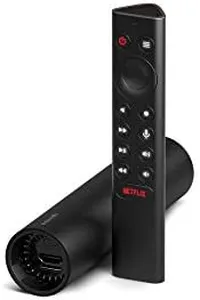
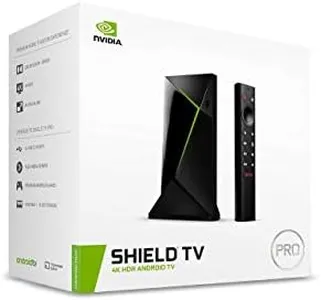
NVIDIA Shield Android TV Pro | 4K HDR Streaming Media Player High Performance, Dolby Vision, 3GB RAM, 2X USB, Works with Alexa, Model:945-12897-2500-101

Rating
10.0
Chosen by1,321
Processor (CPU)
Operating System (OS)
Connectivity

Most important from
13284 reviews

Processor (CPU)
The NVIDIA SHIELD delivers a stable and snappy performance, with all streaming apps working flawlessly.
Operating System (OS)
Security-wise, the SHIELD runs native straight Android, making it a trustworthy choice compared to other Android TV boxes.
Connectivity
Using wired Ethernet, the SHIELD performs seamlessly with other devices like a Marantz receiver and Samsung QLED TV.
User Interface and Remote Control
The SHIELD is highly reliable and offers a great user interface, making it a top choice for streaming and gaming.

The NVIDIA SHIELD Android TV Pro is a standout choice in the Android TV box category, particularly for those seeking a robust streaming and gaming experience. It excels with powerful features like 4K HDR video, AI-enhanced upscaling, and support for Dolby Vision-Atmos, making it ideal for home theater enthusiasts who crave high-quality visual and audio performance.

One of the product's greatest strengths is its versatility; it can handle a wide range of streaming services including Netflix, Amazon Video, and Disney+, all in stunning 4K resolution. The inclusion of the GeForce NOW cloud gaming service transforms the SHIELD into a capable gaming rig, allowing access to over 1000 titles, which is fantastic for gamers who want to enjoy PC-quality games without a high-end gaming PC.

The built-in Google Assistant and Alexa compatibility add convenience for users who prefer voice control to navigate their media. The two USB 3.0 ports allow for easy storage expansion, making it a practical choice for those who want to keep their media library accessible. However, the device comes with only 3 GB of RAM and 16 GB of storage, which might be limiting for heavy users who download lots of apps or games. Additionally, while the performance is impressive, the price point is relatively high compared to other streaming devices, which might not appeal to budget-conscious consumers. The user interface is generally user-friendly, but some less tech-savvy folks might find the setup process and navigating through the various features a bit daunting at first.

Rating
10.0
Chosen by1,321
Processor (CPU)
Operating System (OS)
Connectivity

Most important from
13284 reviews

Processor (CPU)
The NVIDIA SHIELD delivers a stable and snappy performance, with all streaming apps working flawlessly.
Operating System (OS)
Security-wise, the SHIELD runs native straight Android, making it a trustworthy choice compared to other Android TV boxes.
Connectivity
Using wired Ethernet, the SHIELD performs seamlessly with other devices like a Marantz receiver and Samsung QLED TV.
User Interface and Remote Control
The SHIELD is highly reliable and offers a great user interface, making it a top choice for streaming and gaming.
#2

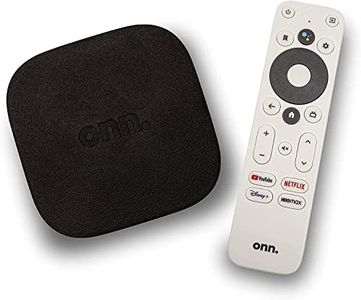
ONN Android TV 4K UHD Streaming Device with Voice Remote Control Google Assistant & High Speed HDMI Cable (100026240) Black

Rating
9.4
Processor (CPU)
Connectivity
Remote Control and User Interface

Most important from
1915 reviews

Processor (CPU)
The device delivers smooth performance with no noticeable lag and stable network connectivity.
Connectivity
The device delivers smooth performance with no noticeable lag and stable network connectivity.
Remote Control and User Interface
Voice remote with Google Assistant simplifies navigation and content search through natural speech.

The ONN Android TV 4K UHD Streaming Device is a solid choice if you want to upgrade your TV with smart features and enjoy ultra-clear 4K picture quality. It runs on Android TV, giving you access to many apps and services through the Google Play Store, and includes built-in Chromecast to easily stream content from your phone. The device comes with 2 GB of RAM, which provides smooth streaming for most uses.

Connecting is simple with the included HDMI cable, and Wi-Fi allows you to stream content without cables. The voice remote with Google Assistant makes it convenient to search and control shows just by speaking. Audio quality is good, offering clear sound and enhanced dialogue to improve your viewing experience.

This device is well-suited for users looking for an affordable, easy-to-use streaming box compatible with many TV brands. It works well primarily for watching movies, shows, and casual use rather than for power users or gamers.

Rating
9.4
Processor (CPU)
Connectivity
Remote Control and User Interface

Most important from
1915 reviews

Processor (CPU)
The device delivers smooth performance with no noticeable lag and stable network connectivity.
Connectivity
The device delivers smooth performance with no noticeable lag and stable network connectivity.
Remote Control and User Interface
Voice remote with Google Assistant simplifies navigation and content search through natural speech.
#3

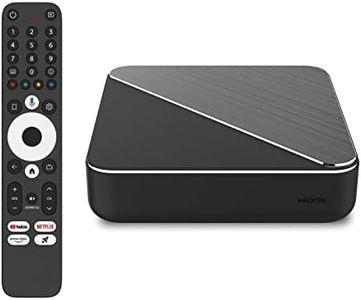
Dune HD Homatics Box R Plus Android TV Box, Media Player, Chromecast, Mini PC, Netflix in Dolby Vision & Atmos, 4GB/32GB, AV1, Wi-Fi 6, 1Gbit, ISO 4K DV P7 FEL MKV AFR, HDR10+, DTS

Rating
8.8
Video and Audio Output
Operating System (OS)
Remote Control and User Interface

Most important from
529 reviews

Video and Audio Output
The upgrade to Android 12 brings significant improvements, including DTS HD MA passthrough and flawless playback of every video and audio codec thrown at it, delivering glorious picture and sound quality that rivals top competitors.
Operating System (OS)
The upgrade to Android 12 brings significant improvements, including DTS HD MA passthrough and flawless playback of every video and audio codec thrown at it, delivering glorious picture and sound quality that rivals top competitors.
Remote Control and User Interface
The Dune Media software is clean, well-organized, and user-friendly, making navigation and media categorization a pleasure, especially for cinephiles who want both streaming and local file playback in one device.
Connectivity
Fast and stable connectivity is ensured by Wi-Fi 6 and gigabit Ethernet, supporting smooth 4K streaming without buffering or stuttering.
RAM
The device's 4GB RAM and 32GB storage comfortably handle media playback and app installations, though heavy local storage users might find the internal space somewhat limited.
Storage
The device's 4GB RAM and 32GB storage comfortably handle media playback and app installations, though heavy local storage users might find the internal space somewhat limited.

The Dune HD Box R 4K Plus is a solid choice for anyone looking for an Android TV box with good streaming capabilities and up-to-date software. It runs on Android TV 14, which means it supports the latest apps and offers a smooth user experience. With 4GB of RAM and 32GB of storage, it handles media playback and app installations comfortably, though storage might feel limited if you want to download many apps or local files.

The presence of Wi-Fi 6 and a 1 Gbit Ethernet port ensures fast and stable internet connections, which is great for streaming in 4K quality. Video output supports 4K resolution and AV1 codec, delivering sharp and efficient video playback. The inclusion of Bluetooth 5.0 and an optical S/PDIF port gives you flexible options for connecting sound systems. The remote control is a standout feature: it uses Bluetooth, so you don't have to point it directly at the box, and it includes voice search via a built-in microphone, plus a customizable app button for quick access.

Additionally, the Dune Control mobile app can replace the remote, allowing easier navigation from your phone. The built-in Chromecast lets you stream content from your phone or computer effortlessly. This device offers a nice blend of standard Android TV features with the unique Dune HD media center software. It is particularly well-suited for users who value smooth streaming, versatile connectivity, and advanced remote control features, though those needing extensive local storage or a very powerful processor might want to explore other options.

Rating
8.8
Video and Audio Output
Operating System (OS)
Remote Control and User Interface

Most important from
529 reviews

Video and Audio Output
The upgrade to Android 12 brings significant improvements, including DTS HD MA passthrough and flawless playback of every video and audio codec thrown at it, delivering glorious picture and sound quality that rivals top competitors.
Operating System (OS)
The upgrade to Android 12 brings significant improvements, including DTS HD MA passthrough and flawless playback of every video and audio codec thrown at it, delivering glorious picture and sound quality that rivals top competitors.
Remote Control and User Interface
The Dune Media software is clean, well-organized, and user-friendly, making navigation and media categorization a pleasure, especially for cinephiles who want both streaming and local file playback in one device.
Connectivity
Fast and stable connectivity is ensured by Wi-Fi 6 and gigabit Ethernet, supporting smooth 4K streaming without buffering or stuttering.
RAM
The device's 4GB RAM and 32GB storage comfortably handle media playback and app installations, though heavy local storage users might find the internal space somewhat limited.
Storage
The device's 4GB RAM and 32GB storage comfortably handle media playback and app installations, though heavy local storage users might find the internal space somewhat limited.

Buying Guide for the Best Android TV Boxes

Choosing the right Android TV box can significantly enhance your home entertainment experience. These devices allow you to stream content, play games, and even browse the internet on your TV. To make an informed decision, it's important to understand the key specifications and how they align with your needs. Here are the main specs to consider when selecting an Android TV box.
Processor (CPU)The processor, or CPU, is the brain of the Android TV box. It determines how fast and efficiently the device can perform tasks. A more powerful CPU will provide smoother performance, especially when streaming high-definition content or running multiple apps simultaneously. CPUs are often categorized by the number of cores they have: dual-core, quad-core, and octa-core. For basic streaming and casual use, a quad-core processor is usually sufficient. However, if you plan to use the device for gaming or running demanding applications, an octa-core processor would be a better choice.
RAMRAM (Random Access Memory) is crucial for multitasking and overall performance. It allows the device to handle multiple applications at once without slowing down. Android TV boxes typically come with 2GB, 4GB, or 8GB of RAM. For basic streaming and light usage, 2GB of RAM may be adequate. If you plan to use the device for more intensive tasks like gaming or running multiple apps, 4GB or more is recommended to ensure smooth performance.
StorageStorage capacity determines how much content and how many apps you can store on your Android TV box. Common storage options range from 8GB to 64GB. If you primarily stream content and don't download many apps, 8GB or 16GB should be sufficient. However, if you plan to download a lot of apps, games, or store media files locally, opting for 32GB or 64GB would be more appropriate. Additionally, check if the device supports expandable storage via microSD cards or USB drives for added flexibility.
Operating System (OS)The operating system is the software that runs on the Android TV box. Most devices come with a version of Android TV, which is optimized for use on televisions. It's important to choose a device with a recent version of the OS to ensure compatibility with the latest apps and features. Android TV versions are updated periodically, so look for a device that either comes with the latest version or can be easily updated. This will help you get the most out of your device and ensure it remains functional for a longer period.
ConnectivityConnectivity options determine how you can connect your Android TV box to other devices and the internet. Key connectivity features include Wi-Fi, Ethernet, Bluetooth, and USB ports. Wi-Fi is essential for wireless internet access, while an Ethernet port provides a more stable wired connection. Bluetooth allows you to connect peripherals like keyboards, mice, and game controllers. USB ports are useful for connecting external storage devices or other accessories. Consider your setup and how you plan to use the device to determine which connectivity options are most important for you.
Video and Audio OutputThe quality of video and audio output is crucial for an immersive viewing experience. Look for an Android TV box that supports at least 1080p resolution, though 4K support is preferable if you have a compatible TV. HDR (High Dynamic Range) support is also a plus, as it enhances the color and contrast of the video. For audio, check if the device supports surround sound formats like Dolby Digital or DTS. This is especially important if you have a home theater setup and want to enjoy high-quality sound.
Remote Control and User InterfaceThe remote control and user interface greatly affect the ease of use of your Android TV box. A well-designed remote with intuitive buttons and voice control can make navigating the device much simpler. Some remotes also come with dedicated buttons for popular streaming services. The user interface should be clean and easy to navigate, allowing you to quickly find and launch apps. Consider devices that offer a user-friendly experience, especially if you are not very tech-savvy.

FAQ