We Use CookiesWe use cookies to enhance the security, performance, functionality and for analytical and promotional activities. By continuing to browse this site you are agreeing to our privacy policy

10 Best Wireless Mouse 2026 in the United States
How do we rank products for you?

Our technology thoroughly searches through the online shopping world, reviewing hundreds of sites. We then process and analyze this information, updating in real-time to bring you the latest top-rated products. This way, you always get the best and most current options available.

headphones-stars

Our Top Picks

#1

Winner

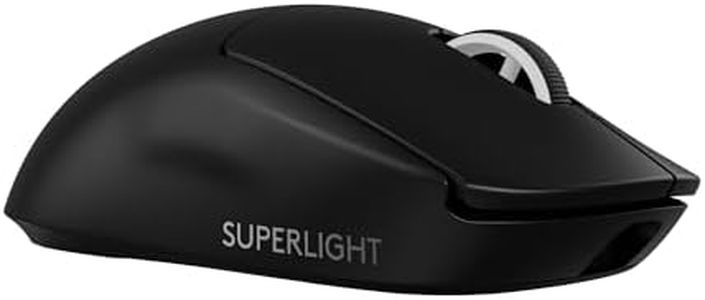
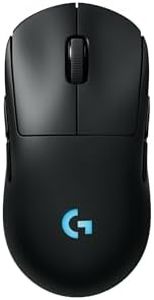
Logitech G PRO X Superlight 2 Wireless Gaming Mouse, 60g Pro-Grade with 5 Programmable Buttons, 44k DPI Sensor, 8kHz Report Rate, USB-C Charging for PC/Mac - Black

Rating
10.0
Chosen by1,432
DPI (Dots Per Inch)
Ergonomics
Battery Life

Most important from
2693 reviews

DPI (Dots Per Inch)
Its sensor delivers extreme precision with instant response, gliding smoothly on any mousepad surface.
Ergonomics
The mouse feels incredibly lightweight and ergonomic, making long gaming sessions comfortable and fatigue-free.
Battery Life
Battery life impresses by lasting several days on a single charge, supporting both gaming and everyday use without frequent recharging.
Connectivity
Wireless performance is flawless with zero lag or connectivity interruptions, essential for competitive gaming.
Buttons and Customization
Customization through onboard memory allows saving settings without the need to keep Logitech G Hub installed, simplifying user experience.
Weight
The mouse is literally lighter than the charging cable, emphasizing its superlight design for effortless handling.

The Logitech G PRO X SUPERLIGHT 2 is a top-tier wireless gaming mouse designed for serious gamers who want precision and speed. It features an extremely high DPI of up to 44,000, allowing it to detect even the smallest hand movements, which is perfect for fast-paced gaming. Its HERO 2 sensor provides smooth and accurate tracking without any lag or filtering, helping users stay precise in intense moments.

Weighing just 60 grams, this mouse is impressively light, reducing hand fatigue during long gaming sessions. Designed with input from professional esports players, it focuses on comfort and efficiency, though its minimalistic design might feel basic for those who prefer a more contoured or padded shape. The battery life is excellent, lasting up to 95 hours on a single charge. Charging is easy and fast via USB-C, and it supports POWERPLAY wireless charging for continuous use without cables. Connectivity is reliable with advanced wireless technology, ensuring a stable, lag-free connection.

With 5 programmable buttons, it offers sufficient customization for gaming commands without being overloaded, and the PTFE mouse feet enable smooth gliding on most surfaces, making it versatile for different mousepads. It is optimized for gaming with fast response and precision, but it may be on the pricier side for casual users or those who do not require high-end specifications. Additionally, users seeking more buttons for productivity or a different ergonomic shape might find better options elsewhere. This mouse is an excellent choice for gamers looking for a lightweight, highly precise wireless mouse with excellent battery life and solid customization, especially suited for competitive gaming.

Rating
10.0
Chosen by1,432
DPI (Dots Per Inch)
Ergonomics
Battery Life

Most important from
2693 reviews

DPI (Dots Per Inch)
Its sensor delivers extreme precision with instant response, gliding smoothly on any mousepad surface.
Ergonomics
The mouse feels incredibly lightweight and ergonomic, making long gaming sessions comfortable and fatigue-free.
Battery Life
Battery life impresses by lasting several days on a single charge, supporting both gaming and everyday use without frequent recharging.
Connectivity
Wireless performance is flawless with zero lag or connectivity interruptions, essential for competitive gaming.
Buttons and Customization
Customization through onboard memory allows saving settings without the need to keep Logitech G Hub installed, simplifying user experience.
Weight
The mouse is literally lighter than the charging cable, emphasizing its superlight design for effortless handling.
#2

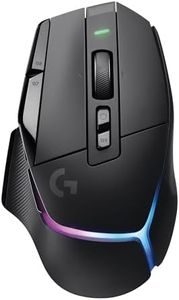
Logitech G502 X Plus Lightspeed Wireless RGB Gaming Mouse - Optical Mouse with LIGHTFORCE Hybrid switches, LIGHTSYNC RGB, Hero 25K Gaming Sensor, Compatible with PC - macOS/Windows - Black

Rating
9.7
DPI (Dots Per Inch)
Ergonomics
Battery Life

Most important from
2480 reviews

DPI (Dots Per Inch)
Customization through Logitech G Hub is extensive, allowing fine-tuning of DPI settings, button assignments, and lighting effects.
Ergonomics
The mouse strikes a perfect balance between comfort and performance with a wider body and a much improved scroll wheel that feels great in hand.
Battery Life
Battery life is solid, and the inclusion of USB-C charging means convenient power top-ups using common chargers.
Connectivity
Wireless performance is seamless with no noticeable latency, making it feel just like a wired mouse during intense gaming.
Buttons and Customization
The buttons are stiff but very responsive, reducing accidental clicks and offering satisfying feedback during use.

The Logitech G502 X Plus Wireless Gaming Mouse is designed for gamers who want high precision and customizable features in a wireless mouse. Its HERO 25K sensor offers extremely accurate tracking with no lag or smoothing, which is great for fast-paced gaming. The mouse supports LIGHTSPEED wireless technology, providing a reliable, low-latency connection suitable for serious gaming sessions. A standout feature is the redesigned dual-mode scroll wheel, allowing you to toggle between fast free-spin and precise ratcheting modes, plus side tilts for extra button functions—helpful for customization during gameplay.

Ergonomically, the mouse is shaped for comfort during long use and is relatively lightweight, which helps reduce hand fatigue. It also has RGB lighting with 8 customizable LEDs, adding a stylish look that can sync with your game. Another practical aspect is its compatibility with Logitech's POWERPLAY wireless charging system (sold separately), meaning it can stay charged without interrupting your play. The active play detection helps optimize power use. The mouse supports USB wireless connectivity, making it primarily intended for PC or Mac gamers using the included receiver.

At 11.3 ounces, the mouse might feel a bit heavier compared to ultra-light gaming mice, which some users may not prefer. Additionally, the advanced features and customizable buttons might require some time to get used to for beginners. Surface compatibility is good thanks to the optical sensor, although performance on glass or unusual surfaces is not specifically highlighted. The Logitech G502 X Plus serves as a strong choice for gamers seeking high precision, comfort, and customization in a wireless mouse, especially if RGB lighting and wireless charging convenience are priorities. It may be less suitable for users looking for the lightest mouse or those needing multi-device Bluetooth functionality.

Rating
9.7
DPI (Dots Per Inch)
Ergonomics
Battery Life

Most important from
2480 reviews

DPI (Dots Per Inch)
Customization through Logitech G Hub is extensive, allowing fine-tuning of DPI settings, button assignments, and lighting effects.
Ergonomics
The mouse strikes a perfect balance between comfort and performance with a wider body and a much improved scroll wheel that feels great in hand.
Battery Life
Battery life is solid, and the inclusion of USB-C charging means convenient power top-ups using common chargers.
Connectivity
Wireless performance is seamless with no noticeable latency, making it feel just like a wired mouse during intense gaming.
Buttons and Customization
The buttons are stiff but very responsive, reducing accidental clicks and offering satisfying feedback during use.
#3

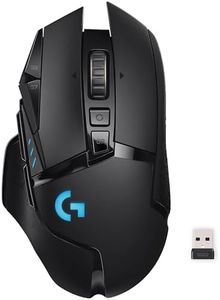
Logitech G502 Lightspeed Wireless Gaming Mouse with Hero 25K Sensor, PowerPlay Compatible, Tunable Weights and Lightsync RGB - Black

Rating
9.7
DPI (Dots Per Inch)
Battery Life
Connectivity

Most important from
13445 reviews

DPI (Dots Per Inch)
The mouse feels nice in hand and tracks perfectly, making it a reliable choice for both gaming and everyday use.
Battery Life
It continues to work flawlessly for years, with impressive battery life requiring charging only once every two weeks.
Connectivity
Some users wish for additional features like a USB-C charging port and Bluetooth connectivity for added convenience.
Buttons and Customization
For architecture and workflow efficiency, the extra buttons are a significant advantage, allowing for multiple shortcuts across different software.

The Logitech G502 Lightspeed Wireless Gaming Mouse stands out as a top option for gamers looking for a high-performance wireless mouse. One of its key strengths is the Hero 25K sensor, which offers incredible tracking accuracy with a DPI range from 100 to 25,600, making it suitable for various gaming styles, from fast-paced shooters to strategic games. The ultra-fast LIGHTSPEED wireless technology ensures minimal input lag, which is essential for competitive gaming.

Ergonomics play a significant role here; the mouse is designed for comfort during extended gaming sessions, and its adjustable weights allow for personalized handling. The G502's 11 customizable buttons provide ample options for assigning macros and shortcuts, enhancing gameplay efficiency. Plus, the hyper-fast scroll wheel is a nifty feature for quickly navigating long documents or web pages.

A notable convenience is the PowerPlay wireless charging compatibility, which can eliminate the concern of battery life during usage. It boasts an impressive battery life of up to 60 hours, making it reliable for long periods of use. The mouse is also lightweight, weighing only 7.1 ounces, which can enhance maneuverability. The PowerPlay charging system is sold separately, which might be an additional cost for users seeking the full wireless experience. While the extensive customization options are a strength, they can be overwhelming for those who prefer a simpler setup. The Logitech G502 Lightspeed is an excellent choice for serious gamers thanks to its advanced features, though it may not be suited for casual users who do not require such high-end specifications or customization options.

Rating
9.7
DPI (Dots Per Inch)
Battery Life
Connectivity

Most important from
13445 reviews

DPI (Dots Per Inch)
The mouse feels nice in hand and tracks perfectly, making it a reliable choice for both gaming and everyday use.
Battery Life
It continues to work flawlessly for years, with impressive battery life requiring charging only once every two weeks.
Connectivity
Some users wish for additional features like a USB-C charging port and Bluetooth connectivity for added convenience.
Buttons and Customization
For architecture and workflow efficiency, the extra buttons are a significant advantage, allowing for multiple shortcuts across different software.

Buying Guide for the Best Wireless Mouse

Choosing the right wireless mouse can significantly enhance your computing experience, whether you're working, gaming, or just browsing the web. The key is to understand the various specifications and how they align with your specific needs. Here are the main factors to consider when selecting a wireless mouse.
DPI (Dots Per Inch)DPI measures the sensitivity of the mouse. A higher DPI means the cursor will move further on the screen for each inch the mouse is moved. This is important for tasks that require precision, such as graphic design or gaming. For general use, a DPI between 800-1600 is usually sufficient. For gaming or high-resolution tasks, you might prefer a mouse with a DPI of 2000 or higher. Choose a DPI setting that matches your activity level and precision needs.
ErgonomicsErgonomics refers to how comfortable the mouse is to use over extended periods. This is crucial to prevent strain or injury. Mice come in various shapes and sizes, so it's important to find one that fits your hand well. If you have smaller hands, look for a compact mouse. For larger hands, a full-sized mouse might be more comfortable. Consider whether you need a mouse designed for right-handed or left-handed use, or an ambidextrous model.
Battery LifeBattery life indicates how long the mouse can operate before needing a recharge or battery replacement. This is important for convenience and uninterrupted use. Some mice use rechargeable batteries, while others use disposable ones. A mouse with a battery life of several months is ideal for general use. For heavy users, a rechargeable mouse with a quick charge feature might be more suitable. Consider your usage patterns to determine the best option.
ConnectivityConnectivity refers to how the mouse connects to your computer. Most wireless mice use either a USB receiver or Bluetooth. USB receivers generally offer a more stable connection and are easier to set up, but they occupy a USB port. Bluetooth mice free up USB ports and are compatible with more devices, but they may have a slightly higher latency. Choose based on your device compatibility and whether you need to conserve USB ports.
Buttons and CustomizationThe number and type of buttons on a mouse can affect its functionality. Additional buttons can be programmed for specific tasks, which is useful for gaming or productivity. A standard mouse has two buttons and a scroll wheel, but some models offer extra buttons on the side or top. If you need shortcuts for specific applications or games, look for a mouse with customizable buttons. For general use, a standard button configuration is usually sufficient.
WeightThe weight of the mouse can affect how it feels and performs. Lighter mice are easier to move quickly, which can be beneficial for gaming or tasks that require rapid movements. Heavier mice can provide more control and precision. Some mice offer adjustable weights, allowing you to customize the feel. Consider what feels most comfortable for you and the type of tasks you'll be performing.
Surface CompatibilitySurface compatibility refers to how well the mouse works on different surfaces. Some mice are designed to work on a variety of surfaces, including glass, while others may require a mouse pad. This is important if you plan to use the mouse on different types of surfaces. If you need versatility, look for a mouse with advanced tracking technology. For use on a consistent surface, a standard optical or laser mouse will suffice.

FAQ