We Use CookiesWe use cookies to enhance the security, performance, functionality and for analytical and promotional activities. By continuing to browse this site you are agreeing to our privacy policy

10 Best Wired Computer Mice 2026 in the United States
How do we rank products for you?

Our technology thoroughly searches through the online shopping world, reviewing hundreds of sites. We then process and analyze this information, updating in real-time to bring you the latest top-rated products. This way, you always get the best and most current options available.

headphones-stars

Our Top Picks

#1

Winner

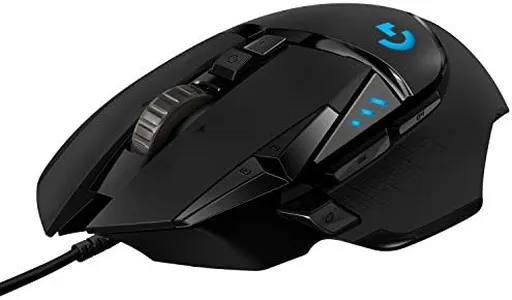
Logitech G502 Hero High Performance Wired Gaming Mouse, Hero 25K Sensor, 25,600 DPI, RGB, Adjustable Weights, 11 Programmable Buttons, On-Board Memory, PC/Mac - Black

Rating
10.0
Chosen by1,131
DPI (Dots Per Inch)
Ergonomics
Button Configuration

Most important from
57945 reviews

DPI (Dots Per Inch)
With 15 DPI settings and customizable weight options, this mouse offers unparalleled personalization.
Ergonomics
The ergonomic design ensures comfort even during extended use, making it perfect for long gaming sessions or work hours.
Button Configuration
The infinite scroll wheel button transforms regular scrolling into a smooth, fast experience, perfect for gaming and browsing.
Cable Length and Quality
The mouse is built to last, with a durable braided cable that withstands wear from pets.

The Logitech G502 HERO Wired Gaming Mouse is a high-performance option designed especially for gamers. It boasts a HERO 25K sensor which provides pinpoint accuracy with a very high DPI range—up to 25,600—making it highly sensitive and precise. This can be especially beneficial for gamers who need quick and accurate movements. It features 11 programmable buttons, allowing you to customize your gaming experience and save up to five profiles directly onto the mouse, which is great for switching between different games or tasks.

The adjustable weight system is a standout feature, letting you fine-tune the mouse's weight to fit your preference for better control and comfort during long gaming sessions. Additionally, the RGB lighting customization adds a personal touch, and it can sync with other Logitech G gear for a cohesive look. The mechanical switch button tensioning ensures crisp and responsive clicks, which is vital for in-game actions.

However, the mouse might be a bit on the heavier side for users who prefer lighter mice, even if the weights are removed. The cable is sturdy but may be a bit stiff for some users. While it's highly specialized for gaming, this mouse might be overkill for casual users or those who do not need extensive customization. The Logitech G502 HERO is an excellent choice for serious gamers who value precision, customization, and durability in their peripherals.

Rating
10.0
Chosen by1,131
DPI (Dots Per Inch)
Ergonomics
Button Configuration

Most important from
57945 reviews

DPI (Dots Per Inch)
With 15 DPI settings and customizable weight options, this mouse offers unparalleled personalization.
Ergonomics
The ergonomic design ensures comfort even during extended use, making it perfect for long gaming sessions or work hours.
Button Configuration
The infinite scroll wheel button transforms regular scrolling into a smooth, fast experience, perfect for gaming and browsing.
Cable Length and Quality
The mouse is built to last, with a durable braided cable that withstands wear from pets.
#2

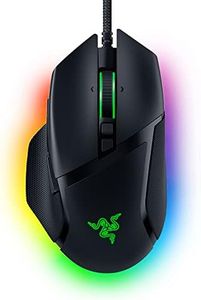
Razer Basilisk V3 Customizable Ergonomic Gaming Mouse: Fastest Gaming Mouse Switch - Chroma RGB Lighting - 26K DPI Optical Sensor - 11 Programmable Buttons - HyperScroll Tilt Wheel - Classic Black

Rating
9.1
DPI (Dots Per Inch)
Ergonomics
Button Configuration

Most important from
10011 reviews

DPI (Dots Per Inch)
The Focus+ 26K DPI optical sensor is ridiculously accurate, taking gaming to the next level.
Ergonomics
The Basilisk V3 is a joy to use with its ergonomic design, customizable buttons, and satisfying scroll wheel making it a productivity powerhouse.
Button Configuration
The 11 programmable buttons are super convenient for assigning macros and secondary functions.

The Razer Basilisk V3 Customizable Ergonomic Gaming Mouse is a top-tier choice for gamers seeking precision and customization. With a 26K DPI optical sensor, it offers incredibly high sensitivity and pixel-perfect accuracy, making it suitable for fast-paced gaming. The ergonomic design with a thumb rest enhances comfort during extended gaming sessions, which is highly beneficial for preventing hand strain.

The mouse features 11 programmable buttons, allowing users to assign macros and secondary functions, which is great for gamers who need quick access to various commands and actions. The HyperScroll Tilt Wheel adds versatility by enabling both free-spin and tactile modes, catering to different scrolling preferences. Furthermore, the Chroma RGB lighting with 11 customizable zones adds a visually appealing touch and can be synchronized with other Razer Chroma-enabled devices.

The optical mouse switches provide responsive and durable performance, rated for up to 70 million clicks, ensuring longevity. However, the wired connectivity might be less appealing to those who prefer the freedom of wireless mice. Additionally, at 3.56 ounces, the weight is moderate but may not suit users who prefer ultra-light mice for quicker movements. Despite these minor drawbacks, the Razer Basilisk V3 excels in delivering high performance, customization, and ergonomic comfort, making it an excellent choice for serious gamers.

Rating
9.1
DPI (Dots Per Inch)
Ergonomics
Button Configuration

Most important from
10011 reviews

DPI (Dots Per Inch)
The Focus+ 26K DPI optical sensor is ridiculously accurate, taking gaming to the next level.
Ergonomics
The Basilisk V3 is a joy to use with its ergonomic design, customizable buttons, and satisfying scroll wheel making it a productivity powerhouse.
Button Configuration
The 11 programmable buttons are super convenient for assigning macros and secondary functions.
#3

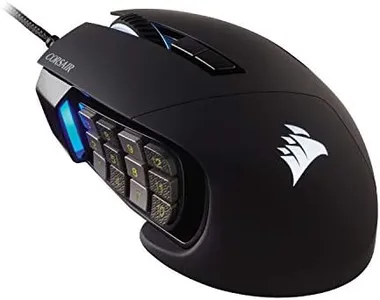
Corsair Scimitar RGB Elite Wired MOBA/MMO Gaming Mouse – 18,000 DPI – 17 Programmable Buttons – iCUE Compatible – PC, Mac, PS5, PS4, Xbox – Black

Rating
9.1
DPI (Dots Per Inch)
Ergonomics
Button Configuration

Most important from
3990 reviews

DPI (Dots Per Inch)
The mouse is extremely sensitive, requiring some adjustment to avoid accidental button presses.
Ergonomics
The Corsair SCIMITAR fits my hand better and the clicks feel amazing—both buttery and snappy.
Button Configuration
The adjustable sliding side buttons help find the sweet spot for my thumb, reducing fatigue.
Weight
The build quality is great and it has a nice, solid feel. Semi-heavy in the hand, which I enjoy.

The Corsair SCIMITAR RGB ELITE Gaming Mouse is a high-performing device designed specifically for MOBA and MMO gamers. It's equipped with a native 18,000 DPI optical sensor that offers highly accurate and customizable tracking, making it ideal for fast-paced gaming. One of its standout features is the 17 fully programmable buttons, which allow for extensive customization and the execution of complex macros.

The patented Key Slider Control System enhances comfort by enabling the repositioning of the 12 side buttons to fit your grip perfectly. Additionally, the mouse boasts a durable construction with 50 million click-rated Omron switches and a sturdy braided cable, which ensures it can withstand extensive use. Ergonomically, it’s designed to fit comfortably in the palm, with a contoured shape and a right-side finger rest for added support. Moreover, the dynamic four-zone RGB backlighting allows for nearly limitless customization of colors and effects to match your gaming setup.

On the downside, the mouse might be a bit heavy for some users, weighing in at 3.52 ounces, and its large size may not be suitable for those with smaller hands. The extensive button configuration might also be overwhelming for casual gamers or those not accustomed to such a high degree of customization. In summary, the Corsair SCIMITAR RGB ELITE is a robust choice for dedicated MMO and MOBA players seeking a highly customizable, durable, and comfortable gaming mouse.

Rating
9.1
DPI (Dots Per Inch)
Ergonomics
Button Configuration

Most important from
3990 reviews

DPI (Dots Per Inch)
The mouse is extremely sensitive, requiring some adjustment to avoid accidental button presses.
Ergonomics
The Corsair SCIMITAR fits my hand better and the clicks feel amazing—both buttery and snappy.
Button Configuration
The adjustable sliding side buttons help find the sweet spot for my thumb, reducing fatigue.
Weight
The build quality is great and it has a nice, solid feel. Semi-heavy in the hand, which I enjoy.

Buying Guide for the Best Wired Computer Mice

Choosing the right wired computer mouse can significantly enhance your computing experience, whether you're working, gaming, or just browsing the internet. The key is to understand the various specifications and how they align with your specific needs. Here are some important specs to consider when selecting a wired computer mouse.
DPI (Dots Per Inch)DPI measures the sensitivity of the mouse. A higher DPI means the cursor will move further on the screen for each inch the mouse is moved. This is important for tasks that require precision, such as graphic design or gaming. For general use, a DPI of 800-1600 is usually sufficient. For gaming or high-resolution displays, you might prefer a DPI of 2000 or higher. Choose a mouse with adjustable DPI settings if you need versatility.
ErgonomicsErgonomics refers to how comfortable the mouse is to use over extended periods. This is crucial to prevent strain or injury, especially if you spend long hours on the computer. Mice come in various shapes and sizes, so it's important to choose one that fits your hand well. If possible, try out different models to see which one feels the most comfortable. Look for features like contoured shapes, thumb rests, and materials that provide a good grip.
Polling RateThe polling rate is how often the mouse reports its position to the computer, measured in Hertz (Hz). A higher polling rate means more frequent updates, which can result in smoother and more responsive cursor movements. For general use, a polling rate of 125Hz is usually adequate. Gamers or users requiring high precision might prefer a polling rate of 500Hz or 1000Hz. Choose based on how responsive you need the mouse to be.
Button ConfigurationThe number and arrangement of buttons on a mouse can affect its functionality. Standard mice have two buttons and a scroll wheel, but many models offer additional buttons that can be programmed for specific functions. This is particularly useful for gaming, productivity tasks, or software that benefits from shortcuts. Consider how many buttons you need and whether they are easily accessible and customizable.
Cable Length and QualityThe length and quality of the cable can impact the usability of a wired mouse. A longer cable provides more flexibility in positioning the mouse, which can be important if your computer setup requires it. Additionally, a well-built cable with good shielding can prevent tangling and ensure durability. Check the cable length to ensure it suits your workspace and look for features like braided cables for added durability.
Sensor TypeWired mice typically use either optical or laser sensors. Optical sensors are generally sufficient for most tasks and work well on non-reflective surfaces. Laser sensors, on the other hand, offer higher sensitivity and can work on a wider range of surfaces, including glass. If you need high precision or plan to use the mouse on various surfaces, a laser sensor might be the better choice. For everyday use, an optical sensor is usually adequate.
WeightThe weight of the mouse can affect how it feels and performs. Lighter mice are easier to move quickly and can reduce fatigue during extended use, which is beneficial for gaming or fast-paced tasks. Heavier mice can provide more control and stability, which might be preferred for tasks requiring precision. Some mice offer adjustable weights, allowing you to customize the feel. Choose a weight that feels comfortable and suits your usage style.

FAQ