We Use CookiesWe use cookies to enhance the security, performance, functionality and for analytical and promotional activities. By continuing to browse this site you are agreeing to our privacy policy

10 Best USB PTZ Cameras 2026 in the United States
How do we rank products for you?

Our technology thoroughly searches through the online shopping world, reviewing hundreds of sites. We then process and analyze this information, updating in real-time to bring you the latest top-rated products. This way, you always get the best and most current options available.

headphones-stars

Our Top Picks

#1

Winner

AVer CAM520 Pro2 Next Level Enterprise Video Conference Camera

Rating
10.0
Chosen by1,251
Resolution
Zoom Capability
Pan and Tilt Range

Most important from
14 reviews

Resolution
Delivers a crystal-clear picture that remains sharp even at maximum zoom.
Zoom Capability
Delivers a crystal-clear picture that remains sharp even at maximum zoom.
Pan and Tilt Range
The camera responds quickly to pan and zoom commands, ensuring smooth operation.
Connectivity
Functions seamlessly with MacBook Pro and browser-based software, making setup straightforward.
Control Options
Supports easy control via USB with programmable presets for quick camera positioning.

The AVer CAM520 Pro2 is designed for enterprise video conferencing and delivers clear Full HD 1080p video at a smooth 60 frames per second, which means the video will look sharp and fluid during meetings. It offers an impressive 18X zoom, combining 12X optical (which keeps the image clear) with 6X digital, allowing you to zoom in up to about 60 feet without losing much detail. The camera has a wide 84-degree field of view, making it suitable for capturing a large area like a conference room. Its pan and tilt functions let you move the camera remotely for better framing.

One strong point is the AI-powered smart framing, which helps keep people centered and focused on the screen, even applying virtual masks for video calls, and it works reliably up to 10 meters away. The camera also performs well in low-light conditions, which is helpful in less brightly lit rooms. Connectivity is flexible, with USB for easy plug-and-play use and Power over Ethernet Plus (PoE+), which simplifies cabling by combining power and data in one cable. It also supports integration with popular control systems like Crestron and Extron, allowing advanced users to manage the camera through existing setups.

On the downside, while the camera supports MP3 and AAC audio formats, details on built-in microphone quality aren't emphasized, so additional audio equipment might still be needed for best sound. The camera is relatively large and heavy (over 7 pounds), so it requires a sturdy setup. The CAM520 Pro2 suits businesses needing reliable, high-quality video with advanced zoom and smart features. It offers versatile control options and strong video performance but may require separate audio gear for optimal sound.

Rating
10.0
Chosen by1,251
Resolution
Zoom Capability
Pan and Tilt Range

Most important from
14 reviews

Resolution
Delivers a crystal-clear picture that remains sharp even at maximum zoom.
Zoom Capability
Delivers a crystal-clear picture that remains sharp even at maximum zoom.
Pan and Tilt Range
The camera responds quickly to pan and zoom commands, ensuring smooth operation.
Connectivity
Functions seamlessly with MacBook Pro and browser-based software, making setup straightforward.
Control Options
Supports easy control via USB with programmable presets for quick camera positioning.
#2

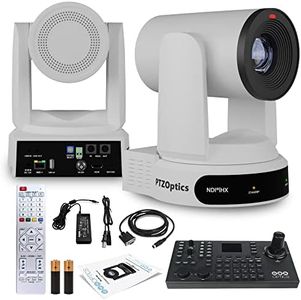
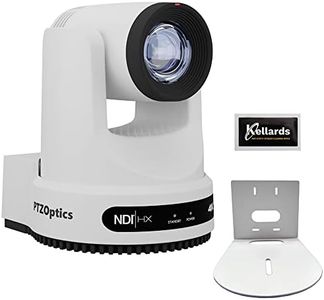
PTZOptics Move 4K SDI/HDMI/USB/IP PTZ Camera with 30x Optical Zoom (White) (PT30X-4K-WH-G3) SuperJoy PTZ Camera Joystick Controller

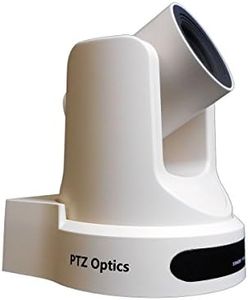
The PTZOptics Move 4K SDI/HDMI/USB/IP PTZ Camera with 30x Optical Zoom is a high-quality camera that offers excellent resolution and versatility. It can capture video in 4K at 60 frames per second, ensuring crisp and smooth footage, which is great for professional video production. The 30x optical zoom allows you to focus on distant subjects clearly, and it also has a 16x digital zoom for additional reach. This camera performs well in low-light conditions, making it suitable for various lighting environments. It features multiple connectivity options, including SDI, HDMI, USB, and IP output, which adds to its versatility.

The automatic tracking feature is particularly useful, as it can follow a specific person within the frame without the need for manual operation, which can save time and effort during live productions or events. Additionally, the PTZOptics SuperJoy Joystick Controller included in the bundle provides an intuitive way to control the camera's movements and settings, making it easier for users to manage the camera remotely.

However, the camera is relatively heavy at nearly 15 pounds, which might be cumbersome for some users to install and handle. The product dimensions also suggest it is not the most compact option available, potentially requiring more space for setup. Despite these drawbacks, the Move 4K's advanced features, such as PoE support, tally light, and comprehensive control options, make it a solid choice for those needing a robust PTZ camera for high-quality video production.

#3

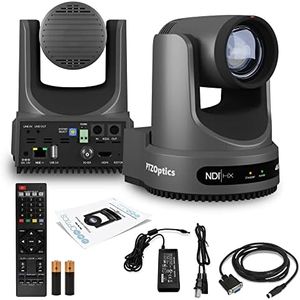
PTZOptics Move 4K 30x Auto-Tracking PTZ Camera with Built-in Tally Light, 3D Noise Reduction, and Advanced White Balance Modes (Gray)

Rating
8.8
Resolution
Zoom Capability
Pan and Tilt Range

Most important from
22 reviews

Resolution
Love this camera, we use it to live stream our church services. The zoom is great, and the picture is clear.
Zoom Capability
Love this camera, we use it to live stream our church services. The zoom is great, and the picture is clear.
Pan and Tilt Range
The camera's quiet PTZ motion and great image quality are impressive.
Connectivity
The camera's multiple connectivity options, including HDMI and audio input, make it versatile for various setups.

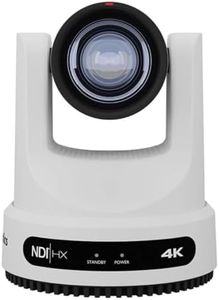
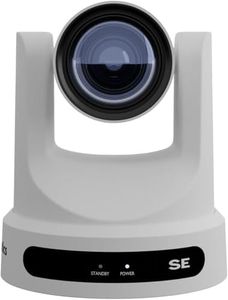
The PTZOptics Move 4K camera is an advanced USB-PTZ camera equipped with impressive features for both professional and novice users. It captures video in up to UHD 4K resolution at 60 frames per second, ensuring high-quality video output, making it suitable for various professional settings. The 30x optical zoom capability is ideal for capturing detailed close-ups even from a distance, supported by 16x digital zoom for additional flexibility. The camera also performs well in low-light conditions, ensuring clear footage in less-than-ideal lighting scenarios.

One standout feature is its versatile connectivity options, including SDI, HDMI, USB, and IP outputs, along with NDI|HX capabilities for seamless integration into different setups. The auto-tracking function is another highlight, allowing the camera to follow a subject without needing a dedicated operator, which can significantly streamline video production workflows. The control options are comprehensive, with RS-232, RS-485, and IP control support, catering to a variety of user preferences.

One minor drawback might be its weight (6.7 pounds) and somewhat bulky dimensions (5.6 x 6.6 x 6.5 inches), which could be cumbersome for some users. Additionally, while the camera's features are extensive, they might be overwhelming for complete beginners, despite the helpful Web UI tutorials provided. This camera is particularly well-suited for professional environments such as conference rooms, live events, and broadcasting, where high resolution, flexible connectivity, and reliable performance are critical.

Rating
8.8
Resolution
Zoom Capability
Pan and Tilt Range

Most important from
22 reviews

Resolution
Love this camera, we use it to live stream our church services. The zoom is great, and the picture is clear.
Zoom Capability
Love this camera, we use it to live stream our church services. The zoom is great, and the picture is clear.
Pan and Tilt Range
The camera's quiet PTZ motion and great image quality are impressive.
Connectivity
The camera's multiple connectivity options, including HDMI and audio input, make it versatile for various setups.

Buying Guide for the Best USB PTZ Cameras

When choosing a USB PTZ (Pan-Tilt-Zoom) camera, it's important to consider several key specifications to ensure you get the best fit for your needs. These cameras are commonly used for video conferencing, live streaming, and surveillance, so understanding the features and how they align with your requirements is crucial. Here are the main specs to look at and how to approach them.
ResolutionResolution refers to the clarity and detail of the video captured by the camera. Higher resolution means better image quality. Common resolutions include 720p, 1080p, and 4K. If you need high-quality video for professional presentations or detailed surveillance, opt for 1080p or 4K. For casual use or basic video conferencing, 720p might be sufficient.
Frame RateFrame rate indicates how many frames per second (fps) the camera can capture. Higher frame rates result in smoother video. Typical frame rates are 30fps and 60fps. For most applications, 30fps is adequate, but if you need very smooth motion for fast-moving subjects or high-quality streaming, 60fps is preferable.
Zoom CapabilityZoom capability determines how close you can get to the subject without losing image quality. Optical zoom is preferred over digital zoom as it maintains clarity. Cameras may offer varying levels of zoom, such as 10x, 20x, or more. Choose a camera with higher optical zoom if you need to capture distant subjects clearly, such as in large conference rooms or auditoriums.
Field of ViewField of view (FOV) is the extent of the observable area the camera can capture. A wider FOV allows more of the scene to be included in the frame. Typical FOV ranges from 70 degrees to 120 degrees. For small rooms or individual use, a narrower FOV is sufficient. For larger spaces or group settings, a wider FOV is beneficial.
Pan and Tilt RangePan and tilt range refers to the camera's ability to move horizontally (pan) and vertically (tilt). Greater ranges allow more flexibility in covering different areas. Common ranges are 180 degrees for pan and 90 degrees for tilt. If you need to cover a wide area or multiple angles, look for cameras with higher pan and tilt ranges.
ConnectivityConnectivity options determine how the camera interfaces with your devices. USB connectivity is standard, but some cameras may offer additional options like HDMI or Ethernet. Ensure the camera is compatible with your existing setup and consider additional connectivity for more flexibility in usage.
Low Light PerformanceLow light performance indicates how well the camera can capture video in dim conditions. Features like larger sensors and infrared capabilities improve low light performance. If you plan to use the camera in poorly lit environments, prioritize models with good low light performance.
Audio QualityAudio quality is crucial for applications like video conferencing. Some cameras come with built-in microphones, while others require external audio equipment. Look for cameras with high-quality microphones if audio is important for your use case, or ensure compatibility with external audio solutions.
Control OptionsControl options refer to how you can manage the camera's functions, such as pan, tilt, zoom, and presets. Options include remote controls, software interfaces, and integration with other systems. Choose a camera with control options that are convenient and compatible with your workflow.

FAQ