10 Best USB-C Dual Display Docking Stations 2026 in the United States

Related Products
Up to 33% off


Our technology thoroughly searches through the online shopping world, reviewing hundreds of sites. We then process and analyze this information, updating in real-time to bring you the latest top-rated products. This way, you always get the best and most current options available.

Our Top Picks
Winner
Plugable Thunderbolt 4 Dock with 100W Charging, Thunderbolt Certified, Laptop Docking Station Dual Monitor Single 8K or Dual 4K HDMI for Windows and Mac, 4X USB, Gigabit Ethernet (TBT4-UD5)
Most important from
460 reviews
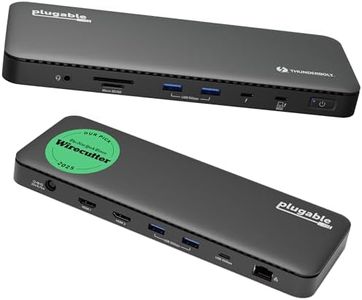
The Plugable Thunderbolt 4 Dock is a strong choice if you need a reliable docking station that supports dual 4K HDMI monitors at 60Hz or a single 8K display, perfect for users with high-resolution display needs. It's officially Thunderbolt certified and Intel Evo approved, ensuring fast 40Gbps data transfer and up to 100W power delivery, which can efficiently charge most laptops. Compatibility covers many Windows and Mac laptops with Thunderbolt 4 or USB4 ports, though dual displays on Mac require newer M-series chips or clamshell mode on base M3 models.
The dock offers a generous 13 ports including 2 HDMI, 1 Thunderbolt 4 downstream with 15W charging, multiple USB-A and USB-C ports, SD card readers, Ethernet, and audio jack, making it versatile for different peripherals. Its slim and sturdy design fits well on a desk without taking much space. Setting up is straightforward, but some users with older Thunderbolt 3 or USB-C ports will be limited to a single external display, which could be a drawback.
With a 2-year warranty providing peace of mind, if your laptop supports Thunderbolt 4 or USB4 and you want a comprehensive docking solution with dual 4K output, this dock delivers excellent performance and convenience. However, it is less suitable if you have older hardware or need more than two external screens.
Most important from
460 reviews
Anker Laptop Docking Station Dual Monitor, 8-in-1 USB C Hub, 4K Dual Monitor with 2 HDMI, 1 Gbps Ethernet Hub, 85W Power Delivery, SD Card Reader, for XPS and More (Charger not Included)
Most important from
6403 reviews
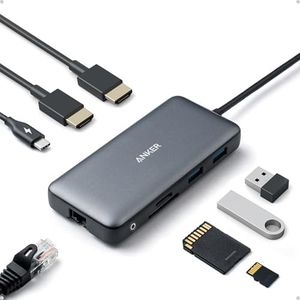
The Anker Laptop Docking Station is a versatile 8-in-1 USB-C hub designed for users needing multiple display outputs and robust connectivity options. With compatibility spanning MacBooks, Windows laptops, and Chromebooks, this docking station suits a wide range of users. It offers dual HDMI ports for connecting up to two 4K displays at 30Hz, ideal for extended screen real estate for productivity tasks. However, macOS users will see identical content on both external monitors, which may limit its utility for some.
The docking station provides 100W Power Delivery, ensuring your laptop remains charged, though you'll need to purchase a separate PD wall charger and USB-C cable to utilize this feature fully. The build quality is solid, with a sleek gray design that complements modern laptops. Ease of use is enhanced by the plug-and-play setup, making it accessible even for those not tech-savvy.
It lacks Linux compatibility, which may be a deal-breaker for some users. Additionally, while it has a comprehensive port selection including Ethernet and SD card readers, the two USB-A ports might not be sufficient for users with multiple peripheral devices. The Anker Laptop Docking Station is a powerful tool for multi-display setups and extensive connectivity needs, though its limitations with macOS and Linux compatibility should be considered.
Most important from
6403 reviews
Anker Prime Docking Station (DL7400), 14-Port Triple Display with DisplayLink, 140W Max, Smart Display, Triple 4K 60Hz, Cooling Fan, for macOS and Windows (The Latest DisplayLink Driver Required)
Most important from
352 reviews
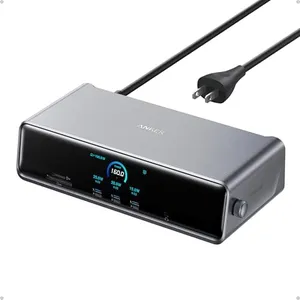
The Anker Prime Docking Station (DL7400) is a versatile hub designed for users needing to connect multiple displays and peripherals through USB-C. It supports up to three external monitors, including one with ultra-high 8K resolution, making it great for multitasking and detailed work on both Mac and Windows laptops. The docking station includes 14 ports, such as USB-C (with high-speed data and charging up to 140W), HDMI, DisplayPort, Ethernet, audio jack, and card readers, covering nearly all types of connections you might need at a desk. Its built-in cooling fan and smart display help monitor performance and keep the unit stable during heavy use.
Setup requires installing the latest DisplayLink driver, which might be a small hurdle for some users. While the front USB-C ports offer charging, they don’t support video output, so you’ll need to plan your monitor connections accordingly. The device is solidly built and compact enough to fit comfortably on a desk. However, despite its power, the dock is a bit heavier than simpler models and may be more than some users require if they don’t need triple display support.
This docking station is well suited for professionals or power users who want a single solution for multiple monitors and a wide range of peripherals, offering strong performance and flexibility with only minor setup considerations.