We Use CookiesWe use cookies to enhance the security, performance, functionality and for analytical and promotional activities. By continuing to browse this site you are agreeing to our privacy policy

10 Best Thermal Label Makers 2026 in the United States
How do we rank products for you?

Our technology thoroughly searches through the online shopping world, reviewing hundreds of sites. We then process and analyze this information, updating in real-time to bring you the latest top-rated products. This way, you always get the best and most current options available.

headphones-stars

Our Top Picks

#1

Winner

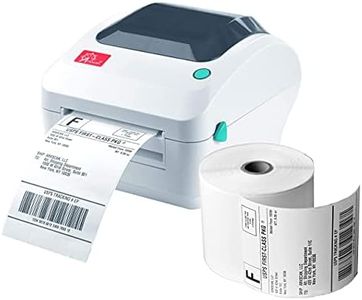
Rollo USB Shipping Label Printer - Commercial Grade 4x6 Thermal Label Printer for Shipping Packages - High Speed Custom Sticker Label Maker for Small Business - Supports Windows & Mac

Rating
10.0
Chosen by1,184
Print Resolution
Print Speed
Label Width

Most important from
16172 reviews

Print Resolution
The printer delivers crisp and clear barcodes and text, making labels easy to scan and professional in appearance.
Print Speed
Printing speed is impressive, producing about one label per second, significantly saving time on shipping tasks.
Label Width
Switching between different label sizes is quick and easy, enhancing versatility for various shipping and product labeling needs.
Connectivity Options
Its reliance on USB connection means no wireless option, which might limit placement flexibility in some setups.
Compatibility
Integration with major shipping platforms like ShipStation is seamless, supporting efficient workflow management.
Durability
The printer’s durability is proven with thousands of labels printed over months without issues, ideal for high-volume use.
Ease of Use
Setup is straightforward and takes less than half an hour, with quick adjustments to paper sizes using simple sliders.

The Rollo USB Shipping Label Printer is a solid choice for small businesses needing fast, reliable label printing. It prints 4x6 inch labels at a good speed—around one label per second—with a clear 203 DPI resolution that ensures barcodes and text are easy to scan and read. This printer uses direct thermal technology, so you won’t need to buy ink or toner, which saves money and hassle. It supports label widths from about 1.6 to 4.1 inches, making it versatile for shipping labels, product tags, or stickers.

Connection is simple via USB, compatible with both Windows and Mac computers, and it works smoothly with major shipping platforms and online marketplaces like Amazon and Shopify. The printer’s compact size and user-friendly setup make it easy to use even if you aren’t tech-savvy. However, it only offers wired USB connectivity—there’s no wireless option, which might limit placement flexibility. The print resolution is standard but not high-end, so it’s best suited for basic label needs rather than detailed graphics.

Durability appears good for a commercial-grade device, backed by positive reviews and a one-year warranty, but it’s designed for monochrome printing only. If you want a straightforward, efficient label maker for shipping and simple custom labels, the Rollo printer fits the bill well, especially if you value speed and cost savings over advanced features.

Rating
10.0
Chosen by1,184
Print Resolution
Print Speed
Label Width

Most important from
16172 reviews

Print Resolution
The printer delivers crisp and clear barcodes and text, making labels easy to scan and professional in appearance.
Print Speed
Printing speed is impressive, producing about one label per second, significantly saving time on shipping tasks.
Label Width
Switching between different label sizes is quick and easy, enhancing versatility for various shipping and product labeling needs.
Connectivity Options
Its reliance on USB connection means no wireless option, which might limit placement flexibility in some setups.
Compatibility
Integration with major shipping platforms like ShipStation is seamless, supporting efficient workflow management.
Durability
The printer’s durability is proven with thousands of labels printed over months without issues, ideal for high-volume use.
Ease of Use
Setup is straightforward and takes less than half an hour, with quick adjustments to paper sizes using simple sliders.
#2

JADENS Bluetooth Thermal Shipping Label Printer – Wireless 4x6 Shipping Label Printer, Compatible with Android, iPhone, Windows & Mac, Widely Used for Ebay, Amazon, Shopify, Etsy, USPS

Rating
10.0
Print Resolution
Print Speed
Connectivity Options

Most important from
8798 reviews

Print Resolution
Print quality is consistently sharp and clear, producing crisp barcodes and dark, legible text on standard 4x6 labels.
Print Speed
The printer handles labels quickly, speeding up busy shipping workflows with minimal lag or delay.
Connectivity Options
Bluetooth connectivity works seamlessly with both iPhone and Windows devices, enabling hassle-free wireless printing.
Compatibility
Compatibility with popular selling platforms like eBay, Shopify, and Etsy, as well as major carriers such as USPS, UPS, and FedEx, makes it highly versatile for online sellers.
Ease of Use
Setup is straightforward and intuitive, allowing users to print their first label within minutes without needing extra drivers.

The JADENS Bluetooth Thermal Shipping Label Printer is a solid choice for small business owners or online sellers who need reliable shipping labels. It offers a good print resolution of 203 DPI, which means labels will be clear enough for typical shipping and barcode needs. The printing speed of up to 72 labels per minute is quite decent, helping to speed up packing tasks. You can print labels ranging from about 1.57" to 4.1" wide, covering most standard shipping label sizes.

One of its strengths is the flexibility in connectivity: it supports wireless Bluetooth printing for Android, iPhone, and Windows 8 or later, plus USB connections for Windows, Mac, and Chrome OS. This makes it adaptable to many devices, though Mac users can only use USB, which is a limitation if you prefer wireless printing. The printer works with popular online selling platforms like eBay, Amazon, Etsy, and Shopify, which is convenient for sellers who use these sites regularly.

Since this is a thermal printer, it requires no ink or toner, making it clean and economical to operate. However, the printer weighs around 2 kilograms and measures about 9 inches wide, so it is not the smallest or most portable option. Setup is straightforward, with helpful instructions and videos included, plus a one-year warranty for peace of mind. This label printer balances ease of use and compatibility with high-quality thermal printing. It is best suited for small to medium-volume shipping needs where wireless printing is desired but USB backup is also appreciated. The main compromises are the heavier size and limited Bluetooth support for Mac users.

Rating
10.0
Print Resolution
Print Speed
Connectivity Options

Most important from
8798 reviews

Print Resolution
Print quality is consistently sharp and clear, producing crisp barcodes and dark, legible text on standard 4x6 labels.
Print Speed
The printer handles labels quickly, speeding up busy shipping workflows with minimal lag or delay.
Connectivity Options
Bluetooth connectivity works seamlessly with both iPhone and Windows devices, enabling hassle-free wireless printing.
Compatibility
Compatibility with popular selling platforms like eBay, Shopify, and Etsy, as well as major carriers such as USPS, UPS, and FedEx, makes it highly versatile for online sellers.
Ease of Use
Setup is straightforward and intuitive, allowing users to print their first label within minutes without needing extra drivers.
#3

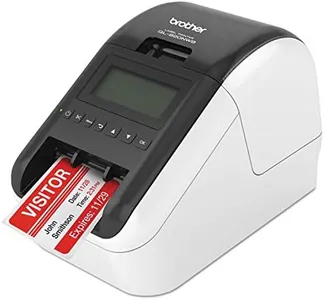
Brother QL-820NWB Professional, Ultra Flexible Monochrome Label Printer with Multiple Connectivity options

Rating
9.7
Print Resolution
Print Speed
Label Width

Most important from
626 reviews

Print Resolution
Prints labels with exceptional clarity and sharpness, handling both portrait and landscape orientations flawlessly on continuous rolls.
Print Speed
Delivers impressively fast printing speeds without sacrificing quality, ideal for labeling tools, bins, shelves, and network equipment in professional settings.
Label Width
Requires the use of Brother-branded label stock, but continuous roll options are available, supporting flexible label length needs.
Connectivity Options
Offers versatile connectivity options including Ethernet, Wi-Fi, Bluetooth, and USB, with the wired Ethernet port being a standout feature for stable network use.
Compatibility
The printer installs effortlessly on wired networks and integrates seamlessly with Mac systems, making setup straightforward even for less technical users.
Ease of Use
The printer installs effortlessly on wired networks and integrates seamlessly with Mac systems, making setup straightforward even for less technical users.

The Brother QL-820NWB is a solid choice if you need a versatile thermal label printer that works well in professional settings. It offers sharp print quality at 300 x 300 dpi, which ensures clear text and barcodes, making it suitable for address labels or product tags. One of its strongest points is speed—it can print up to 110 standard address labels per minute, which is quite fast and helps if you have many labels to print regularly. It handles label widths up to about 2.4 inches, fitting common label sizes well.

Connectivity is very flexible with Bluetooth, Ethernet, Wi-Fi, and USB options, so you can easily connect it to smartphones, PCs, or networks without hassle. Its compatibility with iOS, Android, and Windows devices means you can print from most modern platforms, adding to convenience. The built-in monochrome LCD screen makes it easy to operate the printer on its own without always relying on a computer. This model also supports printing in black and red using special tape, which can be useful for highlighting important information. The printer is lightweight and compact enough to fit on a desk without taking up much space. It comes with starter label rolls and software to get you started quickly.

The print speed is excellent for monochrome text, though color printing (limited to black/red labels) is much slower. Also, the maximum label length of 3 feet might be restricting for some specialized uses. The printer is marketed as durable and professional but may not be the best option for very heavy industrial use where ruggedness is critical. It lacks multifunction features like scanning or copying, focusing strictly on label printing. This printer is ideal for small to medium businesses or home office users who want fast, flexible, and easy-to-use label printing with multiple connectivity choices. If your priority is high-speed monochrome label printing with occasional color highlights and network options, this printer is a dependable pick.

Rating
9.7
Print Resolution
Print Speed
Label Width

Most important from
626 reviews

Print Resolution
Prints labels with exceptional clarity and sharpness, handling both portrait and landscape orientations flawlessly on continuous rolls.
Print Speed
Delivers impressively fast printing speeds without sacrificing quality, ideal for labeling tools, bins, shelves, and network equipment in professional settings.
Label Width
Requires the use of Brother-branded label stock, but continuous roll options are available, supporting flexible label length needs.
Connectivity Options
Offers versatile connectivity options including Ethernet, Wi-Fi, Bluetooth, and USB, with the wired Ethernet port being a standout feature for stable network use.
Compatibility
The printer installs effortlessly on wired networks and integrates seamlessly with Mac systems, making setup straightforward even for less technical users.
Ease of Use
The printer installs effortlessly on wired networks and integrates seamlessly with Mac systems, making setup straightforward even for less technical users.

Buying Guide for the Best Thermal Label Makers

Choosing the right thermal label maker can significantly impact your labeling tasks, whether for personal use, small business, or large-scale operations. Thermal label makers use heat to print labels, which means you don't need ink or toner. When selecting a thermal label maker, consider the key specifications that will determine its suitability for your needs. Understanding these specs will help you make an informed decision and ensure you get a product that meets your requirements efficiently.
Print ResolutionPrint resolution refers to the clarity and detail of the labels produced by the thermal label maker, measured in dots per inch (DPI). Higher DPI values mean sharper and more detailed prints. For basic labeling tasks, a resolution of 203 DPI is usually sufficient. If you need to print barcodes, logos, or small text, consider a higher resolution like 300 DPI or more. Your choice should depend on the level of detail required for your labels.
Print SpeedPrint speed indicates how quickly the label maker can produce labels, usually measured in millimeters per second (mm/s). Faster print speeds are beneficial for high-volume labeling tasks, reducing the time spent on printing. For occasional or low-volume use, a lower print speed may be adequate. Assess your labeling needs to determine if a higher print speed will improve your efficiency.
Label WidthLabel width refers to the maximum width of labels that the thermal label maker can handle. Common widths range from 2 inches to 4 inches. If you need to print larger labels for shipping or product identification, opt for a model that supports wider labels. For smaller labels, such as address labels or price tags, a narrower width will suffice. Consider the types of labels you need to print to choose the appropriate label width.
Connectivity OptionsConnectivity options determine how the thermal label maker connects to your computer or other devices. Common options include USB, Bluetooth, and Wi-Fi. USB connections are reliable for stationary setups, while Bluetooth and Wi-Fi offer more flexibility and convenience for mobile or shared use. Choose a connectivity option that matches your workflow and the devices you plan to use with the label maker.
CompatibilityCompatibility refers to the software and operating systems that the thermal label maker can work with. Ensure that the label maker is compatible with your computer's operating system (Windows, Mac, etc.) and any labeling software you plan to use. Compatibility is crucial for seamless integration into your existing setup and avoiding any technical issues.
DurabilityDurability is about how well the thermal label maker can withstand regular use and potential wear and tear. Look for models with robust construction and good reviews regarding longevity. If you need a label maker for heavy-duty or industrial use, prioritize durability to ensure it can handle frequent and demanding tasks. For occasional use, a less durable model may be sufficient.
Ease of UseEase of use encompasses the user interface, setup process, and overall user experience of the thermal label maker. A user-friendly model will have intuitive controls, straightforward setup, and clear instructions. If you're new to label makers or prefer simplicity, look for models that are praised for their ease of use. This will help you get started quickly and avoid frustration.

FAQ