We Use CookiesWe use cookies to enhance the security, performance, functionality and for analytical and promotional activities. By continuing to browse this site you are agreeing to our privacy policy

10 Best Small Office Colour Laser Printers 2026 in the United States

How do we rank products for you?

Our technology thoroughly searches through the online shopping world, reviewing hundreds of sites. We then process and analyze this information, updating in real-time to bring you the latest top-rated products. This way, you always get the best and most current options available.

headphones-stars

Our Top Picks

#1

Winner

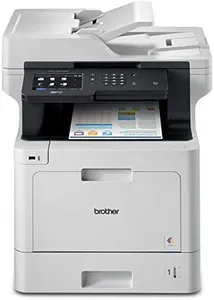
Brother MFC-L8900CDW Business Color Laser All-in-One Printer, Amazon Dash Replenishment Ready

Rating
10.0
Chosen by1,286
Print Quality
Monthly Duty Cycle
Connectivity Options

Most important from
1922 reviews

Print Quality
Print quality is excellent, with good color accuracy and sharp text, although heavy paper may require using the bypass feeder tray.
Monthly Duty Cycle
The Brother MFC-L8900CDW is a reliable workhorse, handling thousands of pages per month effortlessly.
Connectivity Options
Wireless and Gigabit Ethernet connectivity options are flexible and easy to set up, ensuring seamless network integration.
Cost of Consumables
High-yield toner cartridges help keep costs down and reduce the frequency of replacements.
Size and Design
Despite its large size and weight, the printer is manageable to set up alone if necessary.

The Brother MFC-L8900CDW is designed as a robust all-in-one color laser printer ideal for small offices. One of its key strengths is the fast print speed, delivering up to 33 pages per minute in both color and monochrome, which is great for businesses needing to print documents quickly. The 5-inch color touchscreen enhances user experience, allowing easy navigation and the creation of custom shortcuts, which can save valuable time in busy office settings.

Connectivity is another strong point. With built-in Gigabit Ethernet and wireless networking, along with mobile printing capabilities via NFC, this printer adapts well to different office setups. The 70-page capacity auto document feeder is excellent for scanning and copying, especially when dealing with double-sided documents, achieving speeds of up to 56 images per minute.

On the downside, the printer's weight at 63.1 pounds may present some challenges in terms of mobility within the office. Additionally, while the initial purchase price may be reasonable, it’s essential to consider the cost of consumables, such as toner cartridges, which can add up, especially if your office has high printing demands. The monthly duty cycle supports 30,000 pages, making it capable of handling moderate to high workloads without issue. However, users should assess whether this matches their actual printing needs to avoid over or under-utilization.

Rating
10.0
Chosen by1,286
Print Quality
Monthly Duty Cycle
Connectivity Options

Most important from
1922 reviews

Print Quality
Print quality is excellent, with good color accuracy and sharp text, although heavy paper may require using the bypass feeder tray.
Monthly Duty Cycle
The Brother MFC-L8900CDW is a reliable workhorse, handling thousands of pages per month effortlessly.
Connectivity Options
Wireless and Gigabit Ethernet connectivity options are flexible and easy to set up, ensuring seamless network integration.
Cost of Consumables
High-yield toner cartridges help keep costs down and reduce the frequency of replacements.
Size and Design
Despite its large size and weight, the printer is manageable to set up alone if necessary.
#2

HP Color LaserJet Pro MFP 4301fdw Wireless All-in-One Color Laser Printer, Scanner, Copier, Fax, Best-for-Office

Rating
9.1
Print Speed
Print Quality
Paper Handling

Most important from
608 reviews

Print Speed
Fast and flawless performance with perfect print quality, even after ten months of use.
Print Quality
Fast and flawless performance with perfect print quality, even after ten months of use.
Paper Handling
Repeated 'paper jam' errors and significant reliability issues after a year of use.
Cost of Consumables
High toner cost, but comparable to alternatives.

The HP Color LaserJet Pro MFP 4301fdw is a solid choice for small offices looking for a versatile all-in-one printer that can handle print, scan, copy, and fax functions. With a print speed of up to 35 pages per minute, it delivers quick output, making it suitable for busy work environments. The printer also boasts a monthly duty cycle that can support up to 10 users, which is ideal for small teams needing reliable performance.

In terms of print quality, this model stands out with sharp color details and a resolution of 600 x 600 DPI, ensuring professional-looking documents. It features automatic two-sided printing and an automatic document feeder, which adds to its efficiency when handling larger print jobs.

Connectivity options are a strong point, as it offers both USB and Ethernet ports along with intelligent Wi-Fi for wireless printing from mobile devices. This flexibility can be a big advantage for teams that work on various devices. Additionally, HP’s Wolf Pro Security enhances data protection, a crucial aspect for offices handling sensitive information.

However, there are a few drawbacks worth mentioning. Weighing in at 45 pounds, the printer is relatively heavy and may require a stable surface or dedicated space in your office. Also, while the cost of consumables is competitive, those looking for lower ongoing costs might want to consider other budget-friendly alternatives. The monthly duty cycle is decent, but for larger teams or heavier workloads, this printer may not be sufficient. Lastly, the maximum color print resolution of 607 x 600 DPI, while good, may not be the top-tier quality some high-end users seek.

The HP Color LaserJet Pro MFP 4301fdw is an excellent choice for small teams needing an efficient, high-quality color laser printer with solid connectivity and security features, but potential buyers should weigh its size and cost of consumables against their specific needs.

Rating
9.1
Print Speed
Print Quality
Paper Handling

Most important from
608 reviews

Print Speed
Fast and flawless performance with perfect print quality, even after ten months of use.
Print Quality
Fast and flawless performance with perfect print quality, even after ten months of use.
Paper Handling
Repeated 'paper jam' errors and significant reliability issues after a year of use.
Cost of Consumables
High toner cost, but comparable to alternatives.
#3

Brother MFC-L3780CDW Wireless Digital Color All-in-One Printer with Laser Quality Output, Single Pass Duplex Copy & Scan | Includes 2 Month Refresh Subscription Trial, Works with Alexa

Rating
8.8
Connectivity Options
Print Speed
Print Quality

Most important from
769 reviews

Connectivity Options
Setup is incredibly straightforward, with wireless connectivity that works seamlessly without complicated software installations.
Print Speed
The printer operates quickly and quietly, handling large documents without jams or delays that plague typical home office printers.
Print Quality
Print quality delivers bright, vivid colors suitable for professional documents, even if it’s not designed for photo-grade prints.
Size and Design
The build feels sturdy and reliable, reflecting a high standard of quality control and user-friendly design.

The Brother MFC-L3780CDW is a solid choice for small offices needing a reliable all-in-one color laser printer. It delivers fast printing at up to 31 pages per minute for both black-and-white and color documents, which helps keep up with busy workloads. The print quality is sharp and professional thanks to laser technology, supporting clear text and vibrant colors ideal for business documents. Its monthly duty cycle supports small to medium volume printing, making it suitable for typical office use without heavy overuse.

Connectivity options are flexible with wireless dual-band Wi-Fi, Ethernet, Wi-Fi Direct, and USB, allowing easy setup across laptops, smartphones, and tablets. Paper handling is practical with a 250-sheet input capacity and automatic duplex printing, saving time and paper. The design is fairly compact but weighs nearly 48 pounds, so it needs a stable spot in your office. Brother’s genuine toner cartridges come in multiple yield levels, including high and super high yield, and the Refresh EZ Print subscription adds convenience but does come with ongoing costs.

While the initial cost and toner expenses may be higher than basic inkjets, the efficiency and quality balance well for office needs. Some users might find the size and weight a bit bulky if space is tight, and the color scan resolution is on the lower side compared to print quality. For small businesses wanting dependable color laser output combined with scanning, copying, and faxing, this model offers a versatile and user-friendly solution.

Rating
8.8
Connectivity Options
Print Speed
Print Quality

Most important from
769 reviews

Connectivity Options
Setup is incredibly straightforward, with wireless connectivity that works seamlessly without complicated software installations.
Print Speed
The printer operates quickly and quietly, handling large documents without jams or delays that plague typical home office printers.
Print Quality
Print quality delivers bright, vivid colors suitable for professional documents, even if it’s not designed for photo-grade prints.
Size and Design
The build feels sturdy and reliable, reflecting a high standard of quality control and user-friendly design.

Buying Guide for the Best Small Office Colour Laser Printers

Choosing the right color laser printer for your small office can significantly impact your productivity and the quality of your printed materials. It's important to consider various specifications to ensure the printer meets your specific needs. Here are some key specs to consider and how to navigate them to find the best fit for your office.
Print SpeedPrint speed, measured in pages per minute (PPM), indicates how quickly a printer can produce documents. This is important for maintaining efficiency, especially in a busy office environment. Printers with speeds of 20-30 PPM are suitable for small offices with moderate printing needs, while those with speeds above 30 PPM are better for higher volume printing. Consider your office's typical print volume to determine the appropriate print speed.
Print QualityPrint quality is measured in dots per inch (DPI) and affects the clarity and detail of printed documents. Higher DPI values, such as 1200x1200, provide sharper and more detailed prints, which is important for professional documents and marketing materials. For general office use, a DPI of 600x600 is usually sufficient. Assess the type of documents you print most frequently to decide the necessary print quality.
Monthly Duty CycleThe monthly duty cycle is the maximum number of pages a printer can handle in a month without experiencing wear and tear. This is crucial for ensuring the printer's longevity and reliability. For small offices, a duty cycle of 20,000 to 50,000 pages is typically adequate. Estimate your office's monthly print volume to choose a printer with a suitable duty cycle.
Connectivity OptionsConnectivity options determine how you can connect the printer to your office network and devices. Common options include USB, Ethernet, and Wi-Fi. Wi-Fi connectivity allows for wireless printing from multiple devices, which is convenient for a small office. Ethernet provides a stable connection for networked printing, while USB is useful for direct connections. Consider your office's setup and preferred printing methods to select the right connectivity options.
Paper HandlingPaper handling refers to the printer's ability to manage different paper sizes and types, as well as its input and output capacity. A printer with multiple paper trays and a high input capacity is beneficial for offices that print a variety of documents. Look for features like automatic duplexing (double-sided printing) to save paper and time. Evaluate your office's typical printing tasks to determine the necessary paper handling capabilities.
Cost of ConsumablesThe cost of consumables, such as toner cartridges and drum units, can significantly impact the overall cost of owning a printer. It's important to consider the yield of these consumables, which is the number of pages they can print before needing replacement. High-yield cartridges may have a higher upfront cost but can be more economical in the long run. Research the cost and yield of consumables for the printers you are considering to find a cost-effective option.
Size and DesignThe size and design of the printer can affect its placement and usability in your office. Compact printers are ideal for small spaces, while larger models may offer more features but require more room. Consider the available space in your office and the printer's design to ensure it fits well and is easily accessible for all users.

FAQ