We Use CookiesWe use cookies to enhance the security, performance, functionality and for analytical and promotional activities. By continuing to browse this site you are agreeing to our privacy policy

10 Best Sheetfed Scanners 2026 in the United States
How do we rank products for you?

Our technology thoroughly searches through the online shopping world, reviewing hundreds of sites. We then process and analyze this information, updating in real-time to bring you the latest top-rated products. This way, you always get the best and most current options available.

headphones-stars

Our Top Picks

#1

Winner

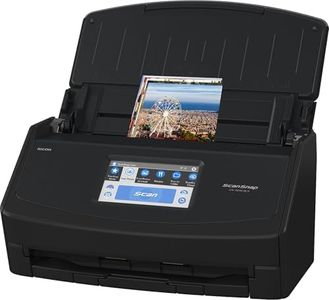
ScanSnap iX1600 Wireless or USB High-Speed Cloud Enabled Document, Photo & Receipt Scanner with Large Touchscreen and Auto Document Feeder for Mac or PC, 17 watts, Black

Rating
10.0
Chosen by1,257
Resolution
Scan Speed
Duplex Scanning

Most important from
3099 reviews

Resolution
Pictures scan better than the originals, even at maximum resolution, making it perfect for archiving photos.
Scan Speed
Scanning is impressively fast, with 50-page documents fully OCR'd and ready to open within seconds.
Duplex Scanning
The duplex function allows scanning both sides of the paper simultaneously, greatly enhancing efficiency.
Connectivity
Setup was a breeze, and the scanner works seamlessly over Wi-Fi without any additional configuration.
Software Compatibility
The ScanSnap Home software is substantially better, offering a clean interface that acts as a document manager and scanner configuration tool.

The ScanSnap iX1600 is a versatile sheetfed scanner designed to simplify document management for home and small business users. Its standout feature is the large color touchscreen, which allows for easy navigation and selection of up to 30 customizable scanning profiles. The scanner offers impressive scanning speed at 40 pages per minute (ppm) and supports duplex scanning, which means it can scan both sides of a document simultaneously. This makes it efficient for large volumes of paperwork.

The automatic document feeder (ADF) enhances its utility by accommodating various paper sizes up to 8.5"x14". With 600 dpi resolution, it ensures clear and high-quality scans, suitable for both documents and photos. Connectivity options include Wi-Fi and USB, providing flexibility in how and where you use the scanner. The wireless connectivity is particularly useful for connecting directly to mobile devices and cloud services without the need for a computer.

The ScanSnap Home software complements the hardware by offering comprehensive document management functionalities, making it easy to organize and edit scanned data. Weighing 7.5 pounds and with compact dimensions, the iX1600 is portable enough for space-constrained environments. However, the scanner is relatively power-hungry with a 17-watt consumption, which might be a consideration for energy-conscious users. Additionally, while the scanner is packed with features, it may come with a higher price tag relative to basic models. The ScanSnap iX1600 is ideal for those who need a reliable, high-performance scanner that offers both convenience and advanced functionality.

Rating
10.0
Chosen by1,257
Resolution
Scan Speed
Duplex Scanning

Most important from
3099 reviews

Resolution
Pictures scan better than the originals, even at maximum resolution, making it perfect for archiving photos.
Scan Speed
Scanning is impressively fast, with 50-page documents fully OCR'd and ready to open within seconds.
Duplex Scanning
The duplex function allows scanning both sides of the paper simultaneously, greatly enhancing efficiency.
Connectivity
Setup was a breeze, and the scanner works seamlessly over Wi-Fi without any additional configuration.
Software Compatibility
The ScanSnap Home software is substantially better, offering a clean interface that acts as a document manager and scanner configuration tool.
#2

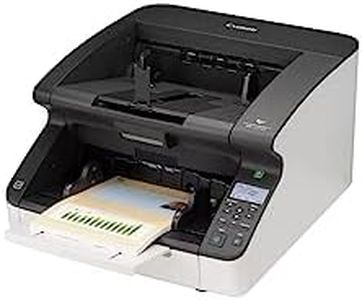
Canon imageFORMULA DR-G2110 Sheetfed Scanner - 600 dpi Optical

The Canon imageFORMULA DR-G2110 Sheetfed Scanner is a high-resolution scanner with 600 dpi optical resolution, ensuring crisp and clear scans. It supports 24-bit color depth, which helps in achieving good color accuracy. With a significant standard sheet capacity of 500 pages, it is well-suited for large volume scanning tasks.

Its weight of 56.5 pounds makes it less portable and more suitable for stationary use in an office environment. Connectivity is straightforward with USB technology, but there are no mentions of wireless options which could limit flexibility in some setups. The scanner supports duplex (double-sided) scanning, which can save time and effort.

While the scanner is compatible with thick paper and business cards, ensuring versatility, the lack of detailed information on software compatibility means you should verify if it works with your preferred applications. In summary, this scanner is ideal for businesses needing high-volume, high-quality scanning, though its heavy weight and potential limitations in connectivity and software compatibility are points to consider.

#3

ScanSnap iX1400 High-Speed Simple One-Touch Button Color Document, Photo & Receipt Scanner with Auto Document Feeder for Mac or PC, Black

Rating
8.2
Resolution
Scan Speed
Duplex Scanning

Most important from
967 reviews

Resolution
Scan quality is consistently clear and professional, suitable for digitizing important documents, receipts, business cards, and photos.
Scan Speed
The scanner delivers impressive speed, effortlessly processing double-sided documents at around 40 pages per minute, making large batch scanning remarkably efficient.
Duplex Scanning
The scanner delivers impressive speed, effortlessly processing double-sided documents at around 40 pages per minute, making large batch scanning remarkably efficient.
Connectivity
The scanner is highly reliable and stable, with USB 3.0 connectivity ensuring a consistent connection and performance.
Software Compatibility
The bundled software simplifies document management and editing, although the interface can feel a bit complex and lacks some advanced features like direct 'Save As' dialogs.
Size and Portability
Its compact footprint fits neatly on a desk, folding to occupy minimal space while remaining powerful enough for home or small office use.

The ScanSnap iX1400 is a user-friendly sheetfed scanner that simplifies scanning with one-touch operation, making it ideal for home offices or small businesses needing quick and easy digitization of various documents like receipts, business cards, and photos. It offers a solid resolution of 600 dpi, ensuring clear images for most everyday needs. Its ability to handle different sizes and types of media suggests good versatility.

The scanner connects via USB, which provides stable performance but limits wireless convenience. Its bundled ScanSnap Home software is a big plus, helping you organize and edit scanned files effortlessly, which is great if you want to keep things tidy without relying on extra programs. The size is compact and lightweight, making it fairly portable.

If you want a straightforward, reliable scanner with good image quality and smart software for everyday document management, the iX1400 is a strong choice.

Rating
8.2
Resolution
Scan Speed
Duplex Scanning

Most important from
967 reviews

Resolution
Scan quality is consistently clear and professional, suitable for digitizing important documents, receipts, business cards, and photos.
Scan Speed
The scanner delivers impressive speed, effortlessly processing double-sided documents at around 40 pages per minute, making large batch scanning remarkably efficient.
Duplex Scanning
The scanner delivers impressive speed, effortlessly processing double-sided documents at around 40 pages per minute, making large batch scanning remarkably efficient.
Connectivity
The scanner is highly reliable and stable, with USB 3.0 connectivity ensuring a consistent connection and performance.
Software Compatibility
The bundled software simplifies document management and editing, although the interface can feel a bit complex and lacks some advanced features like direct 'Save As' dialogs.
Size and Portability
Its compact footprint fits neatly on a desk, folding to occupy minimal space while remaining powerful enough for home or small office use.

Buying Guide for the Best Sheetfed Scanners

When choosing a sheetfed scanner, it's important to consider your specific needs and how you plan to use the scanner. Sheetfed scanners are ideal for quickly scanning multiple pages, making them a great choice for offices or anyone who needs to digitize a lot of documents efficiently. To find the best fit for you, you'll need to look at several key specifications and understand how they impact the scanner's performance and suitability for your tasks.
ResolutionResolution refers to the level of detail the scanner can capture, measured in dots per inch (DPI). Higher resolution means more detail, which is important for scanning images or documents where fine details matter. For general document scanning, 300 DPI is usually sufficient. If you need to scan photos or detailed graphics, look for a scanner with at least 600 DPI.
Scan SpeedScan speed indicates how quickly the scanner can process documents, usually measured in pages per minute (PPM). This is crucial if you need to scan large volumes of documents regularly. For light use, a speed of 15-20 PPM may be adequate. For more intensive use, look for scanners that offer 30 PPM or higher to save time and increase productivity.
ADF CapacityADF stands for Automatic Document Feeder, and its capacity tells you how many pages it can hold at once. A higher ADF capacity means you can scan larger batches of documents without needing to reload the feeder. For occasional use, an ADF capacity of 20-30 pages might be enough. For frequent or high-volume scanning, consider a scanner with an ADF capacity of 50 pages or more.
Duplex ScanningDuplex scanning allows the scanner to scan both sides of a page simultaneously. This feature is essential if you often work with double-sided documents, as it can significantly speed up the scanning process. If you only scan single-sided documents, this feature may not be necessary, but for double-sided documents, it's a must-have.
ConnectivityConnectivity options determine how you can connect the scanner to your computer or network. Common options include USB, Wi-Fi, and Ethernet. USB is straightforward and reliable for direct connections. Wi-Fi allows for wireless scanning, which is convenient if you need to place the scanner away from your computer. Ethernet is useful for office environments where multiple users need access to the scanner. Choose the connectivity option that best fits your setup and workflow.
Software CompatibilitySoftware compatibility refers to the scanner's ability to work with different operating systems and scanning software. Ensure the scanner is compatible with your computer's operating system (Windows, macOS, etc.) and any specific software you plan to use for document management or image editing. Compatibility with popular software can streamline your workflow and enhance the scanner's functionality.
Size and PortabilityThe size and portability of the scanner are important if you have limited space or need to move the scanner frequently. Compact and lightweight models are easier to store and transport, making them ideal for small offices or mobile use. Larger models may offer more features and higher capacities but require more space. Consider your available space and how often you'll need to move the scanner when making your choice.

FAQ