We Use CookiesWe use cookies to enhance the security, performance, functionality and for analytical and promotional activities. By continuing to browse this site you are agreeing to our privacy policy

10 Best Portable Laptops For Photo Editing 2026 in the United States

How do we rank products for you?

Our technology thoroughly searches through the online shopping world, reviewing hundreds of sites. We then process and analyze this information, updating in real-time to bring you the latest top-rated products. This way, you always get the best and most current options available.

headphones-stars

Our Top Picks

#1

Winner

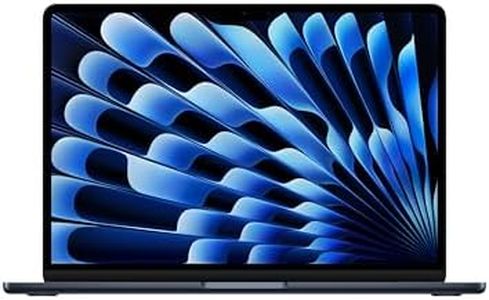
Apple 2025 MacBook Air 13-inch Laptop with M4 chip: Built for Apple Intelligence, 13.6-inch Liquid Retina Display, 16GB Unified Memory, 512GB SSD Storage, 12MP Center Stage Camera, Touch ID; Midnight

Rating
10.0
Chosen by1,217
Processor (CPU)
Display
Battery Life

Most important from
6682 reviews

Processor (CPU)
Its M4 chip with a 10-core CPU and GPU delivers smooth multitasking and handles demanding applications with impressive speed and responsiveness.
Display
The 13.6-inch Liquid Retina display showcases images with vibrant colors and sharp detail, ensuring photo accuracy and a visually stunning experience.
Battery Life
Battery life is exceptional, lasting up to 18 hours, which supports long editing sessions without the need for frequent recharging.
Portability
The MacBook Air strikes an excellent balance between lightweight portability and powerful performance, making it ideal for editing photos on the go.
Graphics Card (GPU)
Though it uses integrated graphics, the performance remains snappy enough for most photo editing tasks and even supports connection to high-resolution external monitors.
Storage
Despite the 512GB SSD being somewhat limited for very large photo libraries, the device’s speed and portability justify using external storage solutions.

The 2025 Apple MacBook Air with the new M4 chip is a strong choice if you want a lightweight and portable laptop for photo editing. Its 10-core CPU and 10-core GPU provide plenty of power to handle photo editing software smoothly, while 16GB of unified memory helps keep multitasking fast and efficient. The 512GB SSD offers good, though not huge, storage space for your photo files and projects. The 13.6-inch Liquid Retina display is a highlight, showing images with sharp detail, bright colors, and support for 1 billion colors—important if you want your photos to look accurate and vibrant.

Battery life is excellent, lasting up to 18 hours, so you can edit photos on the go without worrying about finding a charger. It's also one of the lightest laptops, weighing just 2.73 pounds, making it very easy to carry around. On the downside, the MacBook Air uses an integrated graphics setup rather than a dedicated graphics card, which might limit performance slightly on very heavy photo editing tasks or future software that demands more graphics power.

The storage size of 512GB may fill up quickly if you work with many large photo files or videos, so you might need external drives. Also, it has only two Thunderbolt ports, which may require adapters if you have many peripherals. This MacBook Air is an excellent choice for photographers who value portability and a beautiful display, and who work with moderately large photo projects rather than extremely heavy professional workloads.

Rating
10.0
Chosen by1,217
Processor (CPU)
Display
Battery Life

Most important from
6682 reviews

Processor (CPU)
Its M4 chip with a 10-core CPU and GPU delivers smooth multitasking and handles demanding applications with impressive speed and responsiveness.
Display
The 13.6-inch Liquid Retina display showcases images with vibrant colors and sharp detail, ensuring photo accuracy and a visually stunning experience.
Battery Life
Battery life is exceptional, lasting up to 18 hours, which supports long editing sessions without the need for frequent recharging.
Portability
The MacBook Air strikes an excellent balance between lightweight portability and powerful performance, making it ideal for editing photos on the go.
Graphics Card (GPU)
Though it uses integrated graphics, the performance remains snappy enough for most photo editing tasks and even supports connection to high-resolution external monitors.
Storage
Despite the 512GB SSD being somewhat limited for very large photo libraries, the device’s speed and portability justify using external storage solutions.
#2

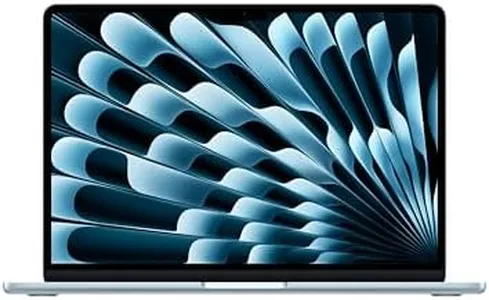
Apple 2025 MacBook Air 13-inch Laptop with M4 chip: Built for Apple Intelligence, 13.6" Liquid Retina Display, 16GB Unified Memory, 256GB SSD Storage, 12MP Center Stage Camera, Touch ID, Sky Blue

Rating
9.7
Processor (CPU)
Display
Battery Life

Most important from
6682 reviews

Processor (CPU)
Combines impressive processing power and efficiency, handling multitasking and demanding applications with ease thanks to the M4 chip and 16GB unified memory.
Display
The 13.6-inch Liquid Retina display delivers vibrant colors and sharp details with excellent true color accuracy and wide P3 gamut, essential for precise photo editing.
Battery Life
Battery life stands out with up to 18 hours on a single charge, supporting long workdays and on-the-go editing without frequent recharging.
Portability
Ultra-slim and lightweight design makes it exceptionally portable, fitting comfortably into bags without adding unnecessary bulk.

The Apple 2025 MacBook Air with the M4 chip is a strong contender for anyone needing a portable laptop for photo editing. Its 10-core CPU with 4 performance cores and 16GB of unified memory ensures smooth multitasking and efficient handling of photo editing software like Adobe Creative Cloud. The 256GB SSD storage is fast but may feel limited if you work with large image libraries, so external storage might be necessary. The integrated 8-core GPU supports hardware-accelerated graphics and video processing, which benefits photo editing, although it’s not a dedicated graphics card like in higher-end laptops.

The 13.6-inch Liquid Retina display is a highlight, offering a sharp resolution of 2560x1664 pixels, true color accuracy with support for 1 billion colors, and wide P3 color gamut—important for accurate photo editing and viewing fine details. Battery life is excellent, with up to 18 hours of video streaming, meaning you can edit photos on the go without frequently charging. Weighing just 2.73 pounds and featuring an ultra-thin design, it’s very portable and easy to carry around. The MacBook Air also benefits from macOS optimizations and seamless integration with other Apple devices, which can streamline a photographer’s workflow.

On the downside, the base storage might not be enough for heavy users, and the lack of a dedicated GPU limits performance for very demanding graphics tasks. Additionally, having only two Thunderbolt 4 ports could restrict connectivity options without adapters. This MacBook Air suits photographers who value portability, excellent display quality, and solid performance for everyday photo editing, while those needing larger storage or more powerful graphics might want to consider other options.

Rating
9.7
Processor (CPU)
Display
Battery Life

Most important from
6682 reviews

Processor (CPU)
Combines impressive processing power and efficiency, handling multitasking and demanding applications with ease thanks to the M4 chip and 16GB unified memory.
Display
The 13.6-inch Liquid Retina display delivers vibrant colors and sharp details with excellent true color accuracy and wide P3 gamut, essential for precise photo editing.
Battery Life
Battery life stands out with up to 18 hours on a single charge, supporting long workdays and on-the-go editing without frequent recharging.
Portability
Ultra-slim and lightweight design makes it exceptionally portable, fitting comfortably into bags without adding unnecessary bulk.
#3

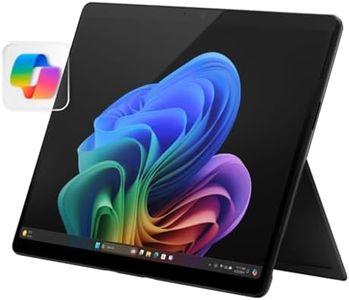
Microsoft Surface Pro 2-in-1 Laptop/Tablet (2024), Windows 11 Copilot+ PC, 13" Touchscreen OLED Display, Snapdragon X Elite (12 Core), 16GB RAM, 1TB Storage, Black

Rating
9.7
Processor (CPU)
Storage
Display

Most important from
67 reviews

Processor (CPU)
The device delivers amazing processing speed and a fast SSD, ensuring smooth and efficient performance.
Storage
The device delivers amazing processing speed and a fast SSD, ensuring smooth and efficient performance.
Display
The OLED touchscreen offers vibrant colors and incredible clarity, perfect for detailed photo editing.
Battery Life
Battery life exceeds expectations, supporting long sessions without needing to recharge.
Portability
Its sleek, minimalistic design and lightweight build make it easy to carry and versatile for various uses, including digital art and note-taking.

The Microsoft Surface Pro 2-in-1 (2024) is a sleek and portable device combining laptop power with tablet versatility, making it a solid choice for photo editing on the move. Its 13-inch OLED touchscreen stands out with vibrant colors and deep contrast, ideal for accurately viewing and editing photos. The Snapdragon X Elite 12-core processor paired with 16GB of fast DDR5 RAM ensures smooth multitasking and decent speed when handling editing software. With a spacious 1TB SSD, you get plenty of room to store large photo files without worrying about running out of space. Battery life is impressive, offering up to 14 hours, which supports long editing sessions away from power outlets.

However, the device uses integrated Adreno graphics rather than a dedicated graphics card, which might limit performance with very heavy or professional-level photo editing tasks that rely on powerful GPUs. The Surface Pro's lightweight design (around 1.7 kg) and fast charging add to its appeal for photographers who travel frequently. This device suits hobbyists and professionals who need a portable, color-accurate screen and solid performance, although users requiring top-tier graphics power might find it somewhat limited.

Rating
9.7
Processor (CPU)
Storage
Display

Most important from
67 reviews

Processor (CPU)
The device delivers amazing processing speed and a fast SSD, ensuring smooth and efficient performance.
Storage
The device delivers amazing processing speed and a fast SSD, ensuring smooth and efficient performance.
Display
The OLED touchscreen offers vibrant colors and incredible clarity, perfect for detailed photo editing.
Battery Life
Battery life exceeds expectations, supporting long sessions without needing to recharge.
Portability
Its sleek, minimalistic design and lightweight build make it easy to carry and versatile for various uses, including digital art and note-taking.

Buying Guide for the Best Portable Laptops For Photo Editing

When choosing a portable laptop for photo editing, it's important to consider several key specifications to ensure that the device can handle the demands of photo editing software and provide a smooth and efficient workflow. Photo editing requires a combination of processing power, display quality, and storage capacity, among other factors. Here are the key specs to focus on and how to choose the best fit for your needs.
Processor (CPU)The processor, or CPU, is the brain of your laptop and is crucial for running photo editing software smoothly. A powerful CPU can handle complex tasks and multitasking without lag. For photo editing, look for at least a quad-core processor. Intel Core i5 or i7, or AMD Ryzen 5 or 7, are good choices. If you work with very large files or do extensive multitasking, consider a higher-end processor like Intel Core i9 or AMD Ryzen 9.
RAMRAM (Random Access Memory) is important for multitasking and handling large files. More RAM allows your laptop to work with more data at once, which is essential for photo editing. For basic photo editing, 8GB of RAM might be sufficient, but for more intensive work or using multiple applications simultaneously, 16GB or more is recommended. If you work with very large files or high-resolution images, consider 32GB of RAM.
StorageStorage determines how much data you can keep on your laptop. For photo editing, an SSD (Solid State Drive) is preferable over an HDD (Hard Disk Drive) because it is faster and more reliable. A minimum of 256GB SSD is recommended, but 512GB or 1TB is better if you store a lot of high-resolution images and software. If you need more space, consider a laptop with expandable storage options or use external drives.
Graphics Card (GPU)A dedicated graphics card (GPU) can significantly improve the performance of photo editing software, especially when working with high-resolution images or using advanced features. While integrated graphics can handle basic tasks, a dedicated GPU like NVIDIA GeForce or AMD Radeon is recommended for more demanding work. For most photo editors, a mid-range GPU will suffice, but for professional work, a high-end GPU might be necessary.
DisplayThe display is crucial for photo editing as it affects how you see and edit your images. Look for a high-resolution display (at least Full HD, but 4K is preferable for detailed work). Color accuracy is also important, so consider a display with a wide color gamut (sRGB or Adobe RGB) and good color calibration. A larger screen size (15 inches or more) can provide a better editing experience, but ensure it balances with portability.
Battery LifeBattery life is important for portability, especially if you plan to edit photos on the go. Look for a laptop with a battery life of at least 8 hours to ensure it lasts through a work session without needing to be plugged in. Keep in mind that more powerful components can drain the battery faster, so balance performance with battery efficiency based on your needs.
PortabilityPortability involves the weight and size of the laptop. For photo editing on the go, a lighter and thinner laptop is preferable. However, ensure it still has the necessary performance and display quality. Laptops around 3-4 pounds are generally considered portable while still offering good performance. Consider how often you will be traveling with the laptop and choose a size and weight that is comfortable for you.

FAQ