10 Best Plotter Machines 2026 in the United States

Related Products


Our technology thoroughly searches through the online shopping world, reviewing hundreds of sites. We then process and analyze this information, updating in real-time to bring you the latest top-rated products. This way, you always get the best and most current options available.

Our Top Picks
Winner
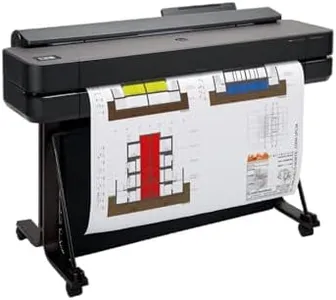
HP DesignJet T650 Large Format 24-inch Plotter Printer, Includes 2-Year Onsite Warranty Support (5HB08T) - New Model
The HP DesignJet T650 is a reliable 24-inch plotter designed especially for professionals like architects, engineers, and designers who need precise line drawings, posters, and maps. It delivers sharp print quality with a resolution up to 2400 x 1200 dpi, ensuring clear and accurate detail. The print speed is decent for its class, producing an A1-sized page in about 26 seconds, which translates to roughly 82 prints per hour—good for moderate workloads.
This machine handles media flexibly, supporting both large rolls up to 24 inches wide and sheets up to 13x19 inches, with an automatic sheet feeder and cutter that switch smoothly between roll and sheet printing. This saves time and reduces manual handling. Connectivity options include Ethernet, USB 2.0, and Wi-Fi, making it easy to print from various devices including smartphones and tablets via the HP Smart app. The printer uses HP’s original pigment and dye-based inks, which balance vibrant colors with durability. The included HP Click software simplifies printing by checking PDFs for errors and optimizing layouts to save ink and paper. Maintenance is also streamlined with a 2-year onsite warranty and remote support, plus HP’s claim of using significantly less ink for maintenance than competitors.
While the print speed is suitable for typical office or small business use, it may not meet the demands of very high-volume production environments. It supports only USB 2.0, which is slower compared to newer USB versions. The printer is print-only and does not scan or copy, which might be limiting if multifunction features are needed. The HP DesignJet T650 represents a cost-effective, user-friendly plotter that fits well for technical professionals or small to medium offices requiring high-quality, large-format prints without a huge volume demand. Its media versatility, good image quality, and solid support make it a practical choice, though very heavy users might seek faster models.
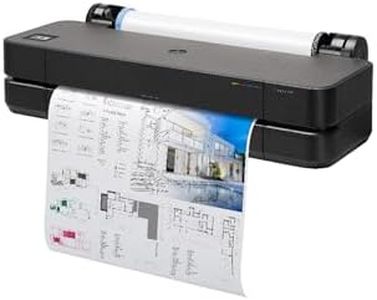
HP DesignJet T210 Large 24-inch Color Plotter Printer for Easy Wide CAD & Poster Prints (8AG32D)
Most important from
120 reviews
The HP DesignJet T210 is a solid choice for users needing precise wide-format prints like CAD drawings, posters, maps, and sewing patterns. It offers sharp print quality with a high resolution of up to 2400 x 1200 dpi, ensuring crisp lines and vibrant colors using pigment and dye-based inks. The printer handles media up to 24 inches wide, supporting both roll and sheet feeds, and includes an automatic cutter, which makes switching between different media sizes easy and convenient.
Print speed is reasonable for its class, with about 59 A1-sized prints per hour and a quick first-page time of 45 seconds, which suits small to medium workloads but may feel slow for very high-volume users. Connectivity options are flexible, including Ethernet, USB 2.0, and Wi-Fi, allowing printing from multiple devices, plus remote management through the HP Smart app. The included HP Click software simplifies printing by supporting common file types and streamlining job submission, saving time and reducing wasted ink and paper.
Maintenance is designed to be cost-effective, using 95% less ink for routine upkeep compared to some competitors, and HP provides a one-year warranty with support accessible by phone. On the downside, it only prints and does not scan or copy, and its maximum input sheet capacity is limited to 50 sheets, so it’s less suited for very large batch jobs. The printer’s weight and size make it somewhat bulky for small offices. The DesignJet T210 is well-suited for professionals and small businesses focused on quality and ease of use for technical and graphic prints in medium quantities. It offers a good balance of connectivity, print quality, and cost-efficiency, though those needing faster speeds or multifunction features might want to explore other models.
Most important from
120 reviews
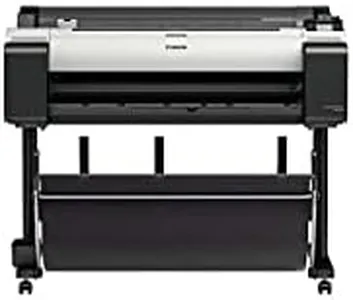
Canon imagePROGRAF TM-300 36-inch 5-Color Inkjet Printer Plotter
Most important from
18 reviews
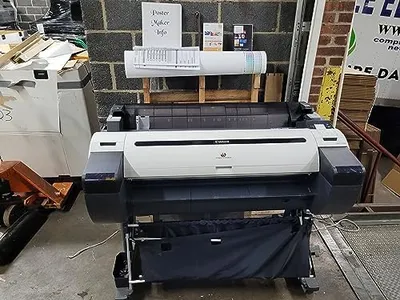
The Canon imagePROGRAF TM-300 is a versatile plotter machine designed for office use. With a high print resolution of 2400 x 1200 dpi, it ensures detailed and sharp print quality, which is a significant strength for anyone needing professional-grade prints. The use of LUCIA TD pigment inks enhances the color vibrancy and longevity of prints, making it suitable for both monochrome and color projects.
The print speed is relatively slow, capped at 3 pages per minute for both monochrome and color prints, which might be a drawback if you need to print large volumes quickly. The device supports various media types, including banner paper and glossy photo paper, with a maximum media size of 36 inches, allowing flexibility for different project sizes. Connectivity options are robust with Wi-Fi and Ethernet support, making it easy to integrate into modern office environments.
The plotter's large weight (215 pounds) and dimensions could pose challenges for smaller office spaces, despite being marketed as having a small footprint. Additionally, it only supports single-sided printing and has a max input sheet capacity of one, which may not be efficient for high output needs. Compatibility with multiple Canon cartridges ensures that ink replacements are straightforward, and the printer comes with a 1-year on-site warranty, providing some peace of mind regarding maintenance and support. The Canon imagePROGRAF TM-300 would be particularly beneficial for small to medium-sized offices that prioritize print quality over speed and have the space to accommodate its size.