We Use CookiesWe use cookies to enhance the security, performance, functionality and for analytical and promotional activities. By continuing to browse this site you are agreeing to our privacy policy

10 Best Photo ID Card Machines 2026 in the United States
How do we rank products for you?

Our technology thoroughly searches through the online shopping world, reviewing hundreds of sites. We then process and analyze this information, updating in real-time to bring you the latest top-rated products. This way, you always get the best and most current options available.

headphones-stars

Our Top Picks

#1

Winner

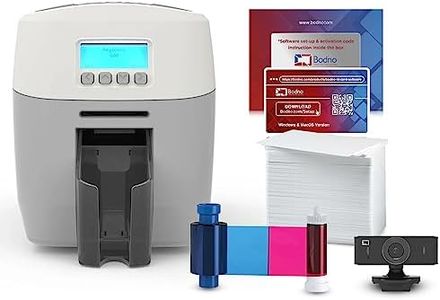
Bodno Magicard 600 Dual Sided ID Card Printer & Complete Supplies Package ID Software - Bronze Edition

Rating
10.0
Chosen by1,222
Print Quality
Ease of Use

Most important from
64 reviews

Print Quality
Upgrading to the Magicard 600 is definitely worth it for its high-quality color printing and advanced software capabilities.
Ease of Use
Setting up the Magicard 600 is straightforward, with excellent support provided for both installation and designing ID cards.

The Bodno Magicard 600 Dual Sided ID Card Printer is a robust option for printing high-quality ID cards. It comes with an all-inclusive package, including a 300-print YMCKO ribbon, PVC cards, and a user-friendly ID software. The printer offers dual-sided printing, which is excellent for comprehensive card designs, and it supports both WiFi and Ethernet connectivity, making network integration seamless. These features cater well to both small businesses and larger organizations needing reliable ID card printing solutions.

The print quality is solid, with a resolution of 600 dpi for black and white and 300 x 300 dpi for color, ensuring clear and professional-looking cards. The initial print time is fast at 10 seconds per card, and with a maximum input sheet capacity of 100, it can handle a decent volume of printing tasks efficiently. However, the maximum color resolution could be higher for more vibrant prints. Additionally, the printer offers a custom HoloKote watermark for added security, though this comes at an extra cost.

The Bodno Bronze Edition software stands out for its ease of use, featuring pre-made templates and drag-and-drop design capabilities, making it accessible even for users who are not tech-savvy. The package includes lifetime support and a 3-year warranty, which adds value and peace of mind. Despite the printer’s weight (10.4 pounds) and dimensions which might be bulky for some workspaces, the Magicard 600 is well-equipped with essential features and connectivity options, making it a strong contender in the photo ID card machine category.

Rating
10.0
Chosen by1,222
Print Quality
Ease of Use

Most important from
64 reviews

Print Quality
Upgrading to the Magicard 600 is definitely worth it for its high-quality color printing and advanced software capabilities.
Ease of Use
Setting up the Magicard 600 is straightforward, with excellent support provided for both installation and designing ID cards.
#2

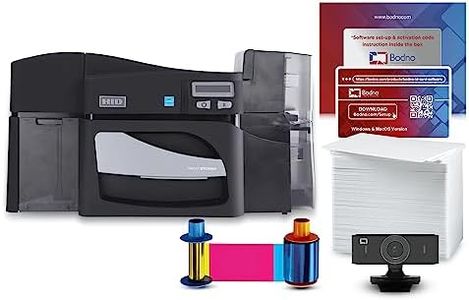
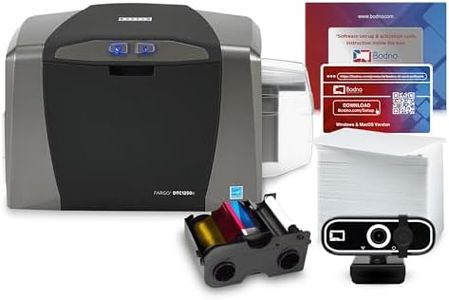
Bodno Fargo DTC4500e Dual Sided ID Card Printer & Complete Supplies Package ID Software - Silver Edition

Rating
9.1
Print Quality
Print Speed
Card Durability

Most important from
4 reviews

Print Quality
Delivers professional-quality plastic cards with clear photos and sharp text, thanks to precise thermal printing at 300 dpi.
Print Speed
Automatic dual-sided printing streamlines the creation of employee badges, student IDs, and membership cards efficiently.
Card Durability
Includes a comprehensive package featuring durable PVC cards, color ribbons, and intuitive software that simplifies batch card creation by importing data directly from Excel or CSV files.
Connectivity Options
Connectivity options with both Ethernet and USB ports provide flexibility for various office environments.
Ease of Use
Compact design and user-friendly interface with a display screen make operation straightforward, even for beginners.
Additional Features
Security features such as password protection, data encryption, and smart-code encoding ensure safe handling of sensitive information.

The Bodno Fargo DTC4500e is a strong choice if you need a reliable, high-volume ID card printer that handles professional-quality plastic cards. It offers automatic dual-sided printing with good color accuracy thanks to its thermal printing technology and 300 dpi resolution, which is adequate for clear photos and texts on employee badges, student IDs, or membership cards. The printer comes as a complete package, including durable PVC cards, color ribbon, an ID camera, and the Silver edition of Bodno’s software, which simplifies card creation by allowing you to import data from Excel or CSV files — a real time saver for managing large batches. Connectivity options are solid with both Ethernet and USB ports, making it flexible for different office setups. Security features like password protection, data encryption, and smart-code encoding add peace of mind when handling sensitive info.

The printer has a compact footprint and a user-friendly interface with a display screen, so it’s fairly easy to operate, even for beginners. While thermal printers of this type generally balance speed and quality rather than prioritizing ultra-fast output, this model may not be ideal if you need instant printing in very large volumes. The included software helps streamline card creation, though some advanced features are available in higher-end editions.

Its weight and size make it more suited to a dedicated workspace rather than a portable setup. If you value security, reliability, and ease of use for medium to large scale ID card printing, this model fits well, especially when bundled with the camera and software that streamline the process.

Rating
9.1
Print Quality
Print Speed
Card Durability

Most important from
4 reviews

Print Quality
Delivers professional-quality plastic cards with clear photos and sharp text, thanks to precise thermal printing at 300 dpi.
Print Speed
Automatic dual-sided printing streamlines the creation of employee badges, student IDs, and membership cards efficiently.
Card Durability
Includes a comprehensive package featuring durable PVC cards, color ribbons, and intuitive software that simplifies batch card creation by importing data directly from Excel or CSV files.
Connectivity Options
Connectivity options with both Ethernet and USB ports provide flexibility for various office environments.
Ease of Use
Compact design and user-friendly interface with a display screen make operation straightforward, even for beginners.
Additional Features
Security features such as password protection, data encryption, and smart-code encoding ensure safe handling of sensitive information.
#3

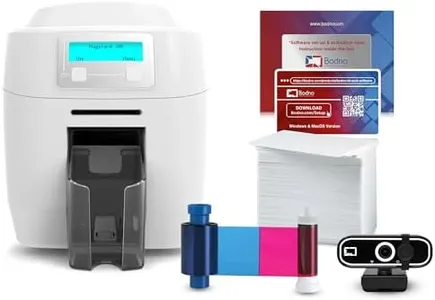
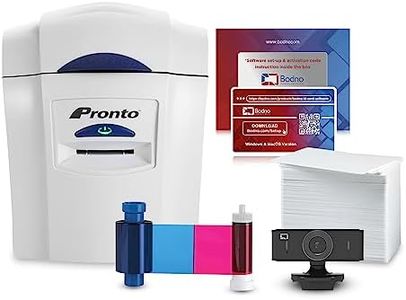
Bodno Magicard 300 Dual Sided ID Card Printer & Complete Supplies Package ID Software - Silver Edition

The Bodno Magicard 300 Dual Sided ID Card Printer and Complete Supplies Package is designed for creating high-quality photo ID cards. One of its standout features is the dual-sided printing capability, which allows for more detailed and informative card designs. The print quality is good, with a resolution of 300x300 dpi, ensuring vibrant and sharp colors on your ID cards. It comes with a 300-print ribbon, making it easy to start printing right away without additional purchases.

Print speed is reasonable for its category, although it may not be the fastest option available, but it balances speed and quality well. The printer ensures card durability through its dye-sublimation printing technology, which provides long-lasting prints. Connectivity options include USB and Ethernet, making it versatile for different setups, whether at home or in an office environment. It's compatible with both Windows and Mac, which adds to its ease of use.

The Bodno Silver Edition software included in the package has useful features like the ability to auto-create cards from Excel or CSV files, boosting productivity. Additionally, the product is backed by a generous 3-year warranty and lifetime support for the software, offering peace of mind. However, some users might find the printer a bit bulky and heavy, which can be a drawback if space is limited. This package is particularly suitable for small to medium-sized organizations looking for a reliable solution to print ID cards efficiently.

Buying Guide for the Best Photo ID Card Machines

Choosing the right photo ID card machine can be a crucial decision for businesses, schools, or organizations that need to produce identification cards regularly. The right machine will depend on your specific needs, including the volume of cards you need to produce, the quality of the images, and any additional features you might require. Understanding the key specifications will help you make an informed decision and ensure you get a machine that meets your requirements efficiently.
Print QualityPrint quality refers to the resolution and clarity of the images and text printed on the ID cards. This is important because higher print quality ensures that the cards are easily readable and the images are sharp. Print quality is usually measured in dots per inch (DPI). Machines with higher DPI (e.g., 300 DPI or more) produce clearer and more detailed images. If your ID cards need to include detailed photos or graphics, opt for a machine with higher print quality.
Print SpeedPrint speed indicates how quickly the machine can produce ID cards. This is important for organizations that need to print a large number of cards in a short amount of time. Print speed is typically measured in cards per hour. Machines with higher print speeds (e.g., 100 cards per hour or more) are suitable for high-volume printing needs. If your organization requires frequent and fast card production, choose a machine with a higher print speed.
Card DurabilityCard durability refers to how long the printed ID cards will last without fading or becoming damaged. This is important for ensuring that the cards remain functional and presentable over time. Durability can be enhanced by features such as lamination or UV coating. If your ID cards are used frequently or exposed to harsh conditions, look for machines that offer additional durability features.
Connectivity OptionsConnectivity options refer to how the photo ID card machine connects to your computer or network. This is important for ease of use and integration with your existing systems. Common connectivity options include USB, Ethernet, and wireless connections. If you need to print cards from multiple locations or integrate the machine with a network, choose a machine with versatile connectivity options.
Ease of UseEase of use refers to how user-friendly the machine is, including the software interface and physical operation. This is important for ensuring that your staff can efficiently operate the machine without extensive training. Look for machines with intuitive software, clear instructions, and simple maintenance procedures. If your team is not highly technical, prioritize machines that are known for their ease of use.
Additional FeaturesAdditional features can include options like dual-sided printing, encoding capabilities for magnetic stripes or smart cards, and security features. These are important for organizations that need more than just basic ID cards. If you require cards with advanced functionalities or enhanced security, look for machines that offer these additional features.

FAQ