We Use CookiesWe use cookies to enhance the security, performance, functionality and for analytical and promotional activities. By continuing to browse this site you are agreeing to our privacy policy

10 Best Lightweight Gaming Mice 2026 in the United States
How do we rank products for you?

Our technology thoroughly searches through the online shopping world, reviewing hundreds of sites. We then process and analyze this information, updating in real-time to bring you the latest top-rated products. This way, you always get the best and most current options available.

headphones-stars

Our Top Picks

#1

Winner

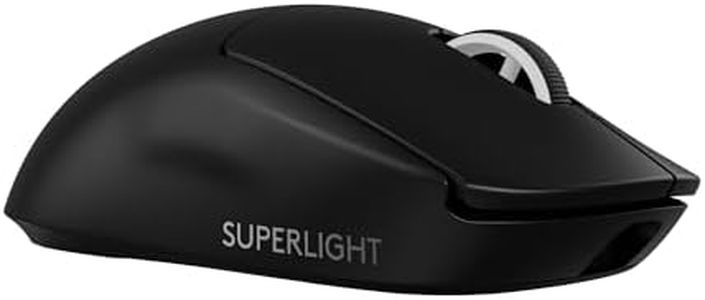
Logitech G PRO X Superlight 2 Wireless Gaming Mouse, 60g Pro-Grade with 5 Programmable Buttons, 44k DPI Sensor, 8kHz Report Rate, USB-C Charging for PC/Mac - Black

Rating
10.0
Chosen by1,489
Weight
Sensor Type
Polling Rate

Most important from
2693 reviews

Weight
The mouse feels incredibly light and comfortable, perfectly suiting a hybrid palm and fingertip grip with a shape that accommodates most average grips.
Sensor Type
The sensor offers outstanding precision with customizable DPI settings, including the ability to adjust the x-axis and y-axis separately and set lift-off distance.
Polling Rate
Polling and response rates are impressively fast, contributing to a seamless and highly responsive gaming experience.
Ergonomics
The mouse feels incredibly light and comfortable, perfectly suiting a hybrid palm and fingertip grip with a shape that accommodates most average grips.
Buttons and Customization
Buttons deliver satisfying, tactile clicks, enhancing overall control and responsiveness during gameplay.
Build Quality and Durability
The scroll wheel is durable and reliable, showing no signs of failure even after intense use and occasional frustration-induced impacts.
Wired vs. Wireless
Battery life is exceptional, with a single charge lasting well over a week even under heavy use.

The Logitech G PRO X SUPERLIGHT 2 is a strong contender for gamers seeking a lightweight, wireless mouse built for performance. Weighing just 60 grams, it offers excellent ease of movement, which is crucial for fast-paced gaming. Its HERO 2 optical sensor supports an ultra-high DPI of up to 44,000, enabling extremely precise tracking without any smoothing or acceleration, ideal for serious gamers who need pinpoint accuracy. The polling rate of 8,000 Hz is impressively high, meaning the mouse sends input data to your computer very frequently for minimal delay.

Ergonomically, it's designed with pro esports players in mind, providing a comfortable shape for extended use, although its specific fit might suit medium to smaller hand sizes best. It includes five programmable buttons, allowing some customization, but this is relatively minimal compared to mice with more buttons for complex macros. Build quality is solid, with premium materials and smooth PTFE feet that help the mouse glide effortlessly on most surfaces. The LIGHTFORCE hybrid switches deliver reliable, tactile clicks, which gamers appreciate for responsiveness.

Battery life is outstanding at up to 95 hours on a single charge, and USB-C charging offers convenience. Wireless connectivity is stable with radio frequency tech, and the mouse also supports Logitech's POWERPLAY system for wireless charging on compatible mousepads. While the price is on the premium side, reflecting its target at competitive players, those who value ultra-light weight, top-tier sensor performance, and freedom from cables will find the Logitech G PRO X SUPERLIGHT 2 an excellent choice to elevate their gameplay.

Rating
10.0
Chosen by1,489
Weight
Sensor Type
Polling Rate

Most important from
2693 reviews

Weight
The mouse feels incredibly light and comfortable, perfectly suiting a hybrid palm and fingertip grip with a shape that accommodates most average grips.
Sensor Type
The sensor offers outstanding precision with customizable DPI settings, including the ability to adjust the x-axis and y-axis separately and set lift-off distance.
Polling Rate
Polling and response rates are impressively fast, contributing to a seamless and highly responsive gaming experience.
Ergonomics
The mouse feels incredibly light and comfortable, perfectly suiting a hybrid palm and fingertip grip with a shape that accommodates most average grips.
Buttons and Customization
Buttons deliver satisfying, tactile clicks, enhancing overall control and responsiveness during gameplay.
Build Quality and Durability
The scroll wheel is durable and reliable, showing no signs of failure even after intense use and occasional frustration-induced impacts.
Wired vs. Wireless
Battery life is exceptional, with a single charge lasting well over a week even under heavy use.
#2

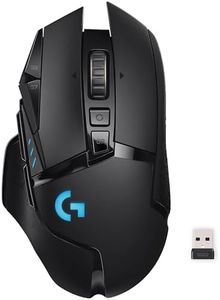
Logitech G502 Lightspeed Wireless Gaming Mouse with Hero 25K Sensor, PowerPlay Compatible, Tunable Weights and Lightsync RGB - Black

Rating
9.4
DPI (Dots Per Inch)
Polling Rate
Ergonomics

Most important from
13445 reviews

DPI (Dots Per Inch)
Customization through G HUB allows for programming buttons, adjusting lighting effects, and setting DPI preferences, enhancing the user experience.
Polling Rate
Latency is imperceptible, even at the highest report rate, making it comparable to a wired mouse.
Ergonomics
The mouse tracks perfectly and feels nice in your hand, making it a great choice for gamers.
Buttons and Customization
The clicks of all the buttons remain snappy and responsive, even after years of use.
Build Quality and Durability
After 3.5 years of daily use, the mouse continues to work flawlessly with amazing battery life.
Wired vs. Wireless
After 3.5 years of daily use, the mouse continues to work flawlessly with amazing battery life.

The Logitech G502 Lightspeed Wireless Gaming Mouse is a solid choice for gamers seeking a lightweight and highly customizable mouse. One of its standout features is the HERO 25K sensor, which offers precise tracking and a wide DPI range from 100 to 25,600. This makes it suitable for both high-speed gaming and detailed, slow-paced scenarios. The LIGHTSPEED wireless technology ensures a fast and reliable connection, which is crucial during competitive play.

The mouse also supports PowerPlay wireless charging, so you never have to worry about battery life if you invest in the additional charging system (sold separately). One of the unique aspects of the G502 Lightspeed is its tunable weights, allowing you to adjust the mouse's weight to your preference for better control and comfort. It has 11 customizable buttons, enabling you to set up macros and shortcuts tailored to each game, enhancing your gaming efficiency. The hyper-fast scroll wheel is beneficial for quick navigation through long web pages or in-game menus.

It excels in wireless performance, customization, and sensor accuracy, making it an excellent choice for serious gamers who value these attributes. However, it's worth noting that while the mouse is marketed as lightweight, the addition of weights can increase its heft, which may not appeal to all users. The build quality is robust and durable, though some might find the design a bit bulky compared to other lightweight gaming mice.

Rating
9.4
DPI (Dots Per Inch)
Polling Rate
Ergonomics

Most important from
13445 reviews

DPI (Dots Per Inch)
Customization through G HUB allows for programming buttons, adjusting lighting effects, and setting DPI preferences, enhancing the user experience.
Polling Rate
Latency is imperceptible, even at the highest report rate, making it comparable to a wired mouse.
Ergonomics
The mouse tracks perfectly and feels nice in your hand, making it a great choice for gamers.
Buttons and Customization
The clicks of all the buttons remain snappy and responsive, even after years of use.
Build Quality and Durability
After 3.5 years of daily use, the mouse continues to work flawlessly with amazing battery life.
Wired vs. Wireless
After 3.5 years of daily use, the mouse continues to work flawlessly with amazing battery life.
#3

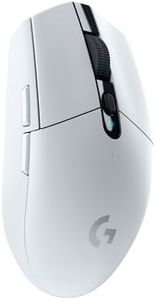
Logitech G305 Lightspeed Wireless Gaming Mouse, White

Rating
8.8
Wired vs. Wireless
Weight
Ergonomics

Most important from
38310 reviews

Wired vs. Wireless
Delivers performance comparable to wired mice with no noticeable lag or tracking issues, making it impressively responsive for wireless.
Weight
The weight strikes a perfect balance—light enough for swift gaming movements without feeling flimsy or cheap.
Ergonomics
Comfortable shape that suits medium to small hands well, supporting both claw and fingertip grips seamlessly.
Buttons and Customization
Plug-and-play setup is effortless, with simple USB connectivity and intuitive customization through the accompanying app.
Build Quality and Durability
Clicks have a satisfying sound—neither too loud nor too quiet—adding to the overall quality feel of the mouse.

The Logitech G305 LIGHTSPEED is a strong contender in the lightweight gaming mouse category, weighing just 99 grams, which helps with quick and precise movements during gaming. It uses Logitech's HERO 12K optical sensor, known for high accuracy and efficiency, supporting up to 12,000 DPI sensitivity. This means you get smooth and responsive tracking, suitable for fast-paced games. The 1ms polling rate via its LIGHTSPEED wireless technology ensures minimal delay, so your actions feel instant without the hassle of cables.

It offers six programmable buttons, giving you customization options to suit different games or workflows. Built with portability in mind, it even has a small storage slot for its USB receiver, making it easy to carry around. The battery life is impressive, lasting up to 250 hours on a single AA battery, so you won’t need frequent replacements during extended gaming sessions.

On the downside, while the compact shape is good for most grip styles, it may not fit comfortably for users with larger hands or those preferring mice with more sculpted ergonomic designs. Also, being wireless, some gamers might worry about input lag, though Logitech’s LIGHTSPEED technology keeps it very low. The G305 effectively balances lightweight design, strong sensor performance, and wireless convenience, making it ideal for gamers looking for portability and reliability without sacrificing responsiveness.

Rating
8.8
Wired vs. Wireless
Weight
Ergonomics

Most important from
38310 reviews

Wired vs. Wireless
Delivers performance comparable to wired mice with no noticeable lag or tracking issues, making it impressively responsive for wireless.
Weight
The weight strikes a perfect balance—light enough for swift gaming movements without feeling flimsy or cheap.
Ergonomics
Comfortable shape that suits medium to small hands well, supporting both claw and fingertip grips seamlessly.
Buttons and Customization
Plug-and-play setup is effortless, with simple USB connectivity and intuitive customization through the accompanying app.
Build Quality and Durability
Clicks have a satisfying sound—neither too loud nor too quiet—adding to the overall quality feel of the mouse.

Buying Guide for the Best Lightweight Gaming Mice

Choosing the right lightweight gaming mouse can significantly enhance your gaming experience. A good gaming mouse should be comfortable, responsive, and tailored to your specific gaming needs. Here are some key specifications to consider when selecting a lightweight gaming mouse, along with explanations to help you make an informed decision.
WeightWeight is a crucial factor in a lightweight gaming mouse. A lighter mouse can be easier to move quickly and with precision, which is essential for fast-paced games. Generally, lightweight mice weigh less than 80 grams. If you play games that require quick reflexes and rapid movements, a lighter mouse will be beneficial. However, if you prefer a bit more stability and control, you might opt for a slightly heavier model within the lightweight category.
Sensor TypeThe sensor type determines the accuracy and responsiveness of the mouse. There are two main types: optical and laser. Optical sensors are generally preferred for gaming due to their accuracy and consistency on most surfaces. Laser sensors can work on more surfaces but may have slight lag issues. For most gamers, an optical sensor is the best choice, especially if you play competitive games where precision is key.
DPI (Dots Per Inch)DPI measures the sensitivity of the mouse. Higher DPI means the cursor moves further on the screen with less physical movement of the mouse. Gaming mice often offer adjustable DPI settings, ranging from 400 to 16,000 or more. For fast-paced games, higher DPI settings can be useful, but for precision tasks, lower DPI is better. Choose a mouse with adjustable DPI settings so you can customize it to your gaming style.
Polling RatePolling rate is how often the mouse reports its position to the computer, measured in Hertz (Hz). A higher polling rate means more frequent updates, leading to smoother and more responsive cursor movements. Common polling rates are 125Hz, 500Hz, and 1000Hz. For gaming, a higher polling rate (500Hz or 1000Hz) is recommended to ensure quick and accurate responses.
ErgonomicsErgonomics refers to how comfortable the mouse is to use over extended periods. This includes the shape, size, and button placement. Some mice are designed for specific grip styles (palm, claw, or fingertip). Choose a mouse that fits your hand size and grip style to prevent discomfort and improve your gaming performance. Trying out different shapes and sizes can help you find the most comfortable option.
Buttons and CustomizationGaming mice often come with additional buttons that can be customized for specific functions or macros. The number of buttons can range from a few to over a dozen. Consider how many extra buttons you need based on the games you play. For example, MMO players might need more buttons for various commands, while FPS players might prefer fewer, strategically placed buttons for quick access.
Build Quality and DurabilityBuild quality and durability are important for a gaming mouse, as it will likely see a lot of use. Look for mice made with high-quality materials and good build construction. Features like braided cables, durable switches, and solid construction can extend the lifespan of your mouse. If you play games frequently, investing in a well-built mouse can save you from having to replace it often.
Wired vs. WirelessWired mice generally offer more consistent performance with no latency issues, which is crucial for competitive gaming. However, wireless technology has improved significantly, and many wireless gaming mice now offer performance on par with wired ones. If you prefer the freedom of movement that wireless offers, look for a mouse with low latency and a good battery life. For the most reliable performance, a wired mouse is still a safe bet.

FAQ