We Use CookiesWe use cookies to enhance the security, performance, functionality and for analytical and promotional activities. By continuing to browse this site you are agreeing to our privacy policy

10 Best Laser Printers For Home 2026 in the United States


How do we rank products for you?

Our technology thoroughly searches through the online shopping world, reviewing hundreds of sites. We then process and analyze this information, updating in real-time to bring you the latest top-rated products. This way, you always get the best and most current options available.

headphones-stars

Our Top Picks

#1

Winner

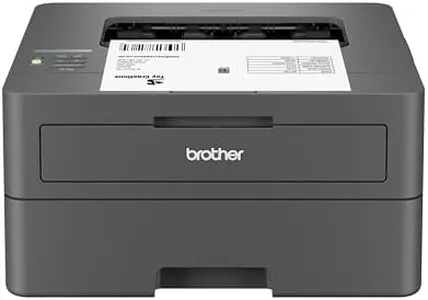
Brother DCP-L2640DW Wireless Compact Monochrome Multi-Function Laser Printer with Copy and Scan, Duplex, Mobile, Black & White | Includes Refresh Subscription Trial(1), Works with Alexa

Rating
10.0
Chosen by1,397
Print Quality
Connectivity Options
Duplex Printing

Most important from
3317 reviews

Print Quality
Print quality is excellent, with crisp, clear text that outshines any inkjet printer.
Connectivity Options
The printer is trouble-free and communicates flawlessly over Wi-Fi.
Duplex Printing
The automatic document feeder and duplex printing features significantly enhance efficiency and convenience.
Toner Cartridge Yield
The toner lasts a long time, and replacement cartridges are reasonably priced.

The Brother DCP-L2640DW is a compact monochrome laser printer that excels in providing multiple functionalities for home or small business use, including printing, copying, and scanning. One of its standout features is the print speed, reaching up to 36 pages per minute, making it a fast option for high-volume tasks. The automatic duplex printing feature adds convenience by allowing you to print on both sides of the paper without manual intervention, which can save both time and resources.

On the quality front, it delivers clear and sharp black and white prints, with a maximum resolution of 1200 x 1200 dpi, which is more than sufficient for typical home or office documents. The 50-page automatic document feeder enhances its efficiency, particularly for scanning or copying multi-page documents.

Connectivity is another strong point, offering flexible options such as Wi-Fi, Ethernet, and USB. The ability to connect via the Brother Mobile Connect app adds a modern touch, allowing you to manage printing tasks directly from your smartphone or tablet. However, the DCP-L2640DW is primarily a monochrome printer, which means it won't be suitable for those who require color printing. While its size is compact for a multi-function device, weighing 25 pounds may limit its portability. The initial page print time of 8.5 seconds might feel a bit sluggish compared to some of its competitors. The toner cartridge yield is decent, but users should note that they will need to purchase Brother Genuine Toner to ensure optimal performance, which could be a drawback for those looking for budget-friendly alternatives.

Rating
10.0
Chosen by1,397
Print Quality
Connectivity Options
Duplex Printing

Most important from
3317 reviews

Print Quality
Print quality is excellent, with crisp, clear text that outshines any inkjet printer.
Connectivity Options
The printer is trouble-free and communicates flawlessly over Wi-Fi.
Duplex Printing
The automatic document feeder and duplex printing features significantly enhance efficiency and convenience.
Toner Cartridge Yield
The toner lasts a long time, and replacement cartridges are reasonably priced.
#2

Epson EcoTank ET-2803 Wireless Color All-in-One Cartridge-Free Supertank Printer with Scan, Copy and AirPrint Support

Rating
9.4
Print Quality
Connectivity Options
Paper Handling

Most important from
20317 reviews

Print Quality
Print quality is high and it’s very easy to setup and use, making copies and scanning a breeze.
Connectivity Options
Connecting to Wi-Fi can be tricky if you have a 5G modem, but using the printer’s interface helps to find the 2G network.
Paper Handling
The paper loading could be improved, as it jams if you put too many sheets in the tray at once.
Size and Design
The printer is lightweight and compact, yet still delivers excellent print quality, especially on quality photo paper.

The Epson EcoTank ET-2803 is a versatile printer well-suited for home use with several strong points. Its standout feature is the cartridge-free printing system, using high-capacity ink tanks that can save you up to 90% on replacement ink costs. This is ideal for those who print frequently, as the printer comes with up to two years of ink in the box, translating to roughly 4,500 pages in black and 7,500 in color. This not only reduces ongoing costs but also minimizes cartridge waste, making it an eco-friendly option. The print quality is impressive, thanks to Epson’s Micro Piezo Heat Free technology, producing sharp text and vibrant photos on various paper types. It also includes a built-in scanner and copier, adding to its functionality.

However, the print speed is relatively modest, at 10 pages per minute (ppm) for monochrome and 5 ppm for color, which may not be suitable for users needing faster print jobs. Connectivity options are modern and versatile, supporting Wi-Fi, USB, and hands-free voice-activated printing. It's also compatible with AirPrint and the Epson Smart Panel app, allowing easy printing from smartphones and tablets. On the downside, it lacks duplex printing, so you'll manually flip pages to print on both sides, which might be inconvenient for some users. The printer's paper handling is decent with a 100-sheet capacity, suitable for typical home use.

The compact design, weighing 8.8 pounds, ensures it won't take up much space in your home office setup. In summary, the Epson EcoTank ET-2803 offers excellent cost efficiency, good print quality, and modern connectivity, making it a strong choice for home users who value economy and ease of use, although it may fall short in speed and duplex printing needs.

Rating
9.4
Print Quality
Connectivity Options
Paper Handling

Most important from
20317 reviews

Print Quality
Print quality is high and it’s very easy to setup and use, making copies and scanning a breeze.
Connectivity Options
Connecting to Wi-Fi can be tricky if you have a 5G modem, but using the printer’s interface helps to find the 2G network.
Paper Handling
The paper loading could be improved, as it jams if you put too many sheets in the tray at once.
Size and Design
The printer is lightweight and compact, yet still delivers excellent print quality, especially on quality photo paper.
#3

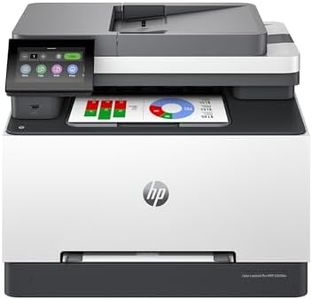
Brother MFC-L3720CDW Wireless Color Laser Printer with Scanner, Copier and Fax | Auto Duplex and 250-Sheet Capacity | Includes Refresh Subscription Trial(1). Amazon Dash Replenishment Ready

Rating
8.5
Print Speed
Print Quality
Connectivity Options

Most important from
879 reviews

Print Speed
This printer works like a workhorse, delivering fast color printing and crisp puzzle image prints, even on plain copier paper.
Print Quality
Print quality is sharp and professional, though prints on plain paper lack the brightness of glossy finishes.
Connectivity Options
Setup on Linux and wireless printing from phones or tablets is seamless, making it highly versatile across devices.
Duplex Printing
The automatic duplex printing feature is a big time and paper saver for everyday home office needs.
Paper Handling
Paper jams are rare, and the printer feels sturdy and well-built, offering great value compared to similar models.
Toner Cartridge Yield
Using generic cartridges works well, especially the XL versions that offer more pages per cartridge, helping reduce running costs.
Size and Design
Its size and weight make it less portable, so it’s best suited for a fixed home office spot rather than frequent relocation.

The Brother MFC-L3720CDW is a color laser printer designed to handle multiple tasks—printing, copying, scanning, and faxing—all in one device, making it a good fit for home offices or small workgroups. It offers solid print speeds of up to 19 pages per minute in both color and black & white, which is decent for everyday home use but not the fastest on the market. Print quality is strong, with sharp, clear output thanks to its laser technology and a high resolution of 2400 x 600 dpi, so documents and color prints look professional.

Connectivity options are flexible, including dual-band Wi-Fi (2.4GHz and 5GHz), Wi-Fi Direct, and USB, allowing easy connections from smartphones, tablets, or laptops. The included Brother Mobile Connect app lets you manage printing tasks from your phone, which adds convenience for remote printing. Automatic duplex printing is a big plus, saving paper by printing on both sides without manual effort.

Paper handling is practical for home use, with a 250-sheet input tray that reduces how often you need to refill paper and supports letter and legal sizes. The 50-page auto document feeder speeds up copying or scanning multi-page documents. The printer’s size is somewhat large and weighs 44 pounds, so you’ll want to place it where it won’t be moved frequently. Toner replacement is straightforward with Brother’s genuine toner cartridges, and the option to use their Refresh EZ Print Subscription can save money and prevent running out of toner unexpectedly. The initial print time can be up to 15 seconds, which might feel slow if you print occasionally and expect instant results. Also, the color scan and copy resolution is moderate (300 dpi), which is fine for documents but not ideal for high-detail photo scanning. This Brother model is a reliable, all-in-one laser printer that balances performance and convenience well for home users who print regularly and want color capability, duplexing, and mobile-friendly features. Its size and print speed might be less suited for those needing ultra-fast or compact solutions.

Rating
8.5
Print Speed
Print Quality
Connectivity Options

Most important from
879 reviews

Print Speed
This printer works like a workhorse, delivering fast color printing and crisp puzzle image prints, even on plain copier paper.
Print Quality
Print quality is sharp and professional, though prints on plain paper lack the brightness of glossy finishes.
Connectivity Options
Setup on Linux and wireless printing from phones or tablets is seamless, making it highly versatile across devices.
Duplex Printing
The automatic duplex printing feature is a big time and paper saver for everyday home office needs.
Paper Handling
Paper jams are rare, and the printer feels sturdy and well-built, offering great value compared to similar models.
Toner Cartridge Yield
Using generic cartridges works well, especially the XL versions that offer more pages per cartridge, helping reduce running costs.
Size and Design
Its size and weight make it less portable, so it’s best suited for a fixed home office spot rather than frequent relocation.

Buying Guide for the Best Laser Printers For Home

When choosing a laser printer for home use, it's important to consider your specific needs and how different features will meet those needs. Laser printers are known for their speed, efficiency, and high-quality text printing, making them a great choice for home offices or households with frequent printing needs. To make an informed decision, you should understand the key specifications and how they impact the printer's performance and suitability for your home environment.
Print SpeedPrint speed is measured in pages per minute (PPM) and indicates how quickly a printer can produce printed pages. This is important if you need to print large documents frequently. For home use, a print speed of 20-30 PPM is usually sufficient. If you print occasionally or in smaller volumes, a lower PPM will be adequate. However, if you have a home office or print large documents regularly, a higher PPM will save you time.
Print QualityPrint quality is measured in dots per inch (DPI) and determines the clarity and detail of the printed output. Higher DPI values mean better print quality. For most home uses, a DPI of 600x600 is sufficient for text documents. If you need to print high-quality graphics or images, look for a printer with a higher DPI, such as 1200x1200 or more. Consider your typical printing tasks to decide the level of print quality you need.
Connectivity OptionsConnectivity options refer to how the printer connects to your devices. Common options include USB, Wi-Fi, and Ethernet. Wi-Fi connectivity is particularly useful for home use as it allows multiple devices to connect wirelessly, making it easy to print from laptops, smartphones, and tablets. If you have a home office setup, Ethernet might be useful for a stable connection. USB is a basic option for direct connection to a single computer. Choose based on your preferred way of connecting and the number of devices you plan to use with the printer.
Duplex PrintingDuplex printing means the printer can print on both sides of the paper automatically. This feature is important for saving paper and reducing printing costs. If you frequently print double-sided documents, such as reports or booklets, a printer with automatic duplex printing will be very convenient. For occasional or single-sided printing, this feature may not be as critical.
Paper HandlingPaper handling refers to the types and sizes of paper the printer can accommodate, as well as the capacity of the paper tray. For home use, a standard paper tray capacity of 150-250 sheets is usually sufficient. If you print a variety of paper sizes or types, such as envelopes or labels, ensure the printer supports these formats. Consider your typical printing needs to determine the appropriate paper handling capabilities.
Toner Cartridge YieldToner cartridge yield indicates the number of pages a cartridge can print before needing replacement. This is important for understanding the long-term cost of operating the printer. Higher yield cartridges mean fewer replacements and lower cost per page. For home use, a standard yield of 1,000-2,000 pages is usually adequate. If you print frequently, consider a printer with high-yield cartridge options to reduce the frequency and cost of replacements.
Size and DesignSize and design refer to the physical dimensions and aesthetic of the printer. This is important for ensuring the printer fits comfortably in your home space. Compact and sleek designs are ideal for small home offices or shared spaces. Measure the available space where you plan to place the printer and choose a model that fits well without being obtrusive. Consider the overall look if you want the printer to blend in with your home decor.

FAQ