We Use CookiesWe use cookies to enhance the security, performance, functionality and for analytical and promotional activities. By continuing to browse this site you are agreeing to our privacy policy

10 Best HDMI Hubs For USB-C 2026 in the United States
How do we rank products for you?

Our technology thoroughly searches through the online shopping world, reviewing hundreds of sites. We then process and analyze this information, updating in real-time to bring you the latest top-rated products. This way, you always get the best and most current options available.

headphones-stars

Our Top Picks

#1

Winner

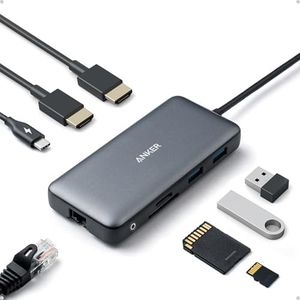
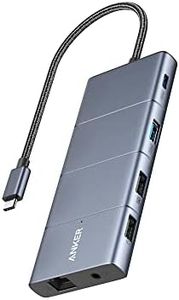
Anker Laptop Docking Station Dual Monitor, 8-in-1 USB C Hub, 4K Dual Monitor with 2 HDMI, 1 Gbps Ethernet Hub, 85W Power Delivery, SD Card Reader, for XPS and More (Charger not Included)

Rating
10.0
Chosen by1,343
Number of HDMI Ports
Additional Ports and Features
Build Quality and Portability

Most important from
6403 reviews

Number of HDMI Ports
Two HDMI ports provide solid connectivity, although it does not have DisplayPort connections.
Additional Ports and Features
The range of ports is excellent, handling everything from HDMI to USB-A and USB-C, ensuring users never feel limited.
Build Quality and Portability
Compact and lightweight design makes it perfect for professionals on the go.
Compatibility
It allows easy connection of dual monitors, significantly boosting productivity.

The Anker Laptop Docking Station is a versatile 8-in-1 USB-C hub that offers a variety of ports, making it suitable for users looking to expand their laptop's connectivity. It features two HDMI ports, allowing dual monitor setups with 4K support at 30Hz, or a single monitor at 4K 60Hz. This makes it great for users needing high-definition displays. However, note that on macOS, both external monitors will display identical content, which could be a limitation for some users.

The device supports up to 85W power delivery, making it ideal for charging high-power devices like MacBook Pros while in use. Additional ports include two USB-A data ports, an Ethernet port for fast wired connections, and a microSD/SD card reader, providing a wide range of connectivity options. The robust build quality and compact design enhance its portability, making it perfect for professionals on the go.

Compatibility is extensive, covering MacBooks, Windows PCs, and ChromeOS devices that support DP Alt Mode and Power Delivery, although it is not compatible with Linux systems. This hub is a solid choice for users needing multiple ports, high-resolution display support, and efficient power delivery, despite the minor macOS display limitation.

Rating
10.0
Chosen by1,343
Number of HDMI Ports
Additional Ports and Features
Build Quality and Portability

Most important from
6403 reviews

Number of HDMI Ports
Two HDMI ports provide solid connectivity, although it does not have DisplayPort connections.
Additional Ports and Features
The range of ports is excellent, handling everything from HDMI to USB-A and USB-C, ensuring users never feel limited.
Build Quality and Portability
Compact and lightweight design makes it perfect for professionals on the go.
Compatibility
It allows easy connection of dual monitors, significantly boosting productivity.
#2

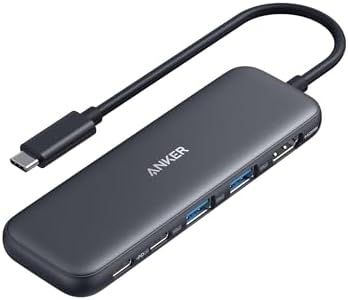
Anker USB C Hub, 5-in-1 USBC to HDMI Splitter with 4K Display, 1 x Powered USB-C 5Gbps & 2×Powered USB-A 3.0 5Gbps Data Ports for MacBook Pro, MacBook Air, Dell and More

Rating
10.0
Resolution and Refresh Rate Support
Power Delivery (PD) Support
Additional Ports and Features

Most important from
17641 reviews

Resolution and Refresh Rate Support
With a 4K HDMI port, this hub elevates viewing experiences to a crisp, clean level, akin to upgrading from VHS to Blu-ray.
Power Delivery (PD) Support
The hub's pass-through charging feature ensures you can keep working without worrying about your battery running low.
Additional Ports and Features
The Anker 332 USB-C Hub is like the Swiss Army Knife of connectivity, addressing the lack of ports on laptops with its versatile 5-in-1 design.
Build Quality and Portability
Compact and lightweight, it's easy to carry around, fitting conveniently in a laptop bag for on-the-go use.
Compatibility
Setup is straightforward with plug-and-play functionality, requiring no extra drivers or steps.

The Anker USB C Hub is a versatile 5-in-1 device that caters to users looking for convenient connectivity options for their laptops. It includes a 4K HDMI port capable of streaming or mirroring content in resolutions up to 4K at 30Hz, making it suitable for high-definition displays. Additionally, it offers a 100W PD-IN port for pass-through charging, allowing you to charge your laptop while using the hub, although the charger is not included. This hub also features one USB-C data port and two USB-A ports, all supporting fast data transfer rates of up to 5Gbps, perfect for quickly moving files.

However, it's worth noting that the USB-C data port does not support video output, which may be a limitation for some users. The hub is compact and lightweight, enhancing portability and ease of use for those on the go. It is compatible with a wide range of devices, including MacBook Pro, MacBook Air, and Dell laptops, supporting USB-C, USB4, and Thunderbolt connections.

The build quality is solid, typical of Anker products, and it comes with an 18-month warranty for added peace of mind. However, it is not compatible with Linux, which could be a drawback for users of that operating system. The Anker USB C Hub is ideal for users needing multiple connectivity options, high-speed data transfer, and efficient pass-through charging, but should be aware of its limitations regarding video output and OS compatibility.

Rating
10.0
Resolution and Refresh Rate Support
Power Delivery (PD) Support
Additional Ports and Features

Most important from
17641 reviews

Resolution and Refresh Rate Support
With a 4K HDMI port, this hub elevates viewing experiences to a crisp, clean level, akin to upgrading from VHS to Blu-ray.
Power Delivery (PD) Support
The hub's pass-through charging feature ensures you can keep working without worrying about your battery running low.
Additional Ports and Features
The Anker 332 USB-C Hub is like the Swiss Army Knife of connectivity, addressing the lack of ports on laptops with its versatile 5-in-1 design.
Build Quality and Portability
Compact and lightweight, it's easy to carry around, fitting conveniently in a laptop bag for on-the-go use.
Compatibility
Setup is straightforward with plug-and-play functionality, requiring no extra drivers or steps.
#3

Belkin 15-in-1 Universal Triple Display DisplayLink Docking Station Hub w/ 3 HDMI Ports, 2 DisplayPorts for Triple 4K Display w/ 85W PD, 3.5mm Mic/Speaker, 1 USB-C, & 5 USB-A Ports, Black

Rating
8.5
Resolution and Refresh Rate Support
Additional Ports and Features
Compatibility

Most important from
76 reviews

Resolution and Refresh Rate Support
Running high-resolution Dell monitors at decent refresh rates on a MacBook Air with M2 is seamless with this dock.
Additional Ports and Features
This dock offers extensive connectivity options, including 5 USB-A ports, 1 USB-C port, and support for 3 external monitors.
Compatibility
Works perfectly with a P14s ThinkPad, supporting 3 external monitors flawlessly along with multiple peripherals like a wired printer, ethernet cable, and wireless dongles.

The Belkin 15-in-1 Universal Triple Display DisplayLink Docking Station Hub offers a comprehensive solution for those needing extensive connectivity options. With three HDMI ports and two DisplayPorts, it supports triple 4K display, delivering high-resolution output for multiple monitors which is impressive for both work and entertainment setups. The hub's 85W Power Delivery (PD) ensures that your devices remain charged while in use, making it convenient for continuous work without interruptions.

Additionally, the inclusion of a Gigabit Ethernet port provides a reliable internet connection, crucial for stable online activities. The hub is equipped with a variety of ports including five USB-A, one USB-C, an SD card reader, and a 3.5mm mic/speaker port, offering versatile connectivity options for various peripherals and accessories. Compatibility is another strong point, as it supports a wide range of devices like MacBooks, Chromebooks, PCs, and iPads, which makes it a versatile choice for different users and environments.

However, the hub's size and weight (2.6 pounds) might be a drawback for those who prioritize portability. Its relatively large dimensions (10.5 x 6 x 3.5 inches) could also take up considerable desk space, which might be a concern for users with limited workspace. Despite these minor drawbacks, the robust build quality and extensive features make the Belkin 15-in-1 hub a powerful tool for enhancing productivity and connectivity needs.

Rating
8.5
Resolution and Refresh Rate Support
Additional Ports and Features
Compatibility

Most important from
76 reviews

Resolution and Refresh Rate Support
Running high-resolution Dell monitors at decent refresh rates on a MacBook Air with M2 is seamless with this dock.
Additional Ports and Features
This dock offers extensive connectivity options, including 5 USB-A ports, 1 USB-C port, and support for 3 external monitors.
Compatibility
Works perfectly with a P14s ThinkPad, supporting 3 external monitors flawlessly along with multiple peripherals like a wired printer, ethernet cable, and wireless dongles.

Buying Guide for the Best HDMI Hubs For USB-C

When choosing an HDMI hub for USB-C, it's important to consider your specific needs and how you plan to use the hub. HDMI hubs allow you to connect multiple HDMI devices to a single USB-C port, which can be particularly useful for expanding the capabilities of laptops, tablets, and other devices with limited ports. Understanding the key specifications will help you make an informed decision and ensure that the hub you choose meets your requirements.
Number of HDMI PortsThe number of HDMI ports on a hub determines how many HDMI devices you can connect simultaneously. This is important if you need to connect multiple monitors, projectors, or other HDMI-enabled devices. Hubs typically come with 1 to 4 HDMI ports. If you only need to connect one additional monitor, a hub with a single HDMI port will suffice. However, if you plan to connect multiple devices, look for a hub with more ports to accommodate your needs.
Resolution and Refresh Rate SupportResolution and refresh rate support indicate the quality of the video output that the hub can handle. Higher resolutions (such as 4K) and higher refresh rates (such as 60Hz) provide better image quality and smoother motion, which is important for tasks like video editing, gaming, or watching high-definition content. If you need high-quality video output, choose a hub that supports 4K resolution at 60Hz. For general use, a hub that supports 1080p resolution at 60Hz may be sufficient.
Power Delivery (PD) SupportPower Delivery (PD) support allows the hub to pass power through to your device while it is connected. This is important if you need to charge your laptop or tablet while using the hub. Hubs with PD support can provide varying levels of power, typically ranging from 30W to 100W. If you need to charge a high-power device like a laptop, look for a hub with higher PD support. For smaller devices like tablets or smartphones, lower PD support may be adequate.
Additional Ports and FeaturesMany HDMI hubs come with additional ports and features, such as USB-A ports, SD card readers, Ethernet ports, and audio jacks. These extra ports can be useful for connecting peripherals like keyboards, mice, external storage, and network cables. Consider what additional connections you might need and choose a hub that offers those features. For example, if you frequently transfer files from a camera, an SD card reader might be essential.
Build Quality and PortabilityBuild quality and portability are important factors, especially if you plan to carry the hub with you. A well-built hub made from durable materials will last longer and withstand daily use. Portability is also key if you need to use the hub on the go. Look for a compact and lightweight design that fits easily into your bag or pocket. If you primarily use the hub at a stationary desk, build quality might be more important than portability.
CompatibilityCompatibility ensures that the hub will work with your specific devices. Check that the hub is compatible with your laptop, tablet, or other USB-C devices. Some hubs are designed to work with specific operating systems (like Windows, macOS, or Android), so make sure the hub you choose supports your device's OS. Additionally, verify that the hub supports the version of HDMI you need, such as HDMI 2.0 or HDMI 2.1, to ensure optimal performance.

FAQ