We Use CookiesWe use cookies to enhance the security, performance, functionality and for analytical and promotional activities. By continuing to browse this site you are agreeing to our privacy policy

10 Best Google Wifi Mesh Systems 2026 in the United States

How do we rank products for you?

Our technology thoroughly searches through the online shopping world, reviewing hundreds of sites. We then process and analyze this information, updating in real-time to bring you the latest top-rated products. This way, you always get the best and most current options available.

headphones-stars

Our Top Picks

#1

Winner

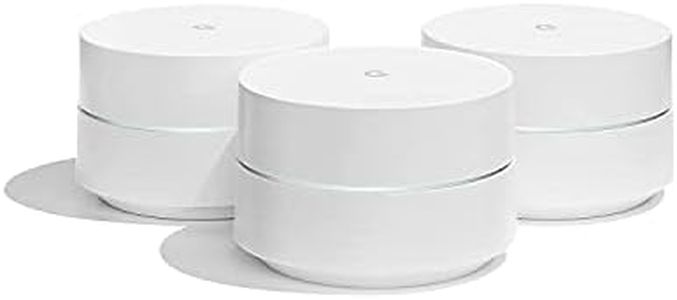
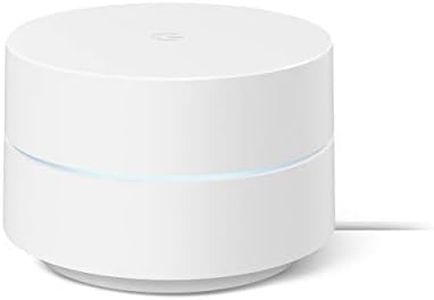
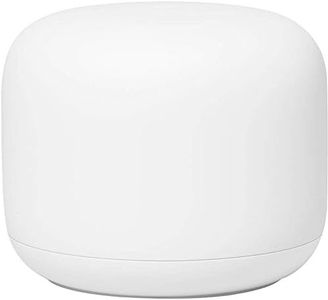
Google Nest WiFi Pro - Wi-Fi 6E - Reliable Home Wi-Fi System with Fast Speed and Whole Home Coverage - Mesh Router - 2 Pack - Snow

Rating
10.0
Chosen by1,142
Speed
Ease of Setup
Coverage Area

Most important from
2392 reviews

Speed
The system delivers steady Wi-Fi speeds around 500-600 Mbps close to the router, with reliable performance for streaming and gaming without buffering or lag.
Ease of Setup
Setting up the Nest WiFi Pro is straightforward using the Google Home app, though initial firmware updates may require connecting each unit via Ethernet for smooth configuration.
Coverage Area
Coverage is strong and signal quality improves noticeably compared to previous Google Wifi generations, even through challenging concrete and brick walls.
Band Support
The 6 GHz band support offers faster speeds, but in typical home environments, speeds max out around 600 Mbps, so upgrading from Nest Wifi (gen2) may not yield a dramatic improvement.
Security Features
The system automatically prioritizes important activities and continuously receives software updates, indicating ongoing improvements and enhanced security.

The Google Nest WiFi Pro is a solid choice for home users wanting fast and reliable Wi-Fi coverage. With two routers, it covers up to 4,400 square feet, which suits medium to larger homes well. It supports the latest Wi-Fi 6E technology, including the new 6 GHz band, which means faster speeds and less interference especially if you have newer devices that can use this band. The system is about twice as fast as previous Wi-Fi 6 models, making it great for video calls, streaming, and online gaming.

Setting up the system is straightforward, and it automatically prioritizes important activities like video calls, helping keep your internet experience smooth. Security is strong with automatic software updates and protection against unauthorized access. You can also see and control all devices on your network, pause access for unknown devices, or set up a separate guest network easily.

The Nest WiFi Pro isn’t compatible with older Google Wifi or Nest Wifi units, so it requires a full new setup if upgrading. While it offers basic parental controls, it may lack some advanced features found in other mesh systems. This system strikes a good balance of speed, coverage, and ease of use, making it suitable for families or anyone wanting a simple yet powerful home Wi-Fi upgrade.

Rating
10.0
Chosen by1,142
Speed
Ease of Setup
Coverage Area

Most important from
2392 reviews

Speed
The system delivers steady Wi-Fi speeds around 500-600 Mbps close to the router, with reliable performance for streaming and gaming without buffering or lag.
Ease of Setup
Setting up the Nest WiFi Pro is straightforward using the Google Home app, though initial firmware updates may require connecting each unit via Ethernet for smooth configuration.
Coverage Area
Coverage is strong and signal quality improves noticeably compared to previous Google Wifi generations, even through challenging concrete and brick walls.
Band Support
The 6 GHz band support offers faster speeds, but in typical home environments, speeds max out around 600 Mbps, so upgrading from Nest Wifi (gen2) may not yield a dramatic improvement.
Security Features
The system automatically prioritizes important activities and continuously receives software updates, indicating ongoing improvements and enhanced security.
#2

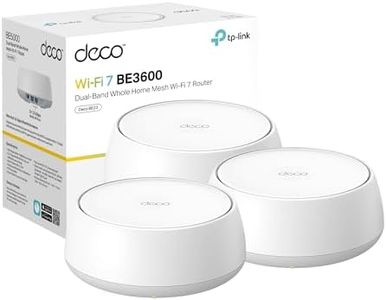
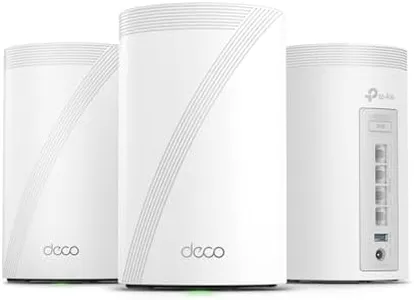
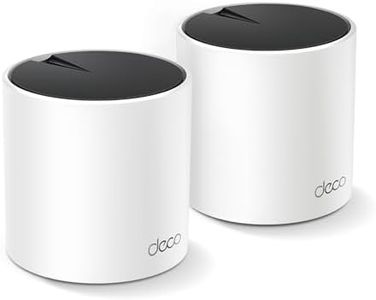
TP-Link Deco X55 AX3000 WiFi 6 Mesh System - Covers up to 4500 Sq.Ft, Replaces Wireless Router and Extender, 3 Gigabit Ports per Unit, Supports Ethernet Backhaul, Deco X55(2-Pack)

Rating
9.4
Coverage Area
Ease of Setup
Band Support

Most important from
17079 reviews

Coverage Area
WiFi now reaches every corner of a two-story home and even beyond, eliminating dead zones completely.
Ease of Setup
Setup is incredibly easy, with the app guiding every step to get the network running in under 10 minutes.
Band Support
The system automatically and seamlessly switches between 2.4 GHz and 5 GHz bands, keeping the network stable without interruptions.
Speed
The Wi-Fi 6 technology delivers fast, responsive speeds that noticeably improve gaming, streaming, and video conferencing experiences.
Parental Controls
The companion app makes managing parental controls, guest networks, and device priorities straightforward and user-friendly.

The TP-Link Deco X55 AX3000 is a solid choice if you want reliable whole-home WiFi coverage, supporting up to 4500 square feet with just two units. Each node offers three gigabit Ethernet ports, allowing wired connections for faster, more stable performance, and supports Ethernet backhaul to boost speed further. This mesh system uses Wi-Fi 6 technology, delivering faster speeds (up to 2402 Mbps on the main band) and supporting up to 150 devices, making it great for families or homes with many gadgets.

Setup is straightforward via the Deco app, which guides you through installation and network management, even when you’re away. It also includes parental controls and a security suite called HomeShield, which helps keep your network safe and lets you manage internet use for kids. The system works with all major internet providers, so compatibility shouldn’t be an issue.

While it covers a decent area with two nodes, larger homes might need additional units for full coverage. Also, being a dual-band system rather than tri-band may slightly affect performance in very busy networks. Some users might find the security and parental controls basic compared to premium alternatives, but they are sufficient for typical home needs. If you want a user-friendly, modern mesh system that balances speed, coverage, and security without complexity, the Deco X55 is a dependable pick.

Rating
9.4
Coverage Area
Ease of Setup
Band Support

Most important from
17079 reviews

Coverage Area
WiFi now reaches every corner of a two-story home and even beyond, eliminating dead zones completely.
Ease of Setup
Setup is incredibly easy, with the app guiding every step to get the network running in under 10 minutes.
Band Support
The system automatically and seamlessly switches between 2.4 GHz and 5 GHz bands, keeping the network stable without interruptions.
Speed
The Wi-Fi 6 technology delivers fast, responsive speeds that noticeably improve gaming, streaming, and video conferencing experiences.
Parental Controls
The companion app makes managing parental controls, guest networks, and device priorities straightforward and user-friendly.
#3

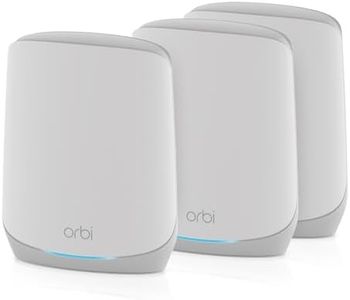
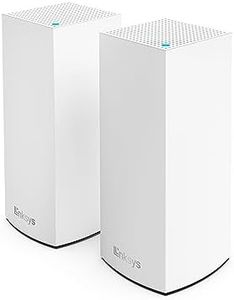
NETGEAR Orbi 370 Series Dual-Band WiFi 7 Mesh Network System for Home (RBE373) – Wireless Router + 2 Extenders, Security Features, 5 Gbps, Covers 6,000 sq.ft., 70 Devices, 2.5GB Internet Port, BE5000

Rating
9.4
Coverage Area
Number of Nodes
Speed

Most important from
331 reviews

Coverage Area
Delivers a solid, stable, and reliable WiFi signal throughout the entire home, eliminating dead zones and connectivity drops.
Number of Nodes
Supports many devices simultaneously without slowing down, making it ideal for busy households with smart TVs, gaming consoles, and security cameras.
Speed
The system’s advanced WiFi 7 technology delivers impressively fast internet speeds, up to 5 Gbps, suited for demanding applications.
Band Support
Provides a seamless single network without the frustration of switching between bands or networks, ensuring smooth video calls and data transfers.
Ease of Setup
Setup is user-friendly and intuitive, allowing even non-technical users to get the system running quickly via the Orbi app.
Security Features
Built-in security features and automatic updates help keep the network safe from hackers and malware.

The NETGEAR Orbi 370 Series is a strong choice if you want fast, reliable WiFi coverage across a large home. It supports WiFi 7, which is newer and faster than WiFi 6, delivering speeds up to 5 Gbps, so it can handle many devices like gaming consoles, smart TVs, and security cameras at once without slowing down. This system includes one router and two extenders, covering up to 6,000 square feet and supporting up to 70 devices, which is great for medium to large homes with multiple users. Its dual-band technology with enhanced backhaul helps keep the connection stable throughout the house. Setup is made easy through the Orbi app, so even if you’re not very technical, you can get it running smoothly.

Security is well-covered with built-in protections against hackers and malware, plus automatic updates to keep your network safe, and it offers parental controls to help manage your family’s internet use. The inclusion of a 2.5 Gigabit Ethernet port allows you to take full advantage of faster internet plans if available. On the downside, it’s designed for use in the U.S. only, and while it’s powerful, it is a dual-band system rather than tri-band, which might affect performance if your household has very heavy simultaneous internet use. Also, the price might be higher than simpler mesh systems. If your main goal is broad, fast coverage with strong security and easy setup, especially in a larger home, this Orbi system is a fitting option.

Rating
9.4
Coverage Area
Number of Nodes
Speed

Most important from
331 reviews

Coverage Area
Delivers a solid, stable, and reliable WiFi signal throughout the entire home, eliminating dead zones and connectivity drops.
Number of Nodes
Supports many devices simultaneously without slowing down, making it ideal for busy households with smart TVs, gaming consoles, and security cameras.
Speed
The system’s advanced WiFi 7 technology delivers impressively fast internet speeds, up to 5 Gbps, suited for demanding applications.
Band Support
Provides a seamless single network without the frustration of switching between bands or networks, ensuring smooth video calls and data transfers.
Ease of Setup
Setup is user-friendly and intuitive, allowing even non-technical users to get the system running quickly via the Orbi app.
Security Features
Built-in security features and automatic updates help keep the network safe from hackers and malware.

Buying Guide for the Best Google Wifi Mesh Systems

Choosing the right Google WiFi mesh system can significantly improve your home network's performance and coverage. Mesh systems are designed to provide seamless WiFi coverage throughout your home by using multiple devices that work together to create a single, unified network. When selecting a Google WiFi mesh system, it's important to consider several key specifications to ensure you get the best fit for your needs.
Coverage AreaCoverage area refers to the total square footage that the mesh system can effectively cover with a strong WiFi signal. This is important because it determines how well the system will perform in different sizes of homes. Coverage areas are typically divided into small (up to 1,500 sq ft), medium (1,500-3,000 sq ft), and large (over 3,000 sq ft). To pick the right one for you, consider the size of your home and any areas where you experience weak or no signal. If you have a larger home or multiple floors, you may need a system with a larger coverage area.
Number of NodesNodes are the individual units that make up the mesh system. The number of nodes you need depends on the size and layout of your home. More nodes generally mean better coverage and stronger signal throughout your home. Systems typically come with 1, 2, or 3 nodes. For smaller homes or apartments, a single node may be sufficient. For medium-sized homes, 2 nodes are usually adequate, while larger homes may require 3 or more nodes to ensure comprehensive coverage.
SpeedSpeed refers to the maximum data transfer rate that the mesh system can handle, usually measured in megabits per second (Mbps). This is important for activities like streaming, gaming, and downloading large files. Speed is often categorized into basic (up to 300 Mbps), moderate (300-600 Mbps), and high-speed (over 600 Mbps). To pick the right speed for you, consider your internet plan and the types of activities you do online. If you have a high-speed internet plan and engage in data-intensive activities, opt for a system with higher speed capabilities.
Band SupportBand support refers to the frequency bands that the mesh system can use to transmit data, typically 2.4 GHz and 5 GHz. Dual-band systems support both frequencies, while tri-band systems add an additional 5 GHz band for better performance. This is important because it affects the system's ability to handle multiple devices and high traffic. Dual-band systems are suitable for most homes, while tri-band systems are better for homes with many devices or heavy internet usage. To pick the right one for you, consider the number of devices connected to your network and your internet usage patterns.
Ease of SetupEase of setup refers to how simple it is to install and configure the mesh system. This is important because a complicated setup can be frustrating and time-consuming. Systems are often rated as easy, moderate, or complex to set up. Easy setup systems typically come with user-friendly apps and clear instructions, making them ideal for those who are not tech-savvy. Moderate and complex setups may require more technical knowledge and time. To pick the right one for you, consider your comfort level with technology and whether you prefer a straightforward installation process.
Parental ControlsParental controls allow you to manage and restrict internet access for specific devices or users. This is important for families with children, as it helps ensure safe and appropriate internet usage. Parental controls can range from basic (simple on/off controls) to advanced (customizable schedules and content filters). To pick the right one for you, consider the level of control you need and the ages of your children. If you need detailed control over internet access, opt for a system with advanced parental controls.
Security FeaturesSecurity features protect your network from unauthorized access and cyber threats. This is important to keep your personal information and devices safe. Common security features include WPA3 encryption, automatic updates, and guest network options. To pick the right one for you, consider the importance of network security in your home. If you handle sensitive information or have many smart devices, opt for a system with robust security features.

FAQ