We Use CookiesWe use cookies to enhance the security, performance, functionality and for analytical and promotional activities. By continuing to browse this site you are agreeing to our privacy policy

10 Best gaming PC motherboards 2026 in the United States
How do we rank products for you?

Our technology thoroughly searches through the online shopping world, reviewing hundreds of sites. We then process and analyze this information, updating in real-time to bring you the latest top-rated products. This way, you always get the best and most current options available.

headphones-stars

Our Top Picks

#1

Winner

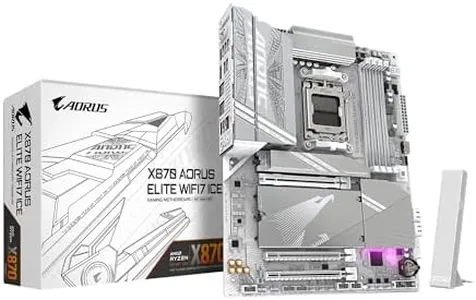
GIGABYTE X870 AORUS Elite WIFI7 ICE AMD AM5 LGA 1718 Motherboard, ATX, DDR5, 4X M.2, PCIe 5.0, USB4, WIFI7, 2.5GbE LAN, EZ-Latch, 5-Year Warranty

Rating
10.0
Chosen by1,403
Expansion Slots
Connectivity and Ports
BIOS/UEFI

Most important from
298 reviews

Expansion Slots
The PCIe lane sharing could be better; using Gen5 NVMe slots reduces GPU PCIe lanes to x8, which might affect performance.
Connectivity and Ports
Ports are well-placed, although an additional fan header on top would be appreciated for better exhaust fan management.
BIOS/UEFI
The BIOS 8-segment display, easy release button, and tool-less design make this motherboard a breeze to use.

The GIGABYTE X870 AORUS Elite WIFI7 ICE is a high-end gaming motherboard designed for enthusiasts and gamers who want top-notch performance and future-proof connectivity. It supports the latest AMD Ryzen 7000, 8000, and 9000 series processors with its AM5 socket, ensuring compatibility with powerful CPUs. The motherboard uses DDR5 RAM, which allows for faster memory speeds up to 5600 MHz and a maximum capacity of 256 GB across 4 DIMM slots, making it ideal for heavy multitasking and gaming demands.

The ATX form factor provides ample space for expansion and is compatible with a wide range of PC cases. With 4 M.2 slots and PCIe 5.0 support, it offers excellent storage and expansion capabilities for the latest SSDs and graphics cards. Connectivity is robust with dual USB4 ports, numerous USB-C ports, Wi-Fi 7, and 2.5GbE LAN, catering to high-speed internet and data transfer needs.

DIY enthusiasts will appreciate features like the EZ-Latch mechanisms for easy installation of M.2 and PCIe components, as well as the EZ-Debug Zone for troubleshooting. Thermal management is another highlight, with VRM and M.2 Thermal Guards ensuring that the system stays cool under heavy loads. However, this motherboard might be overkill for casual gamers or users who don't need the latest and greatest features. Additionally, the premium features and high-end specifications come with a higher price tag, which might not be suitable for those on a budget. For serious gamers and PC builders looking for a reliable and future-proof motherboard, the GIGABYTE X870 AORUS Elite WIFI7 ICE is a solid choice backed by a 5-year warranty.

Rating
10.0
Chosen by1,403
Expansion Slots
Connectivity and Ports
BIOS/UEFI

Most important from
298 reviews

Expansion Slots
The PCIe lane sharing could be better; using Gen5 NVMe slots reduces GPU PCIe lanes to x8, which might affect performance.
Connectivity and Ports
Ports are well-placed, although an additional fan header on top would be appreciated for better exhaust fan management.
BIOS/UEFI
The BIOS 8-segment display, easy release button, and tool-less design make this motherboard a breeze to use.
#2

GIGABYTE B850 AORUS Elite WIFI7 AMD AM5 LGA 1718 Motherboard, ATX, DDR5, 3X M.2, PCIe 5.0, USB-C, WIFI7, 2.5GbE LAN, EZ-Latch, 5-Year Warranty

Rating
10.0
Chipset
RAM Slots and Maximum Capacity
Storage Options

Most important from
333 reviews

Chipset
PCIe Gen 5 support for GPUs and storage ensures the build is future-proof and ready for high-speed components.
RAM Slots and Maximum Capacity
The board supports DDR5 RAM and multiple NVMe M.2 slots, offering great flexibility for high-speed memory and storage upgrades.
Storage Options
The board supports DDR5 RAM and multiple NVMe M.2 slots, offering great flexibility for high-speed memory and storage upgrades.
Connectivity
Built-in WiFi 7 and a 2.5Gb Ethernet port provide excellent wireless and wired connectivity options.
Audio
The integrated audio chipset is functional but falls short of higher-end alternatives, which may disappoint audiophiles.
BIOS/UEFI
Frequent BIOS updates and installing the latest AMD chipset drivers are crucial to maintaining system stability and unlocking full memory support.

The GIGABYTE B850 AORUS Elite WIFI7 motherboard is a solid choice for gamers looking to build a modern AMD-based gaming PC. It supports the latest AMD Ryzen 7000, 8000, and 9000 series processors thanks to its AM5 socket and B850 chipset, providing strong CPU options for gaming. Its ATX form factor fits most mid-to-large computer cases, offering room for expansion.

One of its standout features is support for DDR5 RAM up to 128GB with speeds up to 5200 MHz, ideal for gaming and multitasking. It includes 4 RAM slots, giving flexibility to upgrade memory over time. For storage, it offers three M.2 slots, allowing fast NVMe SSDs that significantly improve game load times. PCIe 5.0 support for expansion cards is an advantage, especially for the latest graphics cards or future-proofing the setup. Connectivity is strong with built-in WiFi 7 for very fast wireless speeds and a 2.5Gb Ethernet port for reliable wired connections. A USB-C port enables easy connection with modern peripherals. The motherboard also has a solid power design (14+2+2 phases) and thermal guards on the VRM and M.2 slots to help maintain stable performance during intense gaming sessions.

EZ-Latch simplifies CPU installation, which is helpful for first-time builders, and the 5-year warranty provides peace of mind. On the downside, this board is geared more toward mid to high-end builds, so it might be excessive for a budget gaming PC. While the B850 chipset is capable, it lacks some premium features found in X-series chipsets, such as advanced overclocking options. Additionally, its ATX size means it won’t fit in smaller cases designed for mini-ITX or micro-ATX boards. This motherboard suits gamers seeking a future-ready AMD platform with fast RAM, multiple storage options, and excellent connectivity, serving as a reliable backbone for a powerful gaming PC.

Rating
10.0
Chipset
RAM Slots and Maximum Capacity
Storage Options

Most important from
333 reviews

Chipset
PCIe Gen 5 support for GPUs and storage ensures the build is future-proof and ready for high-speed components.
RAM Slots and Maximum Capacity
The board supports DDR5 RAM and multiple NVMe M.2 slots, offering great flexibility for high-speed memory and storage upgrades.
Storage Options
The board supports DDR5 RAM and multiple NVMe M.2 slots, offering great flexibility for high-speed memory and storage upgrades.
Connectivity
Built-in WiFi 7 and a 2.5Gb Ethernet port provide excellent wireless and wired connectivity options.
Audio
The integrated audio chipset is functional but falls short of higher-end alternatives, which may disappoint audiophiles.
BIOS/UEFI
Frequent BIOS updates and installing the latest AMD chipset drivers are crucial to maintaining system stability and unlocking full memory support.
#3

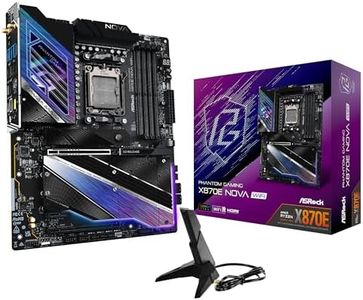
ASRock Phantom Gaming X870E Nova WiFi Socket AM5 AMD Ryzen X870 DDR5 DIMMs 8200 MHz 256 GB ATX Motherboard USB4

Rating
9.4
Form Factor
RAM Slots and Maximum Capacity
Storage Options

Most important from
171 reviews

Form Factor
The motherboard impresses with a beautifully crafted design featuring an 8-layer PCB and a sturdy metal backplate, delivering great value compared to competitors.
RAM Slots and Maximum Capacity
Memory compatibility can be tricky; carefully checking the qualified memory and M.2 drive support lists is essential to avoid issues.
Storage Options
Memory compatibility can be tricky; carefully checking the qualified memory and M.2 drive support lists is essential to avoid issues.
BIOS/UEFI
BIOS updates require a FAT32-formatted thumb drive, which can be inconvenient due to size limitations, and the BIOS interface feels outdated.

The ASRock Phantom Gaming X870E Nova WiFi is a solid choice for gamers looking to build a high-performance PC with AMD’s latest Ryzen processors. It supports the newest AM5 socket and the advanced X870E chipset, providing compatibility with Ryzen 7000, 8000, and 9000 series CPUs. With support for DDR5 RAM up to 256 GB at speeds of 8200 MHz, it ensures fast and ample memory capacity for gaming and multitasking. The motherboard comes in a standard ATX form factor, fitting most gaming cases comfortably.

This board stands out with its 20+2+1 power phase design, which helps deliver stable power to your CPU—important for reliable performance during intense gaming sessions or overclocking. It offers five M.2 slots with easy-to-use heatsinks and an EZ Release design, making storage upgrades simple and efficient, perfect for gamers who want multiple fast SSDs. Dual USB4 Type-C ports provide modern, high-speed connections for peripherals or external drives.

Connectivity includes optimized 5 Gbps LAN and built-in WiFi capability for convenient wireless setups. Although it does not offer the fastest networking options like 10 Gbps LAN or WiFi 6E, it provides solid performance for most gaming needs. The motherboard is priced toward enthusiasts who want top-tier specifications, which might exceed the needs of casual gamers.

Rating
9.4
Form Factor
RAM Slots and Maximum Capacity
Storage Options

Most important from
171 reviews

Form Factor
The motherboard impresses with a beautifully crafted design featuring an 8-layer PCB and a sturdy metal backplate, delivering great value compared to competitors.
RAM Slots and Maximum Capacity
Memory compatibility can be tricky; carefully checking the qualified memory and M.2 drive support lists is essential to avoid issues.
Storage Options
Memory compatibility can be tricky; carefully checking the qualified memory and M.2 drive support lists is essential to avoid issues.
BIOS/UEFI
BIOS updates require a FAT32-formatted thumb drive, which can be inconvenient due to size limitations, and the BIOS interface feels outdated.

Buying Guide for the Best gaming PC motherboards

Choosing the right motherboard for your gaming PC is crucial as it serves as the backbone of your system, connecting all the components together. A good motherboard ensures compatibility, stability, and performance for your gaming needs. When selecting a motherboard, consider the following key specifications to ensure it meets your requirements and enhances your gaming experience.
Form FactorThe form factor of a motherboard refers to its size and shape, which determines the type of case it will fit into. Common form factors include ATX, Micro-ATX, and Mini-ITX. ATX is the most common and offers the most features and expansion slots, making it ideal for high-performance gaming PCs. Micro-ATX is smaller and more compact, suitable for mid-range builds, while Mini-ITX is the smallest, perfect for compact builds but with limited expansion options. Choose a form factor based on your case size and the number of components you plan to install.
ChipsetThe chipset is a crucial component that determines the motherboard's capabilities and compatibility with the CPU. It controls communication between the CPU, RAM, and other peripherals. High-end chipsets offer more features like better overclocking support, more USB ports, and advanced connectivity options. For gaming, look for chipsets that support the latest CPUs and offer robust performance features. If you're planning to overclock your CPU, ensure the chipset supports it.
Socket TypeThe socket type of a motherboard must match the CPU you plan to use. Common socket types include Intel's LGA and AMD's AM4. Each CPU generation may require a different socket type, so ensure compatibility with your chosen processor. For gaming, select a motherboard with a socket type that supports the latest CPUs to ensure optimal performance and future-proofing.
RAM Slots and Maximum CapacityMotherboards come with varying numbers of RAM slots and maximum memory capacities. More RAM slots allow for greater memory expansion, which can enhance gaming performance. Typically, gaming motherboards have 2 to 4 RAM slots, supporting up to 64GB or more of RAM. For gaming, aim for at least 16GB of RAM, with the option to upgrade if needed. Ensure the motherboard supports the RAM speed and type you plan to use.
Expansion SlotsExpansion slots, such as PCIe slots, are used to add additional components like graphics cards, sound cards, and network cards. The number and type of expansion slots determine the motherboard's expandability. For gaming, ensure the motherboard has at least one PCIe x16 slot for a graphics card and additional slots for future upgrades. Consider your current and future needs when evaluating expansion slots.
Storage OptionsMotherboards offer various storage options, including SATA ports for traditional hard drives and SSDs, and M.2 slots for faster NVMe SSDs. M.2 slots are preferred for gaming due to their high-speed performance. Ensure the motherboard has enough storage options to accommodate your needs, with at least one M.2 slot for optimal gaming performance. Consider the number of drives you plan to install and their types.
ConnectivityConnectivity options include USB ports, Ethernet ports, Wi-Fi, and Bluetooth. These features are essential for connecting peripherals and ensuring a stable internet connection. For gaming, look for motherboards with multiple USB ports, including USB 3.0 or higher for faster data transfer. Ethernet ports are crucial for stable online gaming, while built-in Wi-Fi and Bluetooth add convenience. Choose a motherboard with connectivity options that match your gaming setup.
AudioIntegrated audio on motherboards varies in quality. High-end motherboards offer better audio components, providing clearer and more immersive sound for gaming. Look for motherboards with high-definition audio codecs and support for surround sound if audio quality is important to you. If you're an audiophile or use high-quality headphones, consider a motherboard with superior audio features.
BIOS/UEFIThe BIOS/UEFI is the firmware interface that allows you to configure hardware settings. A user-friendly BIOS/UEFI can make it easier to tweak settings for optimal gaming performance. Look for motherboards with intuitive and feature-rich BIOS/UEFI interfaces, especially if you plan to overclock or fine-tune your system. Ensure the BIOS/UEFI supports the features you need for your gaming setup.

FAQ