We Use CookiesWe use cookies to enhance the security, performance, functionality and for analytical and promotional activities. By continuing to browse this site you are agreeing to our privacy policy

10 Best Desktop Sticker Printers 2026 in the United States

How do we rank products for you?

Our technology thoroughly searches through the online shopping world, reviewing hundreds of sites. We then process and analyze this information, updating in real-time to bring you the latest top-rated products. This way, you always get the best and most current options available.

headphones-stars

Our Top Picks

#1

Winner

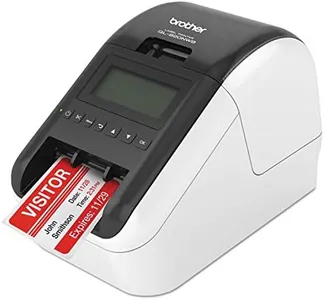
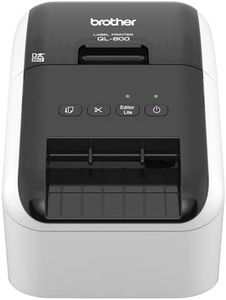
Brother QL-820NWB Professional, Ultra Flexible Monochrome Label Printer with Multiple Connectivity options

Rating
10.0
Chosen by1,310
Print Resolution
Print Speed
Connectivity Options

Most important from
626 reviews

Print Resolution
The QL-820NWB prints quickly and delivers clear, high-quality labels, ideal for labeling systems, network equipment, and cables.
Print Speed
Improved over older models with faster printing speeds, more options, and reliable Wi-Fi connectivity.
Connectivity Options
Network capability stands out, with the option to connect via Ethernet or Wi-Fi, making it versatile for various office setups.
Media Compatibility
The printer offers a wide range of fonts and graphics, delivering perfect results on continuous rolls in both portrait and landscape modes.
Software and Design Tools
Though the supplied software can be a bit confusing, Brother's technical support is excellent and helpful in resolving issues.
Durability and Build Quality
Perfect for business and industrial use, particularly for labeling tools, bins, and shelves.
Cost of Consumables
Economical to run, with no need for ribbons, messy ink, or toner, making it a cost-effective choice.

The Brother QL-820NWB is a versatile desktop sticker printer suitable for professional use. One of its standout features is its multiple connectivity options, including Bluetooth, Ethernet, and Wi-Fi, which makes it highly flexible and easy to connect to various devices. It also has a USB host interface for added convenience when using peripherals such as scanners. The printer is capable of ultra-fast printing, producing up to 110 standard address labels per minute with a resolution of 300dpi, which is sufficient for clear, high-quality monochrome prints.

An additional feature is the ability to print black/red labels using the DK-2251 tape, offering some color variety within its monochrome print capabilities. The built-in monochrome LCD screen allows for standalone use, making it user-friendly even without a connected computer. However, it is important to note that the print speed for color is significantly slower at only 1 ppm. The printer has a solid build quality and a relatively compact size, making it durable and easy to fit in various office setups.

The cost of consumables, such as label tapes, can add up, so it's worth considering for long-term use. In conclusion, the Brother QL-820NWB is an excellent choice for those needing a fast, flexible, and reliable desktop sticker printer with versatile connectivity options, though its color printing capabilities are limited.

Rating
10.0
Chosen by1,310
Print Resolution
Print Speed
Connectivity Options

Most important from
626 reviews

Print Resolution
The QL-820NWB prints quickly and delivers clear, high-quality labels, ideal for labeling systems, network equipment, and cables.
Print Speed
Improved over older models with faster printing speeds, more options, and reliable Wi-Fi connectivity.
Connectivity Options
Network capability stands out, with the option to connect via Ethernet or Wi-Fi, making it versatile for various office setups.
Media Compatibility
The printer offers a wide range of fonts and graphics, delivering perfect results on continuous rolls in both portrait and landscape modes.
Software and Design Tools
Though the supplied software can be a bit confusing, Brother's technical support is excellent and helpful in resolving issues.
Durability and Build Quality
Perfect for business and industrial use, particularly for labeling tools, bins, and shelves.
Cost of Consumables
Economical to run, with no need for ribbons, messy ink, or toner, making it a cost-effective choice.
#2

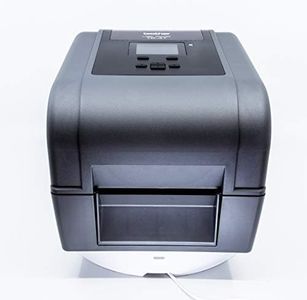
Brother TD-4750TNWB Desktop Direct Thermal/Thermal Transfer Printer - Monochrome - Label Print - Ethernet - USB - Serial - Bluetooth

Rating
9.7
Media Compatibility
Software and Design Tools

Most important from
5 reviews

Media Compatibility
The printer is exactly what was needed for business use, capable of printing direct thermal and thermal transfer labels from 1" to 4" continuous.
Software and Design Tools
Brother's website offers comprehensive software and instruction guides that assist with the setup process.

The Brother TD-4750TNWB Desktop Direct Thermal/Thermal Transfer Printer is designed for industrial and commercial use, making it ideal for warehouses, manufacturing, and supply chain environments. With a 300 dpi resolution, it delivers clean and crisp prints, suitable for barcode scanning and detailed text. The print speed is reasonably fast at 6 inches per second, which should be sufficient for most small to medium-sized businesses.

Connectivity options are a standout feature, as this printer supports Ethernet, USB, Serial, Wi-Fi, and Bluetooth, offering flexibility in how you connect and integrate it into your existing systems. It is compatible with leading warehouse management systems (WMS) and other software solutions, making integration easier for businesses. However, the printer is monochrome, meaning it only prints in black and white, which could be a limitation if you need colorful labels.

Additionally, the printer's size is relatively compact, but it is on the heavier side at over 10 pounds, which might be a consideration if space or portability is an issue. The cost of consumables, like thermal transfer ribbons and labels, should be factored in, although the operating cost is considered affordable. The build quality is durable, meant to withstand industrial settings. On the downside, the initial setup might be complex for those not familiar with networking printers. This printer is a solid choice for those needing a reliable, high-quality label printer with versatile connectivity and robust integration capabilities.

Rating
9.7
Media Compatibility
Software and Design Tools

Most important from
5 reviews

Media Compatibility
The printer is exactly what was needed for business use, capable of printing direct thermal and thermal transfer labels from 1" to 4" continuous.
Software and Design Tools
Brother's website offers comprehensive software and instruction guides that assist with the setup process.
#3

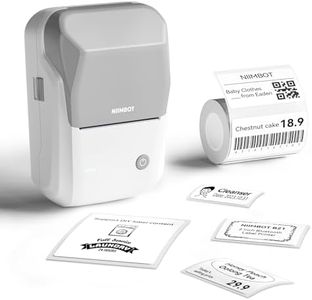
NIIMBOT B1 Label Maker Machine with Tape, Thermal Label Printer Easy to Use for Office, Home, Business, 2 Inch Label Maker with 2'' x1.18'' Labels-230pcs/Roll

Rating
9.4
Print Resolution
Connectivity Options
Durability and Build Quality

Most important from
8678 reviews

Print Resolution
Print quality is sharp, and the thermal labels mean no need for ink, saving money over time.
Connectivity Options
Setup is simple with the app, and the Bluetooth connection works seamlessly.
Durability and Build Quality
The compact design and baby blue color make it easy to carry around and visually appealing.
Cost of Consumables
Quality far exceeds the price point, offering great value for money.

The NIIMBOT B1 Label Maker Machine is a compact and portable thermal label printer designed for use in various settings such as offices, homes, and small businesses. Weighing just 11.2 ounces and equipped with a 1500 mAh lithium battery, this device is highly portable and can operate for up to 5 hours on a single charge. The thermal printing technology ensures that you won't need to buy ink, which can be a cost-saving feature over time.

The print resolution is on the lower side at 203 x 203 dpi, which may not be ideal for highly detailed labels. The maximum print speed of 35 labels per minute in monochrome is decent, though it slows down significantly to 15 for color prints, which could be a drawback for high-volume tasks. The device supports a variety of fonts, languages, borders, and symbols through its companion app, making it quite versatile in design. It is compatible with both iOS and Android devices via Bluetooth, though it is not compatible with iPads.

The build quality is solid, made from high-quality ABS material, and it includes a 12-month free replacement service for faulty units. Connectivity is limited to Bluetooth and USB Type C, which may not suit users needing more versatile connectivity options. The included 2x1.18 inch labels are a standard size, but the printer does support widths from 0.8 to 2 inches, offering some flexibility. The NIIMBOT B1 is a good fit for those needing a portable and versatile label printer for light to moderate use, but it may fall short for those requiring high-resolution prints or faster print speeds.

Rating
9.4
Print Resolution
Connectivity Options
Durability and Build Quality

Most important from
8678 reviews

Print Resolution
Print quality is sharp, and the thermal labels mean no need for ink, saving money over time.
Connectivity Options
Setup is simple with the app, and the Bluetooth connection works seamlessly.
Durability and Build Quality
The compact design and baby blue color make it easy to carry around and visually appealing.
Cost of Consumables
Quality far exceeds the price point, offering great value for money.

Buying Guide for the Best Desktop Sticker Printers

Choosing the right desktop sticker printer involves understanding your specific needs and matching them with the printer's capabilities. Whether you're printing stickers for business, personal projects, or creative endeavors, it's important to consider various specifications to ensure you get the best performance and quality. Here are some key specs to consider when selecting a desktop sticker printer and how to navigate them.
Print ResolutionPrint resolution, measured in dots per inch (DPI), determines the clarity and detail of the printed stickers. Higher DPI values result in sharper and more detailed prints. For basic stickers, a resolution of 300 DPI may suffice, but for high-quality, detailed images, look for printers with 600 DPI or higher. Consider what level of detail you need for your stickers to choose the right resolution.
Print SpeedPrint speed, usually measured in pages per minute (PPM) or stickers per minute, indicates how quickly the printer can produce stickers. Faster print speeds are beneficial for high-volume printing tasks. If you need to print large batches of stickers regularly, opt for a printer with a higher PPM. For occasional or small-scale printing, a lower speed may be adequate.
Connectivity OptionsConnectivity options such as USB, Wi-Fi, and Bluetooth determine how you can connect the printer to your computer or other devices. USB connections are reliable for direct connections, while Wi-Fi and Bluetooth offer wireless convenience. Choose a printer with connectivity options that match your setup and workflow. For example, if you prefer a clutter-free workspace, a wireless printer might be ideal.
Media CompatibilityMedia compatibility refers to the types and sizes of sticker paper the printer can handle. Some printers are versatile and can print on various materials like vinyl, glossy, and matte papers. Ensure the printer you choose supports the media types you plan to use. If you need to print on different materials, look for a printer with broad media compatibility.
Software and Design ToolsSoftware and design tools provided with the printer can enhance your sticker creation process. Some printers come with user-friendly design software that allows you to create and customize stickers easily. Consider what design features you need and whether the included software meets those requirements. If you have specific design needs, ensure the printer's software supports them.
Durability and Build QualityDurability and build quality are important for ensuring the printer can withstand regular use. Look for printers made with sturdy materials and good build quality to ensure longevity. If you plan to use the printer frequently, investing in a durable model will save you from potential issues and replacements in the long run.
Cost of ConsumablesThe cost of consumables, such as ink cartridges and sticker paper, can add up over time. Consider the ongoing costs associated with the printer you choose. Some printers have more affordable consumables, which can be beneficial if you plan to print a lot of stickers. Evaluate the cost and availability of consumables to ensure they fit within your budget and usage needs.

FAQ