10 Best Computer Cameras With Microphones 2026 in the United States

Related Products
Up to 13% off
Our technology thoroughly searches through the online shopping world, reviewing hundreds of sites. We then process and analyze this information, updating in real-time to bring you the latest top-rated products. This way, you always get the best and most current options available.

Our Top Picks
Winner
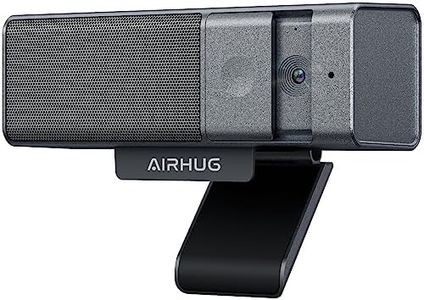
AIRHUG 3 in 1 Webcam - 1080P Webcam with Microphone and Speaker, USB Webcam with Privacy Cover, for Video Conferencing/Online Class/Game Live
Most important from
154 reviews
The AIRHUG Webcam is a solid choice for users needing a straightforward 1080p webcam with a built-in microphone and speaker. Its 1080p resolution ensures clear video for video conferencing, online classes, or game streaming, while the support for low light conditions helps maintain decent image quality in less-than-ideal lighting. The USB connection offers easy compatibility across most computers without needing extra drivers. It includes a privacy cover, which is a thoughtful touch for security-conscious users.
The microphone supports common audio formats (AAC, MP3, PCM), suggesting decent sound quality, though it may not match higher-end standalone microphones. Its compact size and light weight make it easy to mount on monitors or laptops.
This webcam is well suited for everyday online communication and casual streaming but might fall short for users seeking advanced video features or professional-grade audio.
Most important from
154 reviews
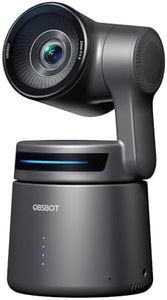
OBSBOT Tail Air NDI Streaming Camera 4K, AI Tracking PTZ Camera with Intelligent APP, Gesture Control, HDMI/USB-C/Wireless Webcam, Live Streaming Video Cameras for Filming, Worship, Content Creator.
Most important from
335 reviews
The OBSBOT Tail Air NDI Streaming Camera 4K packs impressive features into a very compact design. Key highlights include its crystal-clear 4K resolution and versatile 320° horizontal and 180° vertical rotation, which ensures comprehensive coverage of your surroundings. The camera excels in AI tracking, making it perfect for capturing dynamic movements, whether it's people, animals, or objects. This capability, combined with a range of control options like gestures, remote control, and software, offers users flexibility and ease of use.
Its compatibility with multiple connection types (Micro HDMI, USB-C, Ethernet, and Wireless) and support for various protocols (RTMP, RTSP, and VISCA) make it suitable for a variety of streaming platforms such as YouTube, Facebook, and Twitch. The built-in microphone ensures decent audio quality, though it might not match professional standalone microphones. The camera's small size and portability make it convenient for on-the-go use, and its NDI support allows for streamlined broadcasting and reduced cable clutter. However, it's worth noting that the NDI License Key requires an additional purchase, and firmware updates necessitate a U3 Micro SD card.
While it offers good low light performance thanks to its 1.8 f aperture, its performance might vary in extremely dim conditions. Additionally, the need for a separate SD card for updates may add a slight inconvenience. The OBSBOT Tail Air is a robust and versatile option for content creators, streamers, and anyone needing a reliable, high-quality streaming camera with an easy setup and advanced tracking capabilities.
Most important from
335 reviews
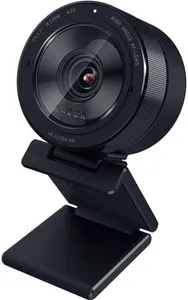
Razer Kiyo Pro Ultra 4K Webcam: Large Sensor - Auto Light Correction - Built-in Mic and Shutter - Pro Grade Content Creation, Streaming, Gaming, Video Calls - Works with OBS, Xsplit, PC, Zoom, Teams
Most important from
225 reviews
The Razer Kiyo Pro Ultra 4K Webcam is a high-end option designed for content creators, streamers, and professionals who need excellent video quality. It features a large 1/1.2” Sony STARVIS 2 Sensor with a 2.9 μm pixel size, delivering exceptional 4K resolution and vibrant colors. The webcam excels in low light conditions, thanks to its custom F/1.7 aperture lens, which allows it to capture clear and crisp images even in dim environments. Additionally, HDR technology at 30 FPS ensures that colors are true to life, enhancing both the darkest and lightest tones for a more dynamic image quality.
The AI-powered video imaging provides face tracking autofocus and auto exposure, keeping you sharp and well-lit during video calls or streams. The webcam also includes a built-in microphone and shutter, which are convenient features for privacy and audio needs. However, the microphone quality, while decent, may not match the performance of dedicated external microphones. The Kiyo Pro Ultra connects via USB and supports popular audio formats such as AAC, MP3, and PCM (16-bit), making it compatible with a wide range of devices and software, including OBS, Xsplit, Zoom, and Teams.
The mounting options are straightforward, but some users might prefer more flexible or varied mounting solutions. Weighing 1.35 pounds and with dimensions of 8.59 x 5.24 x 4.93 inches, it is relatively bulky compared to some other webcams on the market. This webcam is best suited for those who prioritize image quality and low-light performance in their video calls, streaming, or content creation activities.