We Use CookiesWe use cookies to enhance the security, performance, functionality and for analytical and promotional activities. By continuing to browse this site you are agreeing to our privacy policy

9 Best Chromebook 2026 in the United States
How do we rank products for you?

Our technology thoroughly searches through the online shopping world, reviewing hundreds of sites. We then process and analyze this information, updating in real-time to bring you the latest top-rated products. This way, you always get the best and most current options available.

headphones-stars

Our Top Picks

#1

Winner

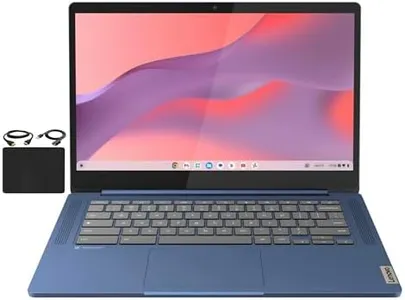
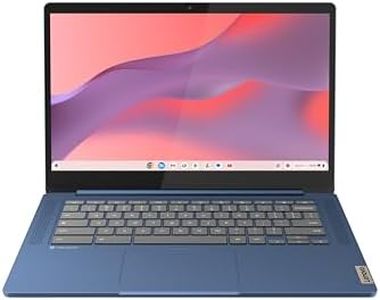
Lenovo IdeaPad Slim 3 Chromebook - 2024 - Lightweight Laptop - Waves MaxxAudio® Speakers - 14" HD Display - 720p Camera - 4GB Memory - 64GB Storage - MediaTek Kompanio 520 - Abyss Blue

Rating
10.0
Chosen by1,260
Build Quality and Design
Operating System and Updates

Most important from
474 reviews

Build Quality and Design
Practical and teen-friendly, it's easy to use and carry.
Operating System and Updates
Fast and easy setup, making it a favorite among other Chromebooks.

The Lenovo IdeaPad Slim 3 Chromebook is a lightweight and stylish option in Abyss Blue, weighing just 2.87 pounds, making it highly portable. It features a 14-inch HD display with a resolution of 1366 x 768 pixels which should be suitable for standard tasks like browsing, streaming, and light document editing. However, those looking for higher resolution for detailed work might find it lacking. Powered by the MediaTek Kompanio 520 processor and 4GB of RAM, this Chromebook handles basic multitasking and everyday tasks smoothly.

It comes with 64GB of storage, which is somewhat limited, but you can use cloud storage for additional space. The battery life is impressive, offering up to 13.5 hours on a single charge, making it a reliable companion for long days without needing to be tethered to an outlet. The Waves MaxxAudio-tuned speakers enhance the audio experience, especially for media consumption. Privacy features like the HD 720p camera with a privacy shutter and a mute key are thoughtful additions for those concerned about security. Operating on Chrome OS, it benefits from regular updates and a user-friendly interface.

Connectivity options, including USB-C, add to its versatility, allowing for easy charging and connection to various peripherals. On the downside, the 4GB of RAM might be a limitation for more demanding applications, and the integrated graphics are not suitable for heavy gaming or graphics-intensive tasks. Those who need more performance or storage might need to look at higher-end models. This Lenovo IdeaPad Slim 3 Chromebook is best for users seeking a portable, budget-friendly solution for everyday computing needs with excellent battery life and essential features.

Rating
10.0
Chosen by1,260
Build Quality and Design
Operating System and Updates

Most important from
474 reviews

Build Quality and Design
Practical and teen-friendly, it's easy to use and carry.
Operating System and Updates
Fast and easy setup, making it a favorite among other Chromebooks.
#2

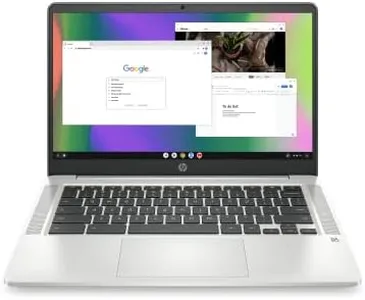
HP Chromebook 14 Laptop, Intel Celeron N4120, 4 GB RAM, 64 GB eMMC, 14" HD Display, Chrome OS, Thin Design, 4K Graphics, Long Battery Life, Ash Gray Keyboard (14a-na0226nr, 2022, Mineral Silver)

Rating
9.4
Battery Life
Build Quality and Design

Most important from
2894 reviews

Battery Life
Crisp screen picture and impressive battery life, needing a charge only once every few days.
Build Quality and Design
Super durable with a textured covering that minimizes damage from drops.

The HP Chromebook 14 is a great choice for everyday tasks whether you are at home, work, or school. Its Intel Celeron N4120 processor and 4 GB RAM provide solid performance for browsing, streaming, and working on documents. The 14-inch HD display offers clear visuals, though it’s not Full HD, which might be noticeable if you are watching high-definition content. However, the anti-glare feature is a nice touch, especially if you work in bright environments.

The 64 GB eMMC storage is sufficient for basic use, but if you need to store lots of files, you might need additional cloud storage or external drives. One standout feature is its long battery life, lasting up to 14 hours, which is perfect for those who need to use their laptop on the go. Plus, it’s lightweight and portable, making it easy to carry around in a backpack. The Chrome OS is user-friendly and keeps the system secure and up-to-date, with access to a wide range of apps via the Google Play Store.

The Chromebook 14 also features good connectivity options with Wi-Fi and Bluetooth, and the inclusion of multiple USB ports is convenient. One downside is the limited 4 GB RAM, which isn’t ideal for heavy multitasking or more demanding applications. Additionally, the integrated Intel UHD Graphics 600 is not suitable for high-end gaming but handles everyday graphics tasks well. In terms of build quality, the HP Chromebook 14 is solid with a sleek, thin design in Mineral Silver, although it is made primarily of plastic. If you need a reliable, portable laptop for light to moderate use, this Chromebook is definitely worth considering.

Rating
9.4
Battery Life
Build Quality and Design

Most important from
2894 reviews

Battery Life
Crisp screen picture and impressive battery life, needing a charge only once every few days.
Build Quality and Design
Super durable with a textured covering that minimizes damage from drops.
#3

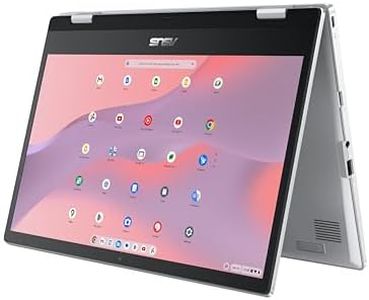
ASUS Chromebook Flip CX1 Convertible Laptop, 14" FHD NanoEdge 360-degree Touchscreen, Intel Celeron N4500 Processor, 128GB eMMC Storage, 8GB RAM, ChromeOS, Transparent Silver, CX1400FKA-AS88FT

Rating
9.4
Processor
Build Quality and Design
Operating System and Updates

Most important from
501 reviews

Processor
It handles everyday tasks like browsing, work, and entertainment smoothly, making it perfect for casual use and multitasking.
Build Quality and Design
The 360-degree flip design adds fantastic versatility, making it enjoyable to switch between laptop and tablet modes seamlessly.
Operating System and Updates
ChromeOS continues to impress with its simplicity and integration, providing a smooth and secure computing environment.

The ASUS Chromebook Flip CX1 is a versatile 2-in-1 laptop offering a 14-inch Full HD touchscreen that can flip 360 degrees, letting you use it as a laptop, tablet, or in tent/stand modes. It has a smooth design that’s lightweight (just under 3.6 pounds) but durable enough to meet military-grade standards, making it a good choice for everyday carry and rougher use. Inside, it’s powered by an Intel Celeron N4500 processor with 8GB of RAM, which handles multitasking and common Chromebook tasks like web browsing, document editing, and streaming fairly well. However, the Celeron chip is on the entry-level side, so it’s not ideal if you plan to push heavy apps or multiple demanding tabs at once.

Storage is 128GB eMMC, which is enough for typical ChromeOS use but may feel limited if you want to save lots of offline files or apps. Battery life is quite strong, with about 11 hours under normal use, so it should last a full work or school day without needing a charge. Connectivity options are good, including two USB-C ports supporting display and charging, plus USB-A ports and a microSD card slot for easy file transfers and expansion.

Running ChromeOS, it benefits from automatic updates, built-in virus protection, and seamless access to Google apps and Android apps, which keeps the system secure and user-friendly. This Chromebook is a solid pick for students, casual users, or anyone wanting a flexible, reliable device for everyday tasks with a touchscreen experience. For those needing stronger processing power or larger storage, other options might be better, but this model offers a good balance of features and value for most typical Chromebook users.

Rating
9.4
Processor
Build Quality and Design
Operating System and Updates

Most important from
501 reviews

Processor
It handles everyday tasks like browsing, work, and entertainment smoothly, making it perfect for casual use and multitasking.
Build Quality and Design
The 360-degree flip design adds fantastic versatility, making it enjoyable to switch between laptop and tablet modes seamlessly.
Operating System and Updates
ChromeOS continues to impress with its simplicity and integration, providing a smooth and secure computing environment.

Buying Guide for the Best Chromebook

Choosing the right Chromebook can be a bit overwhelming given the variety of models and specifications available. However, by understanding your needs and knowing what to look for, you can find a Chromebook that fits your requirements perfectly. Chromebooks are known for their simplicity, speed, and security, making them ideal for students, professionals, and casual users alike. Here are some key specifications to consider when selecting a Chromebook and how to navigate them to find the best fit for you.
ProcessorThe processor, or CPU, is the brain of your Chromebook and determines how fast and efficiently it can run applications. Chromebooks typically come with a range of processors from Intel Celeron and Pentium to more powerful Intel Core i3, i5, and i7, as well as ARM-based processors. For basic tasks like browsing the web, streaming videos, and using Google Docs, an Intel Celeron or Pentium processor will suffice. If you plan to run more demanding applications or multitask frequently, consider a Chromebook with an Intel Core i3 or higher.
RAMRAM (Random Access Memory) is crucial for multitasking and running applications smoothly. Chromebooks usually come with 4GB, 8GB, or 16GB of RAM. For basic use, such as web browsing and using cloud-based applications, 4GB of RAM is generally adequate. However, if you plan to use more intensive applications, open many tabs simultaneously, or use Linux apps, opting for 8GB or more will provide a smoother experience.
StorageStorage on a Chromebook is used to save files, applications, and the operating system. Chromebooks typically come with 32GB, 64GB, or 128GB of eMMC or SSD storage. Since Chromebooks are designed to work with cloud storage, you may not need a lot of local storage. For basic use, 32GB or 64GB should be enough, especially if you use Google Drive or other cloud services. If you need to store a lot of files locally or plan to install many apps, consider a model with 128GB or more.
DisplayThe display size and resolution are important for your viewing experience. Chromebooks come in various sizes, typically ranging from 11.6 inches to 15.6 inches. Smaller screens (11.6 to 13.3 inches) are more portable and suitable for on-the-go use, while larger screens (14 to 15.6 inches) provide a better viewing experience for media consumption and productivity tasks. Additionally, consider the resolution; a Full HD (1920x1080) display offers a sharper image compared to an HD (1366x768) display, which is sufficient for basic tasks.
Battery LifeBattery life is a key factor, especially if you plan to use your Chromebook on the go. Most Chromebooks offer between 8 to 12 hours of battery life on a single charge. If you need a device that lasts through a full day of work or school without needing to recharge, look for models with longer battery life. Keep in mind that battery life can vary based on usage, so consider your typical use case when evaluating this spec.
Build Quality and DesignThe build quality and design of a Chromebook can affect its durability and usability. Some Chromebooks are made with plastic, while others use metal or a combination of materials for a more premium feel. Additionally, consider features like a backlit keyboard, touchscreen, and convertible design (2-in-1) if you need more versatility. If you plan to carry your Chromebook frequently, a lightweight and sturdy design will be beneficial.
Operating System and UpdatesChromebooks run on Chrome OS, which is known for its simplicity and security. One of the advantages of Chrome OS is that it receives regular updates directly from Google, ensuring your device stays secure and up-to-date. When choosing a Chromebook, check the Auto Update Expiration (AUE) date, which indicates how long the device will receive updates. Opt for a model with a longer AUE date to ensure you get the latest features and security updates for a longer period.

FAQ