We Use CookiesWe use cookies to enhance the security, performance, functionality and for analytical and promotional activities. By continuing to browse this site you are agreeing to our privacy policy

10 Best Cell Phones For Seniors 2026 in the United States
How do we rank products for you?

Our technology thoroughly searches through the online shopping world, reviewing hundreds of sites. We then process and analyze this information, updating in real-time to bring you the latest top-rated products. This way, you always get the best and most current options available.

headphones-stars

Our Top Picks

#1

Winner

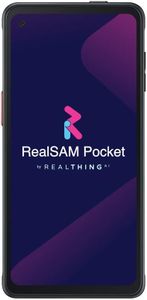
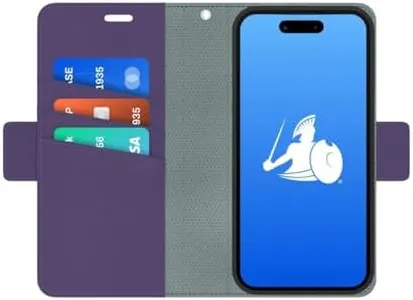
Voice-Operated 5G Smartphone for The Blind: RealSAM Pocket. Just Tap The Screen and Talk, It's That Simple (No Hunting Icons or Swiping); Unlocked, Works with All Major Carriers

Rating
10.0
Chosen by1,485
Ease of Use
Text Size and Accessibility

Most important from
8 reviews

Ease of Use
The tutorial assistance provided is incredibly helpful, ensuring that even non-tech-savvy seniors can use the phone effectively.
Text Size and Accessibility
This phone is a game-changer for seniors with vision impairments, making it easy to make calls and send texts independently.

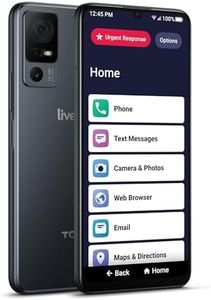
The RealSAM Pocket Voice-Operated Unlocked 5G Smartphone is tailored specifically for seniors, especially those with age-related sight loss. Its standout feature is the voice operation, making it simple for users to make calls, add contacts, and send/read texts without needing to navigate a touchscreen. This is a significant advantage for those who find traditional smartphones complicated. The Sight Assistant feature further enhances accessibility by helping users read text, identify objects, and even describe scenes, making daily tasks more manageable for visually impaired users. The inclusion of sighted volunteer assistance via the Be My Eyes app is a thoughtful addition for extra support when needed.

The phone's 6.6-inch display is large and clear, but its primary interface relies on voice rather than visual elements, which suits the target demographic well. The device's battery life is impressive, with up to 33 hours of talk time and 119 hours on standby, reducing the frequency of recharges. However, the sound quality, while generally good, may not be sufficient for users with moderate or severe hearing impairments. The phone's durability seems adequate, though it is not heavily emphasized in the product details.

The camera quality, with both front and rear capabilities, is decent, ensuring users can take and share photos, albeit not at the highest resolutions available on the market. The RealSAM Pocket is an excellent choice for seniors with sight loss, offering user-friendly voice-operated features, strong battery life, and practical accessibility tools, though it may fall short for users with significant hearing impairments or those needing robust emergency features.

Rating
10.0
Chosen by1,485
Ease of Use
Text Size and Accessibility

Most important from
8 reviews

Ease of Use
The tutorial assistance provided is incredibly helpful, ensuring that even non-tech-savvy seniors can use the phone effectively.
Text Size and Accessibility
This phone is a game-changer for seniors with vision impairments, making it easy to make calls and send texts independently.
#2

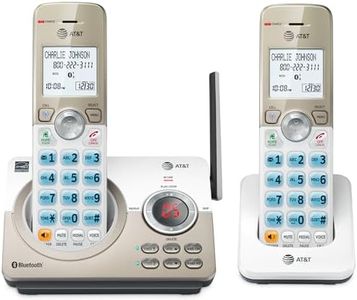
AT&T DL72219 DECT 6.0 2-Handset Cordless Phone for Home with Connect to Cell, Call Blocking, 1.8" Backlit Screen, Big Buttons, intercom, and Unsurpassed Range

Rating
7.6
Ease of Use
Text Size and Accessibility
Sound Quality

Most important from
15132 reviews

Ease of Use
Setup is straightforward and quick, making it ideal for seniors looking for a hassle-free phone experience.
Text Size and Accessibility
The large buttons and clear display cater perfectly to users needing bigger text and easy dialing.
Sound Quality
Call clarity is impressive, providing crisp and reliable audio during conversations.
Battery Life
Battery life is excellent, supporting extended use without frequent recharging.
Durability
The handset feels lightweight yet comfortable, though it may not offer the ruggedness of more durable models.

The AT&T DL72219 cordless phone is a solid choice for seniors who want a reliable home phone with features that make everyday use easier. Its 1.8-inch backlit screen offers large, high-contrast text making it simple to read, which is great if you need bigger text and clear visibility. The handset’s big buttons and lighted keypad also help with dialing, especially in low light. It stands out with its excellent call clarity and long wireless range, ensuring you can move around your home without losing connection. The built-in speakerphone works well, allowing hands-free conversations where both parties can hear and speak simultaneously.

An added bonus is the ability to connect this phone to up to two cell phones, letting you make and receive cellular calls through your cordless handset, which adds flexibility if you have a cell plan. The phone also blocks robocalls automatically, reducing interruptions from unwanted calls. The digital answering system stores up to 22 minutes of messages, useful if you miss calls. While the phone’s battery life is decent, it requires two specific batteries that come included, making replacements easy.

This device does not have a built-in camera, so it’s not suitable if you want to take photos. It also lacks dedicated emergency features like a panic button, which some seniors might prefer for extra safety. The plastic build feels lightweight but may not be as rugged as other phones designed specifically for durability. If you want a straightforward, easy-to-use home phone with large buttons, good sound, and cell phone connectivity, the AT&T DL72219 covers these well but might fall short if camera or emergency alert features are your priority.

Rating
7.6
Ease of Use
Text Size and Accessibility
Sound Quality

Most important from
15132 reviews

Ease of Use
Setup is straightforward and quick, making it ideal for seniors looking for a hassle-free phone experience.
Text Size and Accessibility
The large buttons and clear display cater perfectly to users needing bigger text and easy dialing.
Sound Quality
Call clarity is impressive, providing crisp and reliable audio during conversations.
Battery Life
Battery life is excellent, supporting extended use without frequent recharging.
Durability
The handset feels lightweight yet comfortable, though it may not offer the ruggedness of more durable models.
#3

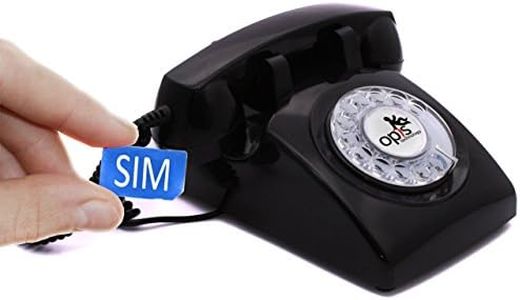
Opis 60s Mobile 4G Phone : The Rotary Retro GSM Desk Cell Phone - Home Senior Cellphone for Elderly Unlocked in Vintage Telephone Style - Black

Rating
7.6
Display Size
Ease of Use
Sound Quality

Most important from
10 reviews

Display Size
Its desktop form factor reduces the chance of misplacement, making it suitable for seniors who prefer a stationary phone setup.
Ease of Use
Setup is straightforward, with clear instructions leading to a quick and hassle-free activation process.
Sound Quality
Adjustable handset volume can reach very loud levels, accommodating users with hearing difficulties without the risk of accidentally muting or lowering the ringer.
Emergency Features
While it lacks emergency SOS features and a digital display, this phone excels at delivering a simple, distraction-free calling experience reminiscent of traditional landlines.
Text Size and Accessibility
The lack of a screen, caller ID, and text messaging aligns with its purpose as a basic voice-only device, avoiding unnecessary features that might confuse elderly users.
Durability
The phone boasts a solid, substantial build, especially the handset, making it feel reliable despite its lightweight plastic dial which is slightly wobbly but not a major issue.

The Opis 60s Mobile 4G Phone is a unique choice for seniors who want a simple, easy-to-use phone with a nostalgic rotary dial design. Its large physical rotary dial and minimalist approach make it very straightforward, which can be great for those who find touchscreens confusing. Since it resembles a classic desk phone, it provides a familiar feel, especially for elderly users with dementia.

The phone supports modern 4G networks, ensuring reliable connectivity without the complexity of a smartphone. Battery life offers about 6 hours of talk time and up to 4 days of standby, covering typical daily use. Sound quality is clear enough for calls, and the desktop form factor means it stays in one place, reducing the chance of misplacement. However, this phone does not have a screen or camera, making it unsuitable for users needing text messaging with large fonts, camera functions, or emergency SOS features common in many senior phones.

Its plastic build is lightweight but might not feel very sturdy over time. The rotary dial can be a bit slow or challenging for some seniors not used to it, and the lack of digital display limits accessibility options like adjustable text size or emergency alerts. This phone is best suited for seniors looking for a very basic, landline-style phone experience using cellular networks, rather than those who want more modern features or emergency assistance capabilities.

Rating
7.6
Display Size
Ease of Use
Sound Quality

Most important from
10 reviews

Display Size
Its desktop form factor reduces the chance of misplacement, making it suitable for seniors who prefer a stationary phone setup.
Ease of Use
Setup is straightforward, with clear instructions leading to a quick and hassle-free activation process.
Sound Quality
Adjustable handset volume can reach very loud levels, accommodating users with hearing difficulties without the risk of accidentally muting or lowering the ringer.
Emergency Features
While it lacks emergency SOS features and a digital display, this phone excels at delivering a simple, distraction-free calling experience reminiscent of traditional landlines.
Text Size and Accessibility
The lack of a screen, caller ID, and text messaging aligns with its purpose as a basic voice-only device, avoiding unnecessary features that might confuse elderly users.
Durability
The phone boasts a solid, substantial build, especially the handset, making it feel reliable despite its lightweight plastic dial which is slightly wobbly but not a major issue.

Buying Guide for the Best Cell Phones For Seniors

Choosing a cell phone for seniors involves considering features that make the device easy to use, accessible, and suitable for their specific needs. Seniors may prioritize simplicity, ease of navigation, and features that enhance safety and communication. Here are some key specifications to consider when selecting a cell phone for seniors.
Display SizeDisplay size refers to the screen size of the cell phone. A larger display can make it easier for seniors to read text, view images, and navigate the phone. Typically, screens range from small (under 5 inches) to large (over 6 inches). For seniors, a larger screen (5.5 inches or more) is often preferable as it reduces eye strain and makes touch controls more accessible.
Ease of UseEase of use encompasses the phone's user interface and overall design. Phones with simple menus, large icons, and intuitive navigation are ideal for seniors. Some phones are specifically designed with seniors in mind, featuring simplified interfaces and physical buttons. When choosing a phone, consider how comfortable the senior is with technology and opt for a model that matches their skill level.
Battery LifeBattery life indicates how long the phone can operate before needing a recharge. Longer battery life is crucial for seniors who may forget to charge their phones regularly. Battery life can range from a few hours to several days. Look for phones with a battery life of at least one day to ensure reliable performance without frequent recharging.
Sound QualitySound quality is important for clear communication, especially for seniors with hearing difficulties. Phones with good sound quality have loud and clear speakers and may offer hearing aid compatibility. When selecting a phone, consider models that provide adjustable volume settings and enhanced audio features to ensure the senior can hear calls and notifications clearly.
Emergency FeaturesEmergency features include functionalities like SOS buttons, fall detection, and location tracking. These features can provide peace of mind and quick access to help in case of an emergency. Phones with dedicated emergency buttons or apps that can alert family members or emergency services are particularly beneficial for seniors. Evaluate the senior's health and lifestyle to determine which emergency features are most relevant.
Text Size and AccessibilityText size and accessibility settings allow users to adjust the size of text and icons on the screen. Larger text and high-contrast settings can make the phone easier to read and use for seniors with visual impairments. Check if the phone offers customizable accessibility options to tailor the experience to the senior's needs.
DurabilityDurability refers to the phone's ability to withstand drops, spills, and other accidents. Seniors may benefit from phones with rugged designs or protective cases that enhance durability. Consider the senior's lifestyle and choose a phone that can handle occasional mishaps without damage.
Camera QualityCamera quality is important for capturing memories and staying connected through photos and video calls. While seniors may not need the highest resolution cameras, a decent camera can enhance their experience. Look for phones with easy-to-use cameras that offer good image quality and simple sharing options.

FAQ