We Use CookiesWe use cookies to enhance the security, performance, functionality and for analytical and promotional activities. By continuing to browse this site you are agreeing to our privacy policy

4 Best Anycubic 3D Printers 2026 in the United States
How do we rank products for you?

Our technology thoroughly searches through the online shopping world, reviewing hundreds of sites. We then process and analyze this information, updating in real-time to bring you the latest top-rated products. This way, you always get the best and most current options available.

headphones-stars

Our Top Picks

#1

Winner

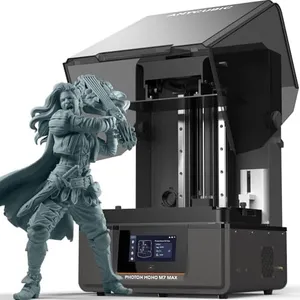
ANYCUBIC Photon Mono M7 MAX Resin 3D Printer, 13.6’’ 7K Large Resin Printer with COB LighTurbo 3.0, Dynamic Heating, Flip-Open Cover Design, Print Size 11.8'' x 11.7'' x 6.5''

Rating
10.0
Chosen by1,158
Print Volume
Layer Resolution
Print Speed

Most important from
78 reviews

Print Volume
The large print volume enables printing full-size cosplay props and complex terrains without splitting parts.
Layer Resolution
The print quality is phenomenal, delivering smooth layers and fine details even on large-scale models.
Print Speed
Printing speed is impressive, completing large and complex prints in significantly less time than previous models.
Bed Leveling
Setup and leveling are straightforward, making it accessible for both hobbyists and professionals.
Connectivity Options
Wifi connectivity and the intuitive interface add convenience to the printing process.
Build Plate Material
The build is solid and reliable, with a user-friendly flip-up cover that makes accessing the print area much easier.

The Anycubic Photon Mono M7 MAX is a resin 3D printer designed for users who want to create large, highly detailed models without the need to split and assemble parts. Its generous print volume (about 11.8" x 11.7" x 6.5") stands out, allowing you to print things like full-size cosplay props and complex terrains. The upgraded LightTurbo 3.0 system ensures strong and even lighting with high precision, resulting in smooth print layers and fine details. Printing speed is also impressive, reaching up to 60 mm per hour, which is twice as fast as some previous models, meaning you can complete projects quicker. The printer supports intelligent features like dynamic resin temperature control and automatic resin refilling, which help maintain print quality and reduce hassle. The flip-open cover design makes it easy to access the print area, and the large resin vat means fewer interruptions during long prints. Connectivity options include compatibility with laptops, PCs, and smartphones, adding convenience.

On the downside, this printer is relatively heavy and bulky, so it needs a sturdy workspace. Also, as a resin printer, it requires careful handling of materials and some post-processing, which might be less straightforward for beginners. The Anycubic Photon Mono M7 MAX is well suited for hobbyists and professionals seeking large, precise resin prints with faster speeds and user-friendly features, though it may require more care and space compared to smaller 3D printers.

Rating
10.0
Chosen by1,158
Print Volume
Layer Resolution
Print Speed

Most important from
78 reviews

Print Volume
The large print volume enables printing full-size cosplay props and complex terrains without splitting parts.
Layer Resolution
The print quality is phenomenal, delivering smooth layers and fine details even on large-scale models.
Print Speed
Printing speed is impressive, completing large and complex prints in significantly less time than previous models.
Bed Leveling
Setup and leveling are straightforward, making it accessible for both hobbyists and professionals.
Connectivity Options
Wifi connectivity and the intuitive interface add convenience to the printing process.
Build Plate Material
The build is solid and reliable, with a user-friendly flip-up cover that makes accessing the print area much easier.
#2

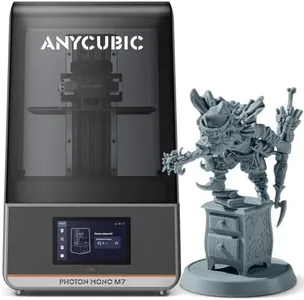
ANYCUBIC Photon Mono M7 Resin 3D Printer, 10.1 inch 14K HD Screen with COB LighTurbo 3.0 System, 150mm/h Fast Printing, Intelligent 3D Resin Printer, Build Volume of 8.77''x4.96''x9.05''

Rating
8.5
Layer Resolution
Bed Leveling
Connectivity Options

Most important from
67 reviews

Layer Resolution
The print quality surpasses anything achievable with FDM printers, delivering superior detail and resolution.
Bed Leveling
The printer is beginner-friendly with straightforward setup, especially the simple method for leveling the build platform.
Connectivity Options
The printer’s Wi-Fi functionality works reliably over long distances and through obstacles, enhancing user convenience.
Build Plate Material
Regular maintenance like pre-cleaning the build plate ensures excellent adhesion and consistent performance over time.

The Anycubic Photon Mono M7 is a resin 3D printer designed for users who want detailed, high-quality prints with relatively fast turnaround. It offers a decent build volume of about 8.77 x 4.96 x 9.05 inches, which is large for a resin printer, allowing you to create bigger models or multiple smaller ones at once. Its 14K monochrome LCD screen delivers excellent layer resolution with very fine XY pixel size, meaning your prints will capture intricate details clearly. Print speeds are quite impressive for resin printers, reaching up to 150mm per hour with special fast resin, reducing waiting times significantly compared to slower models.

The printer uses Anycubic's advanced COB LighTurbo 3.0 lighting system, which helps ensure even exposure and better print success rates. It has smart features like real-time print monitoring, resin level detection, and platform installation checks that make the printing process more reliable and user-friendly.

The build plate and printer construction use sturdy materials like ABS, aluminum, and polycarbonate, offering durability. While it's a bit heavy and takes some space, the printer is suitable for hobbyists and small businesses looking for high-resolution resin prints quickly. Potential drawbacks include the learning curve associated with resin handling. For those focused on detail and speed in resin 3D printing, the Photon Mono M7 provides solid performance at a reasonable price.

Rating
8.5
Layer Resolution
Bed Leveling
Connectivity Options

Most important from
67 reviews

Layer Resolution
The print quality surpasses anything achievable with FDM printers, delivering superior detail and resolution.
Bed Leveling
The printer is beginner-friendly with straightforward setup, especially the simple method for leveling the build platform.
Connectivity Options
The printer’s Wi-Fi functionality works reliably over long distances and through obstacles, enhancing user convenience.
Build Plate Material
Regular maintenance like pre-cleaning the build plate ensures excellent adhesion and consistent performance over time.
#3

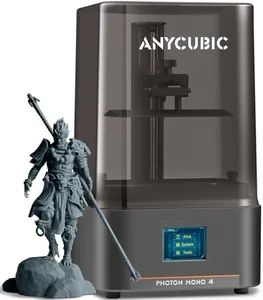
ANYCUBIC Photon Mono 4, Resin 3D Printer with 7'' 10K Mono LCD Screen, Stable LighTurbo Light Source and 70mm/h Fast Printing, Print Volume 6.04'' x 3.42'' x 6.49''

Rating
8.2
Print Volume
Build Plate Material

Most important from
473 reviews

Print Volume
A bigger build volume would be appreciated, especially in the y-axis.
Build Plate Material
Running hot water on the back of the build plate helps with easier removal of prints.

The ANYCUBIC Photon Mono 4 is a resin 3D printer that stands out with its high 10K resolution, allowing for highly detailed and precise prints. The print volume of 6.04'' x 3.42'' x 6.49'' offers a decent amount of space for various projects, though it may be slightly limiting for larger prints. The printer's print speed is quite fast at 70mm/h, which is beneficial for users needing quicker turnaround times on their prints.

With a stable LighTurbo light source, it ensures uniform lighting, reducing imperfections such as layer lines and rasterization, resulting in smoother finishes on printed models. The laser-engraved print platform enhances adhesion, minimizing issues like warping and lifting during printing, and simplifies the removal process. Additionally, the 4-point leveling system is user-friendly, requiring minimal adjustments after the initial setup, which is ideal for beginners.

However, the printer does not support the Anycubic APP service, which might be a drawback for users looking for remote control options. The build plate material and construction seem robust, leveraging ABS, aluminum, and polycarbonate for durability. The printer's connectivity seems limited, as it only mentions compatibility with laptops and personal computers without highlighting other options like Wi-Fi or USB. Weighing 3.5 kilograms and with compact dimensions, it is relatively easy to accommodate in most workspaces. This 3D printer is particularly suited for hobbyists and professionals looking for high-resolution prints and fast printing speeds in a compact and user-friendly device.

Rating
8.2
Print Volume
Build Plate Material

Most important from
473 reviews

Print Volume
A bigger build volume would be appreciated, especially in the y-axis.
Build Plate Material
Running hot water on the back of the build plate helps with easier removal of prints.

Buying Guide for the Best Anycubic 3D Printers

Choosing the right 3D printer can be a daunting task, especially with the variety of options available in the market. To make an informed decision, it's important to understand the key specifications and how they align with your needs. Whether you're a hobbyist, a professional, or someone looking to explore 3D printing for the first time, knowing what to look for will help you pick the best model for your requirements.
Print VolumePrint volume refers to the maximum size of the object that the 3D printer can produce. This is important because it determines the scale of your projects. Small print volumes (e.g., 120x120x120 mm) are suitable for miniatures and small parts, medium volumes (e.g., 200x200x200 mm) are good for most hobbyist projects, and large volumes (e.g., 300x300x400 mm) are ideal for bigger models or professional use. Choose a print volume based on the size of the objects you plan to create.
Layer ResolutionLayer resolution, measured in microns, indicates the thickness of each layer of material that the printer lays down. This affects the smoothness and detail of the final print. Lower resolutions (e.g., 100 microns) are faster but less detailed, while higher resolutions (e.g., 20 microns) produce finer details but take longer. If you need high-detail prints, go for a higher resolution. For general use, a mid-range resolution is usually sufficient.
Print SpeedPrint speed is how fast the printer can lay down material, usually measured in millimeters per second (mm/s). Faster print speeds can save time but may compromise print quality. Slower speeds generally produce better quality prints. If you need quick prototypes, a higher speed is beneficial. For detailed and high-quality prints, a slower speed is preferable.
Filament CompatibilityFilament compatibility refers to the types of materials the printer can use. Common filaments include PLA, ABS, PETG, and TPU. PLA is easy to use and great for beginners, ABS is stronger and more heat-resistant, PETG offers a good balance of strength and flexibility, and TPU is flexible and durable. Choose a printer that supports the filament type that best suits your projects.
Bed LevelingBed leveling ensures that the print bed is perfectly level, which is crucial for successful prints. Manual leveling requires you to adjust the bed yourself, while automatic leveling uses sensors to adjust the bed. Automatic leveling is more convenient and reduces the chance of errors, making it ideal for beginners or those who want a hassle-free experience. Manual leveling can be sufficient for experienced users who don't mind the extra setup.
Connectivity OptionsConnectivity options determine how you can send files to the printer. Common options include USB, SD card, and Wi-Fi. USB and SD cards are reliable and straightforward, while Wi-Fi allows for wireless printing and remote monitoring. If you prefer convenience and flexibility, look for a printer with Wi-Fi capabilities. For a more traditional approach, USB or SD card options are perfectly adequate.
Build Plate MaterialThe build plate material affects adhesion and ease of print removal. Common materials include glass, aluminum, and magnetic flexible plates. Glass provides a smooth surface and good adhesion but can be fragile. Aluminum heats up quickly and is durable but may require additional adhesion aids. Magnetic flexible plates are easy to remove and flexible, making print removal simple. Choose a build plate material based on your preference for ease of use and durability.

FAQ