We Use CookiesWe use cookies to enhance the security, performance, functionality and for analytical and promotional activities. By continuing to browse this site you are agreeing to our privacy policy

10 Best 32-Inch Curved Monitors 2026 in the United States

How do we rank products for you?

Our technology thoroughly searches through the online shopping world, reviewing hundreds of sites. We then process and analyze this information, updating in real-time to bring you the latest top-rated products. This way, you always get the best and most current options available.

headphones-stars

Our Top Picks

#1

Winner

Dell 32 Plus 4K Monitor - S3225QS - 31.5-inch 4K (3840 x 2160) up to 120Hz 16:9 Display, VA Panel, AMD FreeSync Premium, 99% sRGB, 95% DCI-P3, 1500:1 Contrast Ratio, Comfortview - Ash White

Rating
10.0
Chosen by1,113
Resolution
Refresh Rate

Most important from
393 reviews

Resolution
The 4K resolution at 120Hz delivers incredibly sharp and smooth visuals, making gaming and everyday use look stunning.
Refresh Rate
The 4K resolution at 120Hz delivers incredibly sharp and smooth visuals, making gaming and everyday use look stunning.

The Dell 32 Plus 4K Monitor S3225QS is a 31.5-inch curved display offering a sharp 4K resolution (3840 x 2160), delivering detailed and crisp images suitable for both work and entertainment. Its VA panel provides strong contrast with a 1500:1 ratio, making dark scenes deeper and colors more vivid, supported by 99% sRGB and 95% DCI-P3 color coverage for accurate and vibrant visuals. The monitor’s refresh rate can reach up to 120Hz combined with AMD FreeSync Premium, which helps reduce screen tearing and provides smoother motion—beneficial for gaming or fast-moving content. The ultra-low 0.03ms response time also contributes to reducing blur, though VA panels typically have slower response times than some other types like IPS.

The 1800R curvature gently wraps around your field of view, enhancing immersion without causing much distortion. ComfortView Plus technology reduces harmful blue light, making it easier on the eyes during extended use, while the matte screen surface minimizes glare. The ultra-thin bezels and ash white finish create a modern, stylish look, and the weight of about 19 pounds provides a sturdy build. The built-in improved speakers offer basic audio capabilities.

This monitor suits users seeking a high-resolution curved screen for productivity, creative work, and casual gaming, offering excellent color quality and smooth performance. Those prioritizing ultra-fast response times or advanced ergonomic flexibility should verify specific features to ensure they meet personal preferences.

Rating
10.0
Chosen by1,113
Resolution
Refresh Rate

Most important from
393 reviews

Resolution
The 4K resolution at 120Hz delivers incredibly sharp and smooth visuals, making gaming and everyday use look stunning.
Refresh Rate
The 4K resolution at 120Hz delivers incredibly sharp and smooth visuals, making gaming and everyday use look stunning.
#2

KTC 32 Inch 240Hz Curved Gaming Monitor, 2K 1440P Computer PC Monitor with 1000R 1ms Frameless, Adaptive Sync,122% sRGB, HDMI, DisplayPort, Tilt Adjustable, H32S25E

Rating
10.0
Resolution
Refresh Rate
Curvature

Most important from
1526 reviews

Resolution
The monitor delivers bright, vibrant colors and impressive contrast that stand out even in well-lit rooms.
Refresh Rate
The 240Hz refresh rate feels incredibly smooth and responsive, enhancing fast-paced gaming experiences.
Curvature
The 1000R curvature creates an immersive viewing experience that truly matches the natural eye curve.
Ergonomics
The joystick control placement is a common industry choice, though the power button’s location on the back is frustratingly hard to reach, especially when multiple monitors are side by side.

The KTC 32 Inch 240Hz Curved Gaming Monitor is designed with gamers in mind, featuring a 32-inch screen with a QHD 2560x1440 resolution, which offers a good balance between sharpness and performance for gaming and everyday use. Its standout feature is the 1000R curvature, which closely matches the natural curve of the human eye, delivering an immersive viewing experience. The monitor supports a very high refresh rate of 240Hz and a quick 1ms response time, making it excellent for fast-paced games where smooth visuals and minimal motion blur can provide a competitive edge. Adaptive Sync technology further improves gameplay by reducing screen tearing.

The 4000:1 contrast ratio combined with HDR support enhances image details and color vibrancy, especially in darker scenes. Connectivity options are strong, with two HDMI ports and two DisplayPort inputs, allowing easy connection of multiple devices. The DisplayPort supports the full 240Hz refresh rate, ensuring maximum performance. Ergonomically, it offers tilt adjustments between -5° and 20°, and VESA mounting is supported, though it lacks height adjustment or swivel, which might limit comfort for some setups. The matte screen surface helps reduce glare, suitable for various lighting conditions.

It scores well in customer reviews and is priced reasonably for its specifications. Gamers seeking a large, fast, and immersive curved display without venturing into very high-end pricing will find this monitor a solid choice, even if it lacks some premium color accuracy features or advanced ergonomic adjustments.

Rating
10.0
Resolution
Refresh Rate
Curvature

Most important from
1526 reviews

Resolution
The monitor delivers bright, vibrant colors and impressive contrast that stand out even in well-lit rooms.
Refresh Rate
The 240Hz refresh rate feels incredibly smooth and responsive, enhancing fast-paced gaming experiences.
Curvature
The 1000R curvature creates an immersive viewing experience that truly matches the natural eye curve.
Ergonomics
The joystick control placement is a common industry choice, though the power button’s location on the back is frustratingly hard to reach, especially when multiple monitors are side by side.
#3

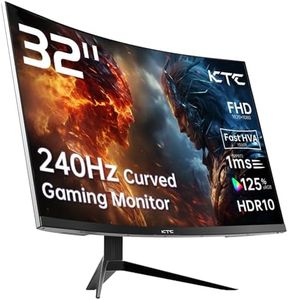
KTC 32 inch 240Hz Curved Gaming Monitor 1500R 1080P 125% sRGB 1ms, Freesync/G-sync HDR10,HDMI/DP/USB Ports VESA,Tilt Adjustable,Xbox PS5 Switch,Black

Rating
8.8
Resolution
Response Time

Most important from
2905 reviews

Resolution
The monitor offers a beautiful, bright, and colorful screen with perfect picture quality, even achieving flawless black and white visuals.
Response Time
Great color accuracy and fast performance make this monitor a superb choice for gaming and general usage.

The KTC 32-inch Curved Gaming Monitor is designed with gamers in mind, offering a fast 240Hz refresh rate that ensures smooth gameplay and reduces motion blur, particularly beneficial for fast-paced games. The 1ms response time also enhances this by minimizing ghosting, making it ideal for competitive gaming environments. Its 1080p resolution, while not the highest on the market, is sufficient for most gaming needs and allows for a faster refresh rate. The 1500R curvature provides an immersive viewing experience, drawing you into the action and making it comfortable to view for extended periods.

The monitor boasts a vibrant display with 125% sRGB color gamut coverage and a high contrast ratio of 3500:1, delivering vivid visuals that enhance the gaming and viewing experience. The panel's matte finish reduces glare, making it easier on the eyes in bright settings. Connectivity is versatile with multiple ports, including HDMI, DisplayPort, and USB, allowing seamless connection to various devices like PCs, consoles, and laptops.

Ergonomically, the monitor supports tilt adjustments, which can help in finding a comfortable viewing position. However, it lacks height adjustment, which could be a downside for those who require more flexibility in positioning. The VESA compatibility offers easy mounting options, further expanding its placement possibilities.

The resolution may not satisfy those seeking ultra-high-definition displays, especially for non-gaming uses like professional content creation. Additionally, the high refresh rate and fast response time might be less critical for casual gamers or users more focused on general multimedia consumption. With a solid build, it stands out as a competitive option for gamers looking for performance at a reasonable price in the curved monitor segment.

Rating
8.8
Resolution
Response Time

Most important from
2905 reviews

Resolution
The monitor offers a beautiful, bright, and colorful screen with perfect picture quality, even achieving flawless black and white visuals.
Response Time
Great color accuracy and fast performance make this monitor a superb choice for gaming and general usage.

Buying Guide for the Best 32-Inch Curved Monitors

Choosing the right 32-inch curved monitor can significantly enhance your viewing experience, whether you're using it for gaming, work, or general use. The curve of the monitor can provide a more immersive experience by wrapping the screen around your field of vision. To make the best choice, you need to consider several key specifications that will determine how well the monitor meets your needs.
ResolutionResolution refers to the number of pixels on the screen, typically measured as width x height (e.g., 1920x1080). Higher resolution means more detail and sharper images. For a 32-inch monitor, Full HD (1920x1080) is the minimum you should consider, but for better clarity and detail, a Quad HD (2560x1440) or 4K (3840x2160) resolution is recommended. If you need the monitor for detailed work like graphic design or video editing, go for higher resolutions. For general use or gaming, Full HD or Quad HD might suffice.
Refresh RateThe refresh rate, measured in Hertz (Hz), indicates how many times per second the screen updates with new information. A higher refresh rate results in smoother motion. Standard monitors have a 60Hz refresh rate, which is adequate for general use. However, for gaming, a refresh rate of 120Hz or higher is preferable to reduce motion blur and provide a more fluid experience. If you're a competitive gamer, look for monitors with 144Hz or even 240Hz.
Panel TypeThe panel type affects the monitor's color accuracy, viewing angles, and response time. The most common types are TN (Twisted Nematic), IPS (In-Plane Switching), and VA (Vertical Alignment). TN panels are cheaper and have fast response times, making them good for gaming, but they have poorer color accuracy and viewing angles. IPS panels offer better color reproduction and wider viewing angles, ideal for creative work and general use. VA panels provide the best contrast ratios and are good for watching movies, but they have slower response times compared to TN panels.
CurvatureThe curvature of the monitor is measured in radius (e.g., 1800R, 1500R). A lower number means a more pronounced curve. The curve is designed to match the natural curvature of the human eye, providing a more immersive experience. For a 32-inch monitor, a curvature of 1500R to 1800R is common. If you want a more immersive experience, especially for gaming or watching movies, go for a more pronounced curve (lower R value). For general use or work, a less pronounced curve might be more comfortable.
ConnectivityConnectivity options determine what devices you can connect to your monitor. Common ports include HDMI, DisplayPort, and USB-C. Ensure the monitor has the ports you need for your devices. For example, if you plan to connect a gaming console, make sure it has HDMI ports. If you need to connect multiple devices, look for a monitor with multiple input options. USB-C is useful for connecting laptops and can also provide power delivery.
ErgonomicsErgonomics refers to how adjustable the monitor is in terms of height, tilt, swivel, and pivot. Good ergonomics can help reduce strain on your neck and eyes. If you spend long hours in front of the screen, look for a monitor with adjustable stand options. This allows you to position the monitor at a comfortable viewing angle and height, which is crucial for maintaining good posture and reducing fatigue.
Response TimeResponse time, measured in milliseconds (ms), indicates how quickly a pixel can change from one color to another. Lower response times reduce motion blur and ghosting, which is important for fast-paced gaming. For gaming, look for a response time of 5ms or lower. For general use or work, response time is less critical, and anything under 10ms should be sufficient.

FAQ